You're probably here because a song keeps looping in your head, and you want to turn it into something people can watch, sing with, or share. Maybe you've got lyrics in a document, a deadline looming, and no desire to wrestle with a full video timeline. That's exactly where a music lyrics video editor fits, it turns a song, text, timing, and visuals into one publishable file without making you build the whole thing from scratch.
Why a Lyric Video Is Suddenly on Everyone's To-Do List
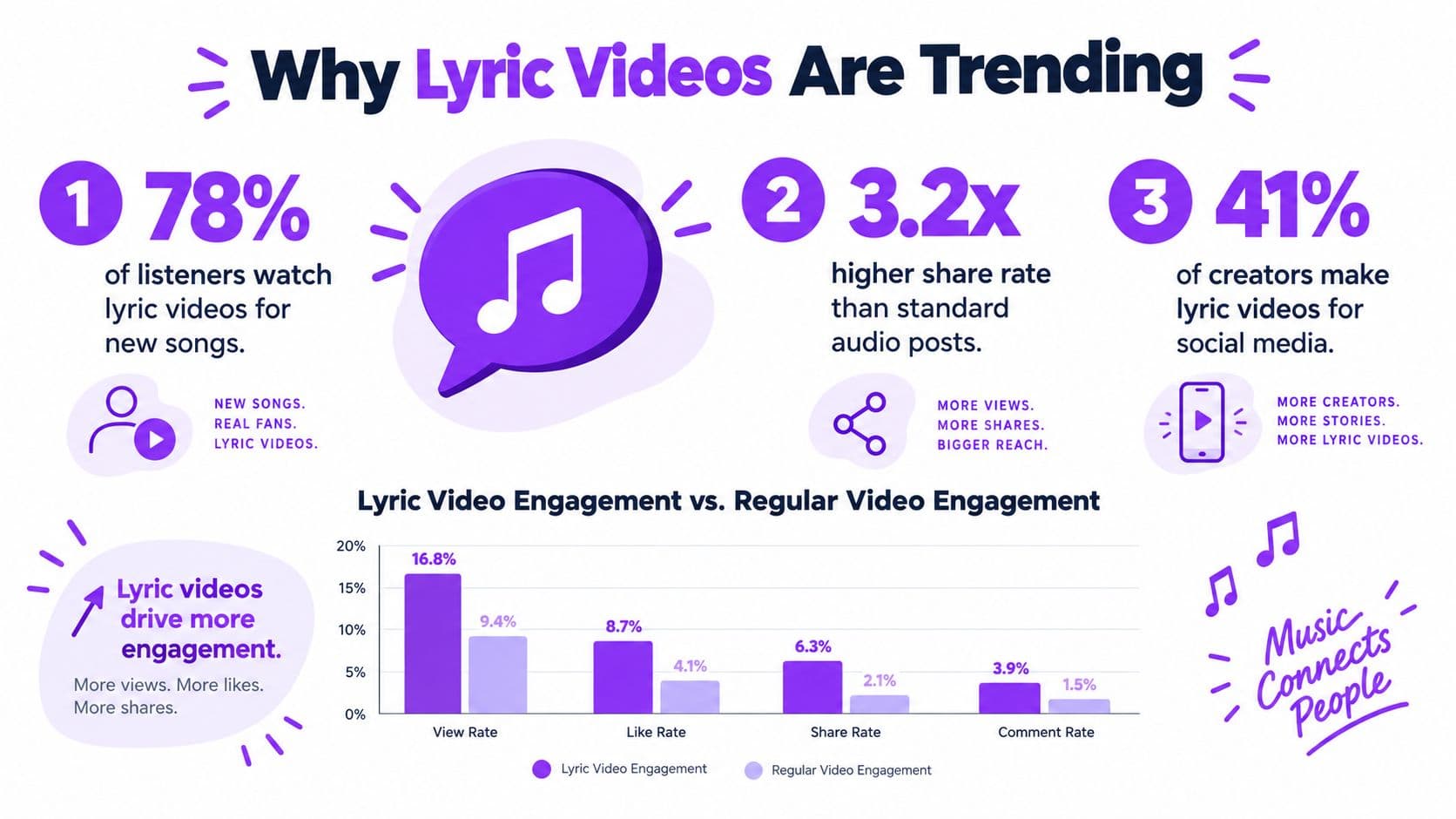
A lyric video used to feel like a niche extra. Now it's closer to a standard deliverable, because music discovery happens in a video-first environment and creators need a visual layer that can travel well across platforms. The point isn't just decoration, it's giving listeners something they can follow, quote, and replay.
The history helps explain why this format works. Karaoke began in Japan in the early 1970s, first with accompaniment tapes and then with machines that paired music, readable lyrics, and timing so people could join in. Japan's government notes that Toshiharu Yamashita sold eight-track accompaniment tapes in 1970 as the first “karaoke software,” and Daisuke Inoue's 1971 8JUKE machine added an amplifier, microphone, coin mechanism, and eight-track playback (government publication on karaoke history). That same basic structure still drives lyric-video workflows today.
Why creators keep coming back to this format
Streaming now shapes the business case too. The IFPI reported US$29.6 billion** in global recorded-music revenue in 2024, with streaming at **US$20.4 billion, or 69.0% of total recorded-music revenue, and subscription streaming making up more than half of the market (IFPI global recorded-music revenue report). That matters because a lyric video is often the easiest way to package a song for a streaming-first audience without rebuilding the track in a complicated desktop suite.
If you're looking for examples of how creators turn music into shareable video, see ClipCreator.ai's viral video tips for a practical adjacent perspective on music-video packaging. The useful takeaway is simple, people don't only listen now, they also watch while deciding whether a song is worth sticking with.
Practical rule: if a listener can read the words, follow the beat, and understand the mood in the first few seconds, the video is doing its job.
What a Music Lyrics Video Editor Actually Does
Think of a music lyrics video editor as a smart subtitle artist with a tiny film studio attached. It doesn't just place words over a song. It handles the audio, the text, the timing, and the finished export so those pieces work together instead of fighting each other.
The four jobs the editor has to do
First, it takes in the song. Then it accepts the lyrics, either pasted in or imported from a file. After that, it matches each line or word to the right point in the track, and finally it renders the finished video.
That sequence sounds basic, but each part solves a different problem. If the timing is off, the sing-along feels sloppy. If the typography is hard to read, the viewer stops paying attention. If the export is wrong, the file looks fine in the editor and muddy everywhere else.
A lyric video, a karaoke video, and a sing-along are related but not identical. A lyric video usually presents the words as a designed visual piece. A karaoke video is built for audience participation, so timing and readability matter even more. A sing-along sits somewhere between the two, often with more emphasis on helping people follow the vocal phrasing in real time.
A simple way to name what you need
Useful shortcut: if the words are meant to guide a performance, you need tighter timing than if the words are just there for mood and recognition.
That distinction helps when you compare tools. Some editors are really just text-on-video apps with a few templates. A real editor lets you manage lyric input, timing, style, and export as a pipeline, so you can revise the project instead of rebuilding it every time you spot a mistake. If you're comparing browser-based options, find AI video maker options can help you see how different tool types are positioned.
The reason this matters is practical. A better editor doesn't just make the first draft look good, it makes the next correction less painful.
The Core Features That Separate a Real Editor from a Text Overlay
A true editor gives you control over timing, not just text placement. That difference shows up fast when the song has quick phrasing or repeated lines, because you need the words to move with the music instead of sitting on top of it like a caption block.
Timing is the real product
For browser-based editors, the best mental model is timed text. W3C treats karaoke lyrics as timed text and includes them in media-synchronization standards like WebVTT and TTML (W3C timed-text charter). In practical terms, that means the editor should store each lyric line as a time interval, then treat each word as a smaller interval inside it.
That structure matters because word-level timing can keep dense vocal phrases from feeling late. When the vocal line is fast, line-level highlighting can lag behind the syllables even if the sentence is technically “on time.” A better system preserves the timing as editable metadata, so you can correct one word without rerendering the entire project.
What separates a working editor from a flashy one
A good tool also lets you do the following:
- Adjust word timing manually: If the AI misses an ad-lib or drags a repeated chorus, you can nudge the word instead of redoing the whole line.
- Change fonts and colors: The lyrics should fit the song's tone and still stay readable on small screens.
- Swap backgrounds: Solid colors, images, or motion backgrounds give the video its mood, but the lyrics still need to stay legible.
- Preview in real time: You should see timing and styling changes before export, not after.
The best editors keep the source timing editable so the same project can be reused in different aspect ratios. That's why a structured workflow matters for 16:9, 9:16, and square formats. A video tool that only bakes words into frames gives you less room to fix errors later.
If you're comparing feature sets with a more general creative stack, browse AI video maker options can be a useful reference point for independent creators who want to understand where lyric-specific tools sit.
A Typical Workflow from Audio File to Finished Video
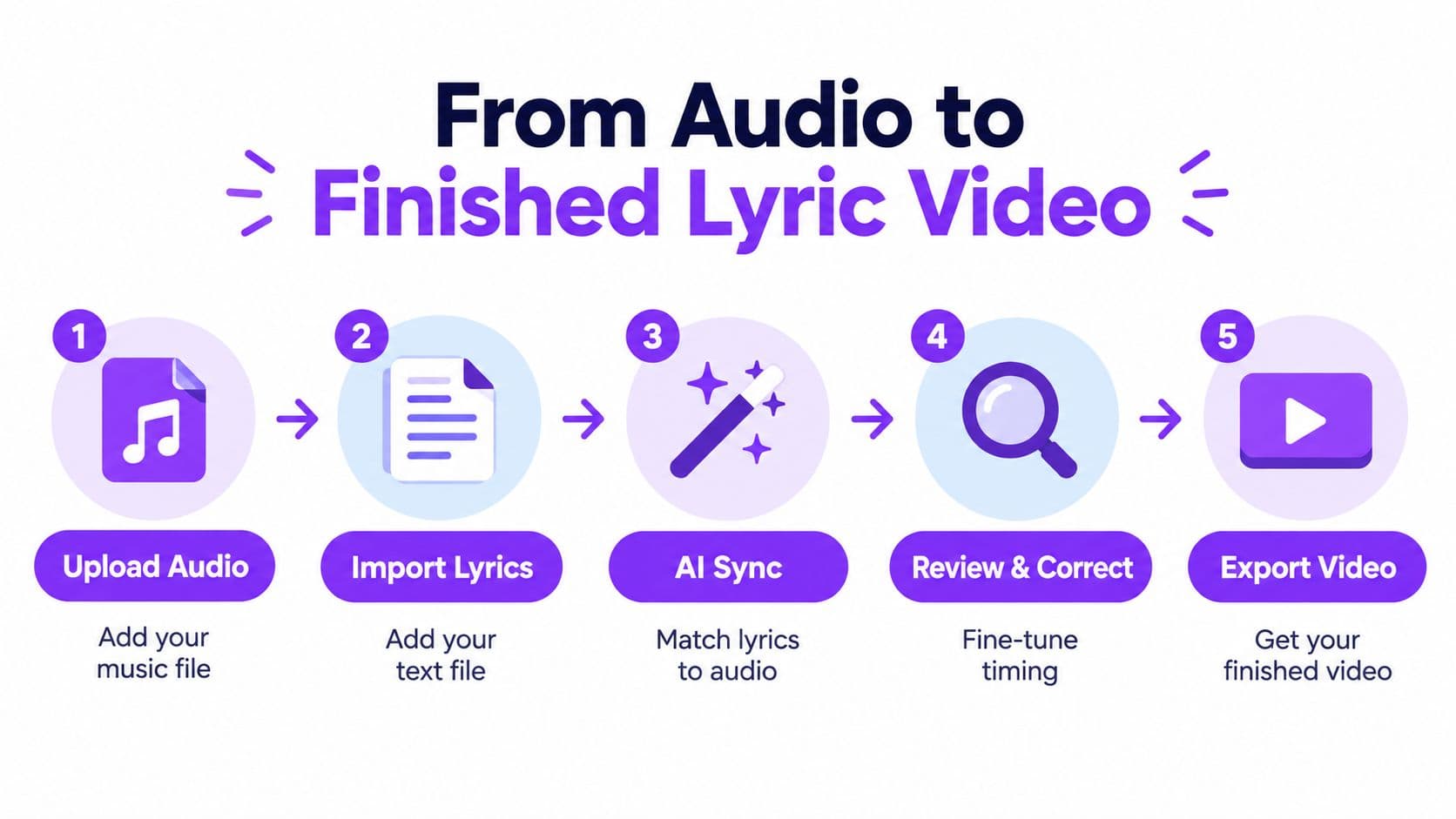
A good workflow feels repetitive in a helpful way. You upload the audio, add the lyrics, let the editor line things up, clean up the rough spots, then customize and export. That's the whole shape of the process, but each step still needs a human check.
What happens at each step
- Upload the audio. The editor needs a clean source file first, because every timing decision depends on the track.
- Import the lyrics. You can paste plain text or bring in prepared lyrics from elsewhere.
- Run the AI sync. The software maps the text to the song so you don't have to place every word by hand.
- Review and correct. You fix awkward spacing, repeated choruses, translations, and any ad-libs the system missed.
- Export the video. Once the timing and styling feel right, you render the final file.
The modern advantage is speed, not perfection. Traditional desktop editors can do this work too, but they often force you into manual keyframing and frame-by-frame adjustment. Purpose-built lyrics editors compress that work into a much smaller set of decisions, which is why they feel easier for first-time creators.
A useful example is the chorus. AI may place most words well, but a sung pickup or a stretched syllable can still need manual correction. That's normal, not a sign the tool failed.
For a deeper look at automatic lyric alignment in a browser-based workflow, see this guide on song automatic lyrics. It's the kind of feature that saves time only when you still review the result carefully.
The fastest workflow is the one that still leaves room for a human pass before export.
Matching the Editor to Your Real Use Case
Different creators want different outcomes, so the right editor depends on the job. A karaoke channel manager doesn't need the same setup as a social creator posting short clips, and neither one needs the same workflow as a marketing team making branded content.
Choose by audience, not by feature noise
Karaoke channel managers usually care about repeatable branding, clean 1080p output, and a process they can use again and again. Musicians and lyric video creators tend to care more about precise timing, expressive fonts, and a publishing process that respects permissions and credits. Social media creators often need vertical formats and quick turnaround, because the video has to fit feed habits and phone screens.
Event organizers usually want fast theme changes, easy on-screen titles, and something they can adapt for a live room or a themed night. Small businesses and marketing teams need a tool their staff can learn quickly, with typography that matches the brand and revisions that don't take a full afternoon.
That's why feature lists can be misleading. A long checklist looks impressive until you realize half of it doesn't help your actual workflow. If your output is mostly vertical social content, for example, a clean 9:16 export matters more than a complicated effects library.
One browser-based option in the mix
If you want a browser-based editor that handles upload, lyric sync, customization, and export without local installation, MyKaraoke Video is one example in this category. For product-adjacent guidance on web-first editing, read the browser-based video editor overview, then compare that approach with your own production habits.
The key question is simple: what kind of video do you need to publish most often? Once you answer that, the feature list gets much shorter.
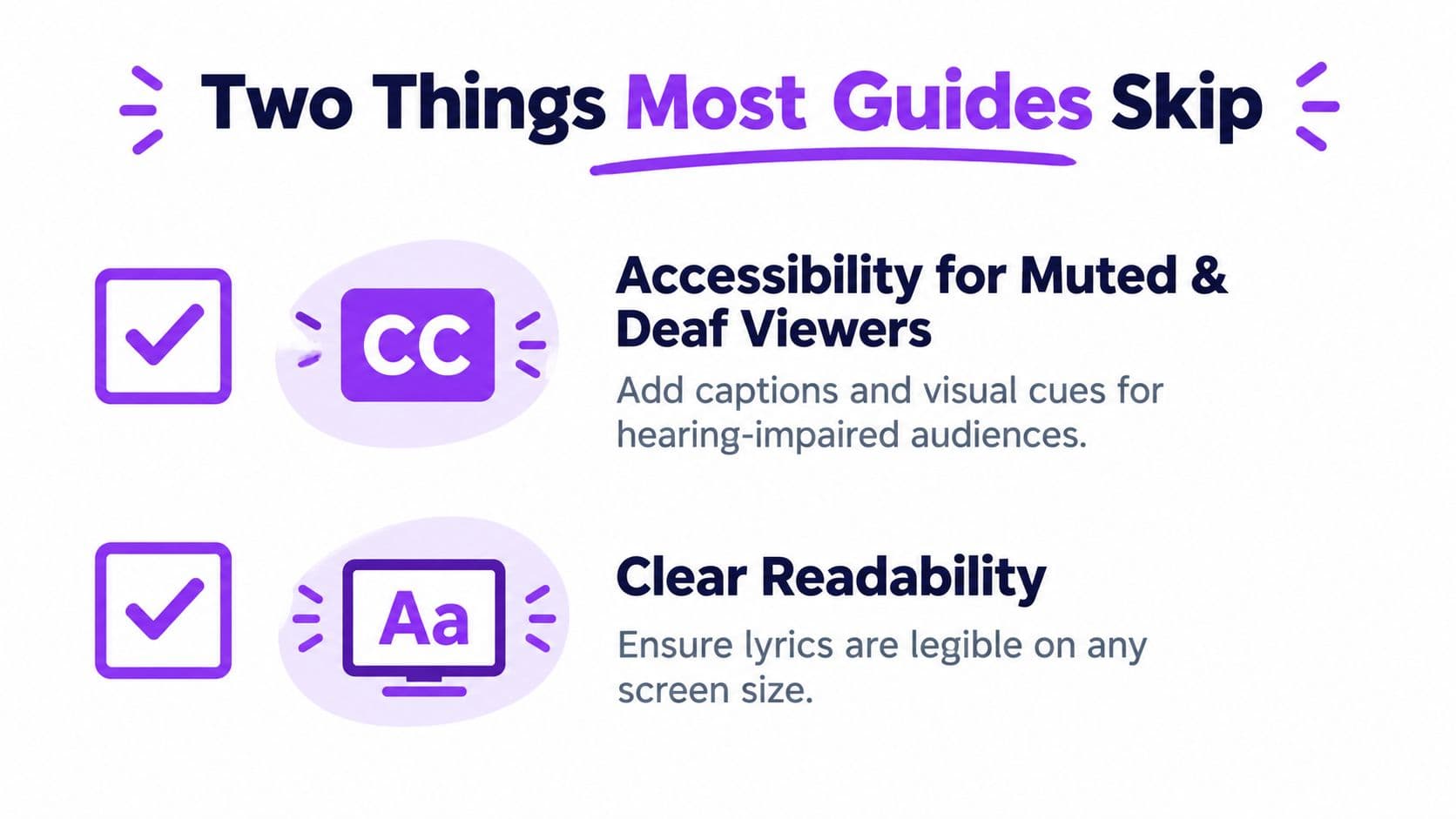
The Two Things Most Lyric Video Guides Skip
Most tutorials focus on timing and styling, then stop. A lyric video still has to work where people may watch with the sound off and where your handling of lyrics, translations, and AI help can affect whether the project is ready to publish.
Accessibility is not a side issue
Industry guidance reported in 2025 said as many as 85% of social videos are watched without sound (DJMag coverage of social video viewing habits). That makes readable text, strong contrast, safe margins, and timing that works on a small screen part of the core job.
A lyric video that looks clear on a big monitor can still fail on a phone if the lines are too long or the contrast is weak. Color alone is risky too, because some viewers need a second cue to understand what changed. A highlight plus motion, or a color change plus position shift, gives the viewer a clearer signal than color by itself.
Rights and disclosure need a trail
The other skipped issue is what to keep track of when AI touches the project. A 2025 UK consumer survey found that 81.5% of music consumers thought music generated solely by AI should be clearly labeled, and 78.5% said artists' music or vocals shouldn't be used by AI without permission (Perfect Corp summary of the survey findings). The same summary also reports that a separate UK Music creator survey found 66% of creators viewed AI as a threat to their careers, and more than 90% supported protections involving consent, payment, labeling, and protection of voice and image (UK Music creator survey on AI).
Before publishing, keep a record of who approved the lyrics, who translated them, and whether AI helped with syncing or visual presentation.
An AI-assisted project is not automatically a problem, but you should know what happened to the text, the vocals, and any artwork before you publish. A strong publishing workflow keeps that trail visible so the project is easier to defend, audit, and reuse later.
Selection Criteria You Can Apply to Any Editor
A useful checklist should tell you what changes the experience. If a tool saves time but makes correction difficult, it's not a real fit for lyric work. If it exports beautifully but takes a long time to learn, that may still be a bad match for a fast-moving team.
What to check before you commit
Look at AI sync accuracy first, then see how painful manual correction feels after the fact. Some tools look smart in the demo and then get clumsy when you need to fix one word in a repeated chorus.
Check the customization depth next. Fonts, colors, line spacing, backgrounds, and safe-area control all shape the final result. Then confirm the export options, because a lyric video intended for YouTube, Reels, or Shorts needs different framing choices even if the project starts the same way.
You should also weigh browser access against installed software. A browser-based editor is easier to start with, especially if you're working across devices or with a small team. Desktop software may offer deeper control, but it usually asks for more setup and more technical comfort.
Comparing editor types at a glance
| Criterion | Browser-Based Lyric Editor | Desktop Video Editor | Lightweight Text App |
|---|---|---|---|
| Sync workflow | Built for timed lyrics and quick corrections | Possible, but often manual | Basic text placement |
| Customization | Fonts, colors, backgrounds, layouts | Deep but more complex | Limited styling |
| Export | Designed for lyric-video output | Flexible, but requires more setup | Often minimal |
| Access | Works in a browser | Requires installation | Usually web-based or app-based |
| Learning curve | Low to moderate | Moderate to high | Low |
| Best fit | Fast lyric and karaoke projects | Advanced video production | Simple captions or text overlays |
For social-first publishing, the export specs matter as much as the styling tools. If you want to compare what a platform should support for feed-ready output, review the social media video specs guide before you commit to a format.
The best choice is the one that matches your real publishing pattern, not the one with the longest feature page.
Putting It All Together and Choosing Your Next Step
The easiest way to choose is to answer three questions. What is this video for, who will watch it, and how often will you make more like it? Those answers tell you whether you need a one-off browser tool, a repeatable channel workflow, or a brand-ready publishing system.
If you're making a single lyric video for a song you already have, a browser-based editor is usually enough. If you're running a karaoke channel, you'll probably want batch-friendly output and a predictable 1080p export path. If you're a marketer, the bigger questions are brand consistency, revision speed, and whether you can document permissions and AI use clearly.
The two checks that keep coming back are still the same ones. Test the video at phone size with the sound off, and keep records for any lyric, translation, or AI-assisted change. Those habits matter more than any template because they decide whether the video is merely finished or ready to publish.
If you want a browser-based way to turn audio and lyrics into a polished karaoke or lyric video, MyKaraoke Video gives you upload, automatic sync, live preview, and export in one place. If you're ready to try the workflow for yourself, visit MyKaraoke Video and see how quickly a song can become something publishable.
