You've uploaded the song, pasted the lyrics, clicked auto-sync, and exported the first karaoke render. Then the chorus arrives. The words appear late, the second verse drifts further off the vocal, and the final hook looks as if it belongs to another track. The file is technically finished, but nobody wants to watch it twice.
I've shipped hundreds of lyric videos, and the difference between an acceptable draft and a professional release usually isn't the font or background. It's timing that feels locked to the singer. Automatic lyrics can create the first pass quickly, but the review-and-fix loop is where the finished video earns its quality.
Why Song Automatic Lyrics Is the Real Bar in 2026
Karaoke lyrics have been moving toward timed, machine-displayed text for decades. Japan had shifted from paper and memorized lyrics to on-screen synchronized subtitles by 1981, while LaserDisc systems helped popularize subtitled music playback in the mid-1980s. The format later spread into family media through Disney Sing-Along Songs in 1986, creating a direct line from static lyric sheets to modern lyric-video workflows. The history of subtitles and synchronized lyrics shows why viewers now treat timed words as part of the playback experience, not an optional decoration.
The expectation is simple. If the vocalist starts a phrase, the corresponding words need to arrive with the phrase. A delay of about 200 milliseconds can be noticeable in a lyric experience, according to coverage of lyric-video trends in 2026. That doesn't mean every cue must be mathematically perfect, but it does mean a chorus that lands consistently late will feel amateur immediately.
Producer's rule: Auto-sync is a draft generator. The timeline review is the production work.
Use automatic lyrics to remove repetitive cue placement, not to excuse skipping quality control. If the text itself still needs writing or revision, prepare accurate lyrics for your song before you ask a synchronizer to place them. Incorrect words create a second problem that timing tools can't solve cleanly.
The technical field reflects this higher standard. Research has treated lyrics alignment as a word or syllable timing problem, not merely a transcription task. A system must determine which lyric unit is being sung and when it begins, which is why forced alignment and speech-recognition methods matter more than a basic subtitle editor. The rest of this guide focuses on that distinction, from the alignment pipeline to benchmark interpretation and the manual corrections that make sub-second timing usable in public releases.
How Auto Lyrics Sync Actually Works Behind the Scenes
Automatic lyrics synchronization makes a series of predictions. It doesn't read the singer's intention, and it doesn't understand the song in the way a producer does. It compares an audio signal with text, then estimates where each part of the text belongs.
The first pass examines the audio. Beat tracking identifies rhythmic events, while tempo estimation looks for the pulse and possible tempo changes. Vocal activity detection separates likely singing from non-vocal sections, silence, crowd noise, and dense backing arrangements. The system also looks for broad boundaries such as an intro, verse, chorus, bridge, and outro because a repeated chorus provides a different alignment context from a one-off vocal line.
Alignment is a probability problem
After the audio is analyzed, the engine compares the supplied lyrics with vocal sounds. Phoneme recognition breaks sung language into sound patterns, and forced alignment maps words or syllables to likely timestamps. The system may attach confidence values to matches, helping identify lines that deserve a closer human look.
That process works best when the lead vocal is clear and the text is correct. It becomes less reliable when ad-libs overlap the written lyric, backing vocals introduce competing sounds, or harmonized parts blur individual consonants. Tempo changes can also expose a weak alignment because a small early error may become obvious by the end of a phrase.
The academic framing is important. A landmark paper cited in 2008 addressed the automatic synchronization of textual lyrics to acoustic music signals, and the MIREX alignment task defined the goal at syllable or word level. The research overview of automatic lyrics alignment makes the practical point clear: automatic lyrics isn't just “add captions.” It's timed matching between two different forms of information.
What you should watch in the editor
Your working model should be straightforward: upload audio, provide lyrics, run alignment, inspect the differences, and correct drift. Treat flagged or uncertain lines as review targets, not as proof that the complete track failed. A timeline view lets you compare the vocal waveform with each cue, which is far faster than rebuilding every subtitle manually.
For a visual walkthrough of the broader creation process, see how to create lyric videos with AI. The useful question after synchronization isn't “Did the tool finish?” It's “Which lines still need a producer's decision?”
Building a Karaoke Video in MyKaraoke Video
Start with the cleanest audio you have. A WAV or MP3 can be uploaded through the browser, and the song should already be trimmed and mixed in the form you intend to publish. If you replace the audio after syncing, every cue becomes suspect, so don't treat the upload as a disposable preview.
The lyrics panel gives you several starting points. Paste plain text, import an LRC file if you already have timed lyrics, or use the built-in catalogue where appropriate. Check spelling before starting automatic alignment, especially for artist names, slang, repeated syllables, and words that a recognizer might interpret phonetically.
Read the timeline before styling anything
Trigger auto-sync, then inspect the waveform timeline rather than jumping straight to visual design. Synced syllables or lyric units appear along the audio, allowing you to compare each highlighted bar with the actual vocal entry. Lines that appear visibly early, late, unusually long, or compressed into a dense cluster deserve attention.
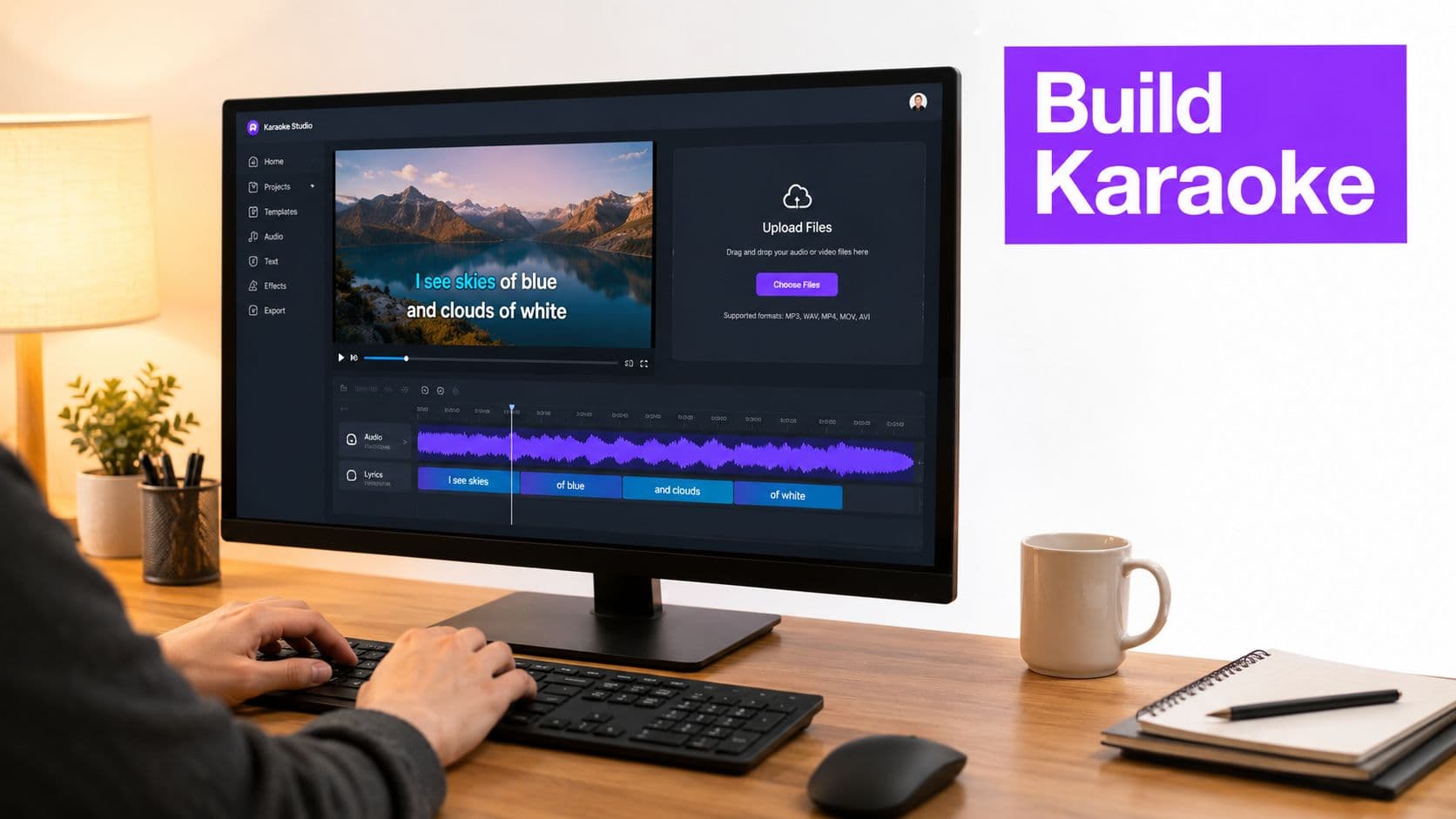
Click a line to adjust its start and end timestamps. Split a long phrase when several words need to appear separately, merge fragments when the display becomes choppy, and reassign text when the engine misheard a word. A global lead-in offset is useful when the entire file starts consistently early or late. Use per-line adjustments when the error is local, otherwise you'll fix one verse by damaging another.
The editor is also where you decide how much text belongs on screen at once. Karaoke readability improves when the active phrase is easy to follow and the inactive line remains visually subordinate. Keep the timing decision separate from the styling decision, then apply the chosen font, weight, position, highlight colour, and background treatment across the project.
Export for the destination, not the timeline
Before export, choose the resolution and format that match the publishing destination. A hardcoded karaoke highlight is appropriate when the text must travel inside the video. An accompanying LRC file is useful when another player or platform needs timed lyrics as a separate asset.
The same production logic applies if you're creating supporting visual material with long-form content with ClipNova. Generate or assemble the visual layer independently, then keep the lyric layer readable above it. For broader karaoke production guidance, use this guide to making a karaoke video, but don't let templates replace timing review.
Precision Benchmarks That Separate Amateur and Pro Output
Start with average absolute error, or AAE, then review the song section by section. AAE measures the average distance between a predicted lyric onset and the matching vocal onset. Lower AAE places words closer to the performance, but an average can hide one verse that drifts badly while the rest appears accurate.
Percentage of correct overlap, or PCO, measures how often predicted and reference timings overlap within an accepted window. A delay near 200 milliseconds is noticeable during lyric playback, so use that threshold as a practical review line. The 2023 multilingual alignment research reports AAE below 0.2 seconds on the standard JamendoLyrics dataset, while a later extension reports 0.20 AAE with 95% PCO on JamendoLyrics++.
Treat these figures as benchmarks, not export guarantees. Earlier results in the same research include 1.40 seconds average absolute error, while another method reaches 0.448 seconds under optimal settings. That gap is why every auto-synced song needs a review pass. Check each verse, chorus boundary, bridge, and tempo change. A result can meet a strong average while still looking amateur in one transition.
| Metric | Amateur tier | Pro tier | What viewers notice |
|---|---|---|---|
| AAE | Frequent visible lag or early cues | Around 0.20 seconds or lower on a suitable benchmark | Words feel attached to the vocal instead of trailing it |
| PCO | Inconsistent overlap across phrases | High overlap across clean sections, with 95% PCO reported on JamendoLyrics++ | Fewer lines look disconnected from the singer |
| Verse consistency | Drift accumulates after transitions | Each section reviewed against its own vocal entry | The song remains readable beyond the first chorus |
| Text formatting | Punctuation, capitalization, and segmentation are left untouched | Text and timing are checked together | The screen looks intentional rather than machine-generated |
Use the benchmark dataset with the same discipline. JamendoLyrics MultiLang contains 79 songs in English, Spanish, German, and French with word- and line-level timestamps. Jam-ALT revises that material around industry transcription standards, including punctuation and capitalization. The JamendoLyrics dataset shows why timing accuracy and text normalization require separate checks. Fix timing until the words track the singer, then inspect formatting before export.
Fixing Timing Drift and Misheard Words After Auto-Sync
A synced draft often looks acceptable at the opening and fails later. Start a verse-by-verse scrub instead of watching only the first chorus. Jump to every chorus boundary, bridge entrance, and tempo change, then compare the first sung consonant with the first visible lyric unit.
Drift usually appears as a pattern. The opening line is close, the next line is slightly late, and by the end of the phrase the display is visibly behind. A bridge or key change can expose the mismatch more sharply because the vocal phrasing no longer follows the timing assumptions established earlier.
Correct the timing before redesigning the screen
Suppose a chorus begins with the right words but the first highlighted phrase arrives after the singer. Don't move the whole project immediately. Check whether the error affects that line alone, the complete chorus, or every section after a specific transition.
Use the waveform as the ground truth. Nudge the line's start and end points, then play the phrase repeatedly at normal speed. If the text is grouped badly, split the phrase into shorter units. If the engine created fragments that interrupt a natural vocal run, merge them. Re-run automatic synchronization only on the misaligned verse when the tool supports partial processing, rather than overwriting sections that already work.
Text errors follow recognisable patterns. A soft initial consonant may disappear, a homophone may replace the intended word, and a fast vocal run may spill across a cue boundary. Correct the lyric text first, then retime the affected unit. Timing a wrong word perfectly still produces a bad lyric video.
A practical before-and-after
Before the fix, a chorus line may begin late, hold too long, and force the following phrase to appear in a rushed burst. After the fix, move the first cue to the vocalist's entry, split the long phrase where the singer naturally articulates it, and shorten the hold so the next line arrives without overlap.
That is the review-and-fix loop. It's faster than manually building the entire song, but it still requires someone to listen. This guide to fixing common karaoke sync issues is useful when a local adjustment turns into a larger section-level problem.
When Automatic Lyrics Still Need a Human Editor
Automatic lyrics is not finished output. Human review becomes essential when the recording contains conditions that make the audio-to-text relationship ambiguous.
A multilingual song is a common example. The recognizer may handle an English line cleanly, then keep applying English sound patterns after the vocalist switches languages. The result can include phonetic substitutions, missing words, or a line segmentation that ignores the actual phrasing. Disable auto-sync for that passage, cue the phrase manually against the waveform, and return to automation for cleaner sections.
Live recordings create a different failure pattern. Crowd noise can mask consonants, audience singing can resemble a second lead, and room reflections can soften the vocal onset. Don't ask the system to resolve every competing sound. Manually anchor the first word of each phrase, then inspect the rest of the line for drift.
The difficult tracks need selective automation
Accented vocals may produce consistent substitutions rather than random errors. That consistency can make the output look plausible while still being wrong. Dialect, slang, and unusual pronunciation deserve a text-first correction pass before timing edits.
Mashups are harder because two songs may overlap, change vocal identity, or use different lyric structures. Align each source section independently where possible, and manually control the transition instead of expecting one uninterrupted recognition pass to understand the arrangement.
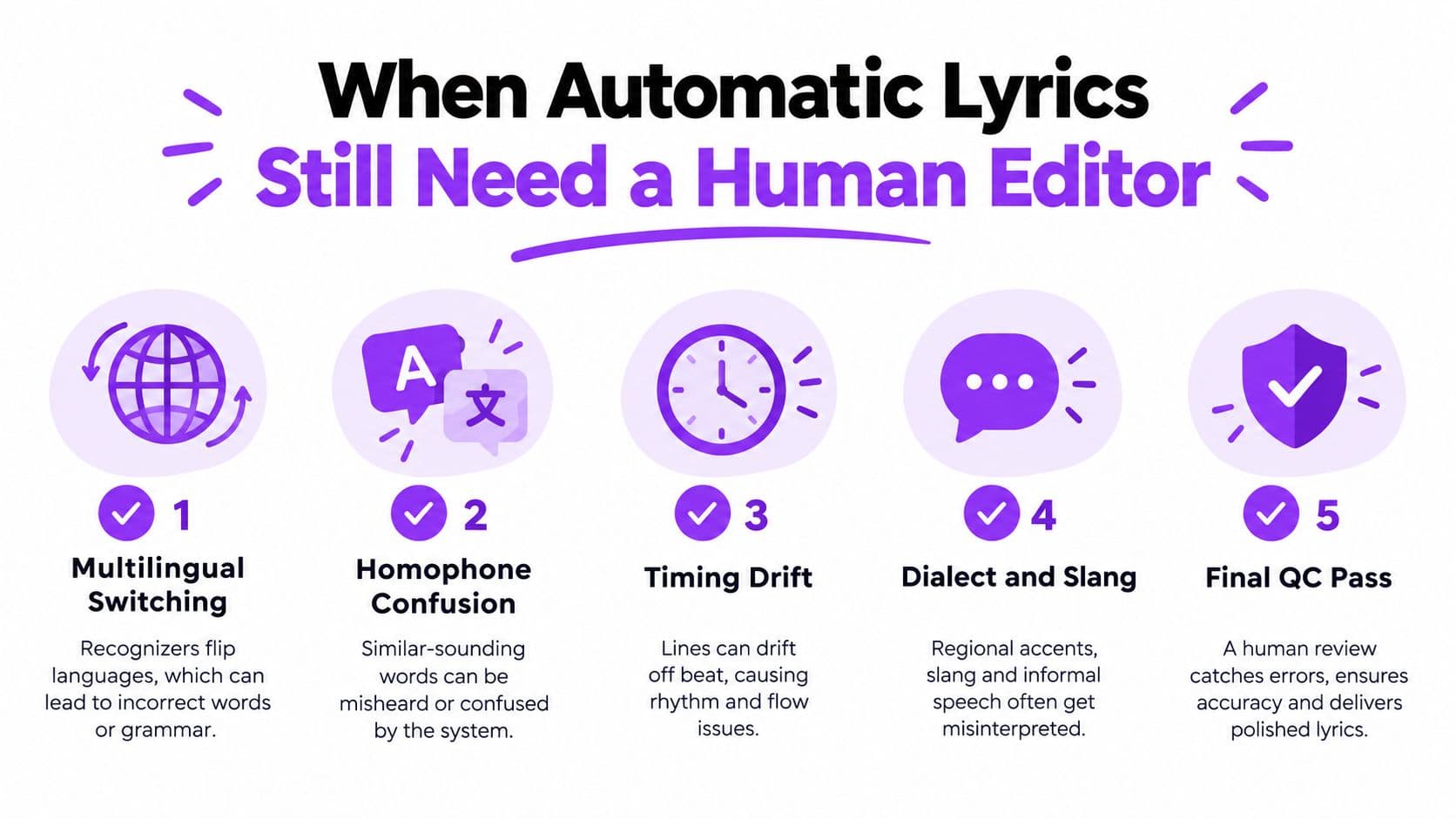
Human review isn't a fallback. It's the control layer that makes automation publishable.
Research on synthetic lyrics also points to weaknesses beyond timestamps. Listeners can identify machine-generated writing through repetition, awkward rhyme patterns, and weak contrast between verse and chorus, while newer work continues to examine where generated lyrics fail to match human songwriting. Recent research on synthetic lyrics and human perception supports a practical conclusion: improving word-level alignment doesn't remove the need for editorial judgment about authenticity, wording, and emotional fit.
Your Pre-Publish Checklist for Lyric Videos That Hold Up
Run the finished video as a viewer would. Watch it once with the audio muted and read only the on-screen lyrics. This pass exposes stray line breaks, missing words, awkward punctuation, inconsistent capitalization, and cues that disrupt the song's visual rhythm.
Restore the audio and inspect each vocal entrance. Check the first line after a musical break, every chorus opening, the bridge, tempo changes, and the final repeated hook. Compare the sync across verses, because automatic timing can drift gradually even when the first section looks correct. If a lyric appears more than about 200 milliseconds before or after the vocal, fix it before export. That delay can feel like lag to viewers, and Independent 2026 coverage of lyric-video expectations identifies the threshold as perceptually noticeable.
Make the screen readable in real viewing conditions
Test contrast against the busiest background frame, not the easiest one. A highlight colour that works over a dark opening may vanish when bright footage appears. Keep active and inactive lines clearly different, while avoiding effects so bright or animated that they compete with the words.
Set a safe zone that survives the intended crop, particularly for vertical video. Check the lyric size on a phone, not only in a large desktop preview. If translations are included, position them consistently and keep the primary lyric visually dominant.
- Text accuracy: Verify every name, repeated phrase, slang term, punctuation mark, and language switch.
- Timing accuracy: Scrub verse entrances, chorus boundaries, bridges, tempo changes, and the final refrain.
- Visual contrast: Test the brightest and darkest background moments with the selected highlight colour.
- Mobile readability: Review the export at phone size and confirm that line breaks remain easy to follow.
- Accessibility: Avoid strobing colour changes, maintain clear contrast, and keep optional translation text stable.
- Output integrity: Confirm the resolution, video format, audio track, and any separate LRC file before publishing.
After release, treat comments as quality-control evidence. If viewers repeatedly flag one lyric line, inspect that cue instead of dismissing the feedback. Review retention after the video has gathered meaningful viewing behaviour, then re-sync lines that repeatedly appear in comments as late, early, or incorrect.
A publishable lyric video comes from a review-and-fix loop. Automatic lyrics remove repetitive timing work, while the producer catches drift, corrects wording, and decides exactly what viewers see and when.
MyKaraoke Video lets you upload a song, add or transcribe lyrics, generate an automatic sync draft, and refine timing in a browser-based editor before styling and exporting the lyric video. Visit MyKaraoke Video to run your next track through that upload, review, fix, and export workflow.