Making a great karaoke video used to be a real chore, but modern tools have completely changed the game. Now, you can take an instrumental track, pair it with the lyrics, and let an AI platform do the heavy lifting of syncing them perfectly. From there, you just customize the look and export your final video—all from a web browser in a matter of minutes.
The New Way to Create Karaoke Videos
If you've ever tried to make a lyric video the old way, you know the pain of clunky desktop software and manually timing every single word. It was a tedious, hours-long process. Thankfully, those days are over.
Today's approach makes producing professional-quality karaoke videos accessible to everyone. It’s perfect for YouTube creators, event hosts, or anyone who wants to bring music to life visually. The secret is letting smart automation handle the synchronization, which frees you up to focus on what really matters: the creative design.
So, what do you actually need to get started? It breaks down into a few simple elements:
- A Clean Instrumental Track: This is your canvas. A high-quality audio file without the main vocals is essential so the singer can take center stage.
- Accurate Lyrics: You don't need anything fancy. A simple text file with the song's words is all it takes to feed the machine.
- AI-Powered Syncing: Here's where the magic happens. An algorithm listens to your audio and reads your text, automatically lining up every word with the music.
- Browser-Based Editor: Forget about installations or updates. All the fun stuff—choosing fonts, colors, and backgrounds—is done right in a simple online tool.
Old School vs Modern Karaoke Video Creation
To really appreciate how far things have come, it helps to see the old and new methods side-by-side. The contrast is pretty stark.
The traditional way meant wrestling with complex video editing software. You had to manually place and time every single lyric, which could easily take hours for just one song. This approach also required a powerful computer and a lot of technical know-how.
Here's a quick comparison:
| Feature | Traditional Method (Desktop Software) | Modern Method (Browser-Based AI) |
|---|---|---|
| Lyric Syncing | Manual, word-by-word timing. Very time-consuming. | Automatic, AI-powered sync. Takes seconds. |
| Software | Requires powerful, expensive software (e.g., Adobe Premiere Pro). | No installation needed. Runs in any web browser. |
| Learning Curve | Steep. Requires video editing skills. | Minimal. Intuitive and user-friendly. |
| Creation Time | Hours per song. | Minutes per song. |
| Accessibility | Limited to users with powerful hardware and software licenses. | Accessible on any computer with an internet connection. |
| Backgrounds | Requires sourcing and importing your own video/image files. | Often includes a built-in library of stock media. |
The modern, browser-based approach automates the most frustrating part of the process and puts all the design tools you need in one place. It’s a total game-changer.
What used to be a multi-hour technical chore is now a creative task that you can finish in the time it takes to drink a cup of coffee.
This shift isn't happening in a vacuum. The global karaoke market is booming, expected to hit between USD 9.17 billion in 2025 and USD 14.46 billion by 2034. The demand for user-friendly creation tools is exploding as more people get into making content. If you want to dive deeper, you can explore more karaoke market trends and see just how fast this space is growing.
Getting Your Audio and Lyrics Ready for a Flawless Sync
Before you even start thinking about cool fonts or flashy backgrounds, your karaoke video's success comes down to two things: a solid audio track and a perfectly prepped lyrics file. Honestly, getting this part right is the secret sauce. It's the difference between a smooth, five-minute process and an hour-long headache of fixing tiny mistakes. Think of it as your foundation—if it’s shaky, the whole project will be a struggle.
Nail the Audio First
First things first, you need a clean, high-quality instrumental track. It's tempting to just grab any old MP3 you have lying around, but that's often a mistake. MP3s are compressed, meaning they've shed some audio data to save space. For the best result, you really want to work with a WAV or FLAC file whenever you can. These uncompressed formats give the AI a richer, more detailed soundscape to work with, which almost always leads to a much tighter, more accurate sync.
So, where do you find these pristine tracks? A surprising number of artists actually post official instrumentals on their YouTube channels or streaming services. You can also find websites that sell licensed, high-fidelity karaoke backing tracks. And if all you have is the original song with vocals, you can use a vocal remover tool. We actually have a whole guide on that if you want to dive deeper: how to remove the vocals from a song.
Structure Your Lyrics for AI Success
With your audio sorted, it's time to format the lyrics. I can't stress this enough: this is probably the most important prep work you'll do. A messy text file is the number one reason for sync errors, and it forces you to go back and manually adjust everything word by word.
Your mission is to make the text file dead simple for the AI to understand. Here’s a checklist I follow:
- One Phrase, One Line: Each line in your text file should be exactly what you want to appear on the screen at one time. Don't just paste a wall of text from a lyrics website.
- Ditch End-of-Line Punctuation: Get rid of commas or periods at the end of each line unless they're absolutely critical to the song's meaning. This helps avoid weird, unnatural pauses in the animation.
- Use Blank Lines for Pauses: Is there a slick guitar solo or a long pause between verses? Just hit 'Enter' and add a blank line in your text file. This is a clear signal to the AI that nothing should be on screen.
- Write Out Every Repetition: For choruses or any repeated lines, you have to copy and paste the lyrics every single time they're sung. Never use shortcuts like "[Chorus x2]".
The AI takes your text file literally. It has no idea what a "chorus" or "bridge" is. You have to spell everything out, in order, exactly as it sounds in the song.
A Quick Formatting Example
Let's take a simple, famous chorus to see what this looks like in practice.
Incorrect Formatting:
And I will always love you, I will always love you. You, my darling, you.
If you feed this to the software, it'll probably spit out one long, awkward line that’s impossible to sing along to.
Correct Formatting:
And I will always love you
I will always love you
You
My darling, you
See the difference? Each sung phrase gets its own line, and that blank line I added creates a natural pause before the final words. This simple cleanup gives the AI crystal-clear instructions, making the initial sync incredibly accurate right out of the gate.
When you're getting all your assets together, remember that modern audio-to-video conversion tools can also help keep everything organized. A few minutes spent on prep work here will save you a ton of frustration later and make your final video look so much more professional.
Using AI for Perfect Lyric Timing and Sync
Alright, with your audio and lyrics prepped, we get to the fun part: the automatic sync. This is where modern tools really shine, turning what used to be hours of painstaking manual work into a process that takes just a few seconds. Seriously, forget the old days of manually dragging text clips along a timeline. The game has completely changed.
So, how does it work? An AI algorithm essentially "listens" to your instrumental track. It analyzes the waveform to pick up on rhythmic patterns, beats, and the subtle cues where vocals would naturally fall. It then takes your text file and intelligently matches each line of lyrics to the right moment in the song. The result is a surprisingly accurate first draft of your synchronized video, generated almost instantly.
The whole process hinges on having good raw materials, as this simple flowchart shows.
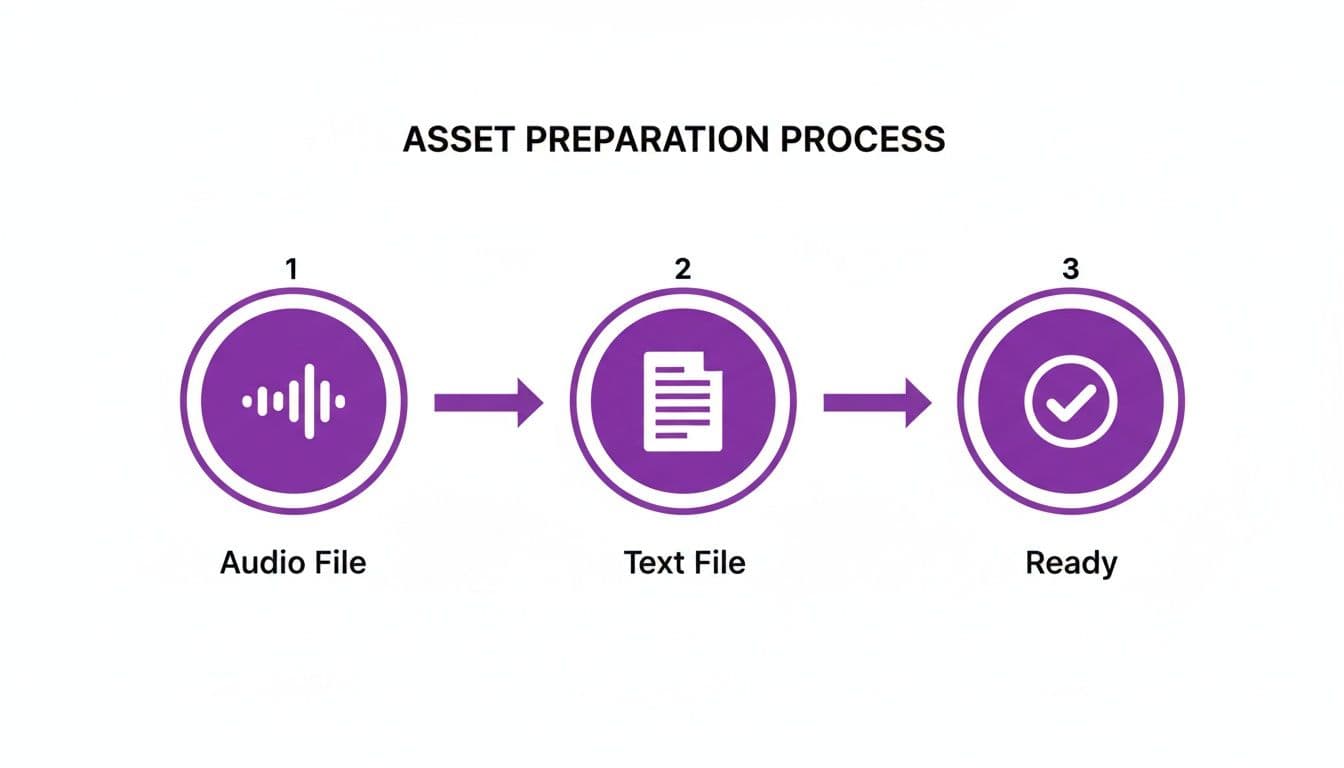
As you can see, a clean audio file and a properly formatted text file are the two essential inputs that feed the AI and get you a project that’s ready for fine-tuning.
The Power of the Visual Sync Editor
Even the smartest AI can't always capture the unique soul of a human performance. A singer might hold a note a little longer, or push a phrase just ahead of the beat for effect. That’s where a visual sync editor becomes your secret weapon. Instead of building the timing from scratch, you’re just making small, precise adjustments.
These editors give you a visual representation of the audio waveform with your synced lyrics layered right on top. This makes it incredibly easy to see exactly where each word lands. If a line feels a fraction of a second too early, you can literally just click and drag it into the perfect position.
Most of your time in the editor will be spent on a few key tweaks:
- Fine-Tuning Word Timing: Nudging individual words left or right by just a few milliseconds to lock them perfectly into the vocal performance.
- Merging and Splitting Lines: If the AI broke up a phrase you’d rather keep on one line, you can merge them. On the flip side, you can split longer lines into more digestible, singable chunks.
- Adjusting Line Duration: Extending or shortening the time a lyric is highlighted to match how long a note is actually held in the song.
The goal here isn't just about robotic accuracy; it's about crafting a natural, intuitive experience for the person singing. The AI gets you 95% of the way there, but the visual editor is where you apply your creative touch to nail that final 5%.
Mastering this is a lot like knowing how to add subtitles to videos. The core skill is the same—it’s all about precise timing and display. The main difference is that with karaoke, you're timing to a musical rhythm, which makes it even more interactive and creative.
From Manual Labor to Online Efficiency
This move from manual editing to AI-powered workflows reflects a huge shift in the karaoke world. It wasn't that long ago that creating a quality karaoke track required dedicated hardware or clunky, complicated desktop software. Now, the entire industry is moving online.
More and more, production is happening on browser-based platforms. These tools let you upload your audio, paste in the lyrics, get an AI-generated sync, customize the look, and export a high-quality 1080p MP4 video. The old DVD or CD+G workflows are being replaced by scalable, efficient online pipelines.
The tools available on the market today, like the AI lyric video generator we cover in another guide, are a direct response to this demand. They’re built to be fast and intuitive, opening up video creation to everyone, not just tech experts. They’ve tackled the single biggest barrier for most aspiring creators: getting the lyrics synced perfectly to the music.
By letting AI handle the heavy lifting of the initial sync and then using a visual editor for the final polish, you get the best of both worlds: incredible speed and artistic precision. This combination empowers you to create a professional karaoke video that feels perfectly timed and is a blast to sing along to. You’re no longer just an editor; you’re conducting the experience, making sure every word lands right on cue.
Designing a Visually Stunning Karaoke Experience
Once your lyrics are perfectly synced, the real fun begins. You can now step away from the technical side and dive into the creative heart of the project. The design of your karaoke video is what will elevate it from a basic sing-along track into something truly immersive. It’s your chance to set the mood, complement the song's theme, and develop a signature look that makes your channel stand out.
All the visual pieces—your fonts, colors, backgrounds, and animations—need to work together. They're there to grab the singer's attention and guide them effortlessly through the lyrics. A great design feels completely intuitive, almost invisible, because it enhances the performance. A bad one? It's just distracting and hard to read.
Let's break down how to make smart, stylish choices that will make your project shine.
Choosing Fonts and Colors That Work
Above all else, your text has to be readable. If people are squinting to make out the words, you've already lost. This is why your font and color choices are so critical.
When it comes to fonts, clarity beats creativity every time. Those super decorative or complex script fonts might look artistic, but they're a nightmare to read on the fly, especially from a few feet away. Stick with a clean, bold sans-serif font like Montserrat, Poppins, or Roboto. These are practically foolproof choices designed for screen legibility.
Color is your next most powerful tool, and the golden rule is high contrast. There’s a reason timeless combinations like white text on a dark background or black text on a light one are so common—they just work.
Of course, you can get more creative than that. A high-energy pop song might call for vibrant, saturated colors. A slow, emotional ballad, on the other hand, would feel more at home with a muted, subtle palette. Just make sure to test your choices. What looks great on your high-end monitor might become an unreadable mess on a TV across the room.
Pro Tip: Use a free online color contrast checker. You can plug in your text and background colors, and it will tell you if they meet accessibility standards. It’s a simple step that ensures everyone can enjoy your video.
Crafting the Perfect Background
The background sets the entire stage for your song. You’ve got a few solid options here, each with its own vibe.
- Static Images: A single, high-resolution photo can be incredibly effective. Think of a serene landscape for a folk song or a gritty urban scene for a rock anthem. The key is to avoid images that are too "busy," which can clash with the text.
- Video Loops: For a more dynamic feel, a subtle video loop is a fantastic choice. We're talking slow-moving clouds, abstract light patterns, or gentle ocean waves. The keyword here is subtle. The background should add atmosphere, not steal the spotlight.
- Color Gradients: Sometimes, the simplest choice is the most elegant. A smooth gradient that shifts between two or three complementary colors provides a clean, modern backdrop that keeps the focus squarely on the lyrics.
No matter which path you take, remember that the background is there to support the song, not compete with it. A common mistake I see is choosing a background that’s too bright or has too much frantic movement, which just causes eye strain.
Bringing Lyrics to Life with Animation
Animation is the magic that guides the singer, showing them exactly when to sing each word. The style you choose can dramatically alter the video's entire feel.
The most traditional method is the color fill, where the text changes color—word by word or syllable by syllable—as the music plays. It's direct, easy to follow, and the industry standard for good reason. But you don't have to stop there.
Modern tools offer far more creative options. A gentle fade-in effect for the upcoming line can give your video a softer, more cinematic quality. Some software even lets you get fancy with words that bounce or slide into place. If you're hunting for ideas, our guide on creating animated text for videos dives deep into different styles you can experiment with.
The trick is to match the animation to the song's energy. A fast-paced pop track works well with a quick, sharp color fill. A slower ballad, however, might feel better with a smooth, gentle fade. Consistency is also key. Pick one or two animation styles and stick with them to give your video a polished, professional look.
Exporting and Sharing Your Finished Karaoke Video
You’ve synced the lyrics, dialed in the design, and given your video a final polish. Now it’s time to get it out into the world. This last step is just as critical as the creative work, since how you export and share the video determines how your audience will actually see and find it.
Getting the technical settings right and understanding the basics of online distribution is the key to building a successful channel—or just making sure your hard work looks fantastic on any screen.
The great thing is, most modern karaoke video makers handle the complex stuff for you. You don't need to be a video engineer to get a professional-quality file. Still, knowing which buttons to press and why they matter will give you a serious leg up.
Choosing the Right Export Settings
Once you’re ready to export, you’ll probably be faced with a few technical-sounding options. Don't let them intimidate you. For sharing online, especially on a platform like YouTube, the industry standards are incredibly clear. Sticking to them guarantees your video will look great and play everywhere.
For a hassle-free, high-quality result, these are the settings you'll almost always want to use:
- Resolution 1080p (1920x1080): This is the sweet spot for high-definition video. It looks sharp and crisp on everything from a smartphone to a big-screen TV, all without creating a ridiculously large file that takes forever to upload. While 4K is an option, 1080p offers the perfect balance of quality and manageable file size for most creators.
- Format MP4 (H.264 codec): Think of MP4 as the universal language of online video. It’s a container that gives you excellent quality in a surprisingly small file size. The H.264 codec is the magic behind that efficiency, and it’s supported by virtually every device and platform out there.
Locking in these settings ensures your video uploads smoothly and plays back flawlessly for your audience. It’s a simple step that prevents a lot of potential headaches.
Navigating Copyright and Fair Use
Okay, before you hit that "upload" button, we need to talk about copyright. This is easily the most intimidating part of making karaoke videos, but it doesn't have to be a deal-breaker. If you ignore it, you risk having your video taken down, getting a strike against your channel, or even facing legal trouble.
Your safest bet is to only use music you have clear permission for. This usually means one of two things:
- Royalty-Free Music: You can find instrumental tracks from dedicated libraries where you purchase a license. This gives you explicit permission to use the song in your video without worrying about future copyright claims.
- Official Instrumentals with Permission: Sometimes, artists or labels grant permission, or you can operate under YouTube's Content ID system. With Content ID, the original copyright holder might place ads on your video and collect the revenue. This is a common model for cover songs, but it isn’t a guarantee—the owner can change their policy at any time.
Always assume a song is protected by copyright. Taking a few minutes to secure the proper rights upfront will save you from major problems down the road and protect the channel you’re working so hard to build.
Optimizing Your Video for YouTube
Just uploading your video isn't enough; you need to help people find it. This is where a little bit of search engine optimization (SEO) makes a huge difference. By giving YouTube clear signals about your video's content, you can dramatically increase its chances of being discovered by singers looking for their next performance piece.
To give your video the best shot at being seen, you'll want to fine-tune a few key settings during the upload process.
YouTube Upload Settings for Karaoke Videos
This quick reference table breaks down the most important settings for getting your karaoke video discovered on YouTube.
| Setting | Recommendation | Why It Matters |
|---|---|---|
| Title | Artist Name - Song Title (Karaoke Version) | This is the most common and effective format. It’s exactly what users search for, so it helps your video appear in relevant results. |
| Description | Write a few sentences about the song/artist. Include the full lyrics and credit the original creators. | A detailed description provides more context for YouTube's algorithm. Including lyrics can help your video rank for specific phrases. |
| Tags | Karaoke, Song Title, Artist Name, Lyrics, Instrumental, Cover | Tags act as keywords. Using a mix of broad and specific terms helps you cast a wide net and attract the right viewers. |
By taking the time to craft a keyword-rich title, a helpful description, and relevant tags, you're essentially creating a roadmap that leads singers directly to your video. It’s the final piece of the puzzle that ensures your hard work doesn't just look and sound great, but also finds the audience it deserves.
Diving into the Nitty-Gritty: Your Karaoke Video Questions Answered
Once you get started making karaoke videos, you'll inevitably run into a few hurdles. It happens to everyone. Whether you're wrestling with software choices, navigating the murky waters of music copyright, or just trying to streamline your workflow, getting good answers is key.
I've been there, and I've seen these same questions pop up time and time again in creator communities. Let's tackle the most common ones head-on so you can spend less time guessing and more time creating.
What's the Best Software for Making a Karaoke Video?
It's tempting to fire up a big-name editor like Adobe Premiere Pro or Final Cut Pro. While these are incredible tools for filmmaking, they're honestly overkill—and surprisingly inefficient—for lyric videos. The main problem? You have to sync every single word manually. It's a painfully slow process that can take hours for a single song.
A much smarter approach is to use a modern, browser-based karaoke video maker. These tools are built for one specific purpose: creating lyric videos quickly and easily.
The real game-changer is their use of AI for automatic lyric syncing. What used to take hours of tedious manual work now takes just a few minutes. Everything you need, from fonts and backgrounds to final export, is all in one place without downloading a thing.
If you're serious about building a karaoke channel on YouTube, a dedicated online tool is, without a doubt, the way to go. It completely automates the most time-consuming part of the job, letting you focus on making your videos look amazing.
How Do I Legally Use Songs for Karaoke on YouTube?
This is the big one. Getting this wrong can put your entire channel at risk, so pay close attention. To legally use a song in your YouTube karaoke video, you have a few paths you can take.
- Go Royalty-Free: The absolute safest option. Using instrumental tracks from royalty-free music libraries gives you a clear, documented license to use the audio without future headaches.
- Get a Sync License: For that chart-topping hit you have to use, the technically correct way is to get a synchronization (or "sync") license from the music publisher who owns the rights to the song's composition. This can be complex and expensive, but it's the proper legal route.
- Work Within YouTube's Content ID: This is how many channels operate. You use a popular song, and YouTube's Content ID system flags it. The copyright holder can then place ads on your video, and they collect all the revenue. While common, this is never a guarantee. The rights holder can change their mind at any time and issue a takedown notice.
No matter which path you choose, always credit the original artists in your video description. And please, don't assume your video falls under "fair use"—karaoke content almost never qualifies.
Where Can I Find High-Quality Instrumental Tracks?
Your audio quality is everything. A fuzzy, poorly mixed instrumental will make people click away instantly, no matter how good your visuals are. Luckily, finding great tracks is easier than you might think.
A surprising number of artists release official instrumentals on their own YouTube channels, so that's always the first place I look. You can also find professionally produced backing tracks on dedicated karaoke music sites. If you’re a musician, creating your own instrumental with production software like Logic Pro or FL Studio gives you the ultimate control.
Just steer clear of those low-quality MIDI files or sketchy "vocal remover" apps. They often leave behind weird digital artifacts that sound terrible. A crisp, clean instrumental is the foundation of a professional-sounding karaoke video.
Can I Make a Professional Karaoke Video on My Phone?
You can, but I wouldn't recommend it if you're aiming for professional quality. Mobile video editing apps just don't offer the fine-tuned control you need for a polished, high-end karaoke video.
For things like pixel-perfect lyric timing, custom branding elements, and exporting in crisp 1080p, a computer is still your best friend. The bigger screen and the precision of a mouse make a world of difference when you're tweaking tiny details. Using a browser-based tool on your desktop or laptop gives you the power and flexibility to create something that truly stands out.
Ready to stop syncing lyrics manually and start creating stunning videos in minutes? MyKaraoke Video provides a powerful, browser-based platform with AI-powered tools to make the process fast and fun. Start creating your first karaoke video for free today!