You've got the song cut, the lyric timing is close, and the export looks clean on your laptop. Then you open it on a phone and the bottom line sits under the caption bar, the hook doesn't hit fast enough, and the version that felt polished in your editor behaves like a missed opportunity in the feed. That gap is why video editing for social media needs to be treated like a platform system, not a styling pass.
I see this most often with lyric and karaoke clips. The file is technically finished, but the edit never respected the platform's frame, attention window, or UI overlays, so the video starts losing viewers before the good part arrives. The fix isn't more effects. It's a better brief, a better layout, and a workflow that assumes one master cut will become several platform-specific variants.
The market has already moved in that direction. One industry dataset says 42% of video content created in 2023 was short-form under 1 minute, and another projects that by 2025 short-form will make up about 80% of all online video content, with mobile generating roughly 75% of all video views. Consumer editing software also reportedly has a user base of 2.1 billion in the same market snapshot, which is a reminder that editing is now a mainstream creator skill, not a specialist corner of production. Video editing industry statistics
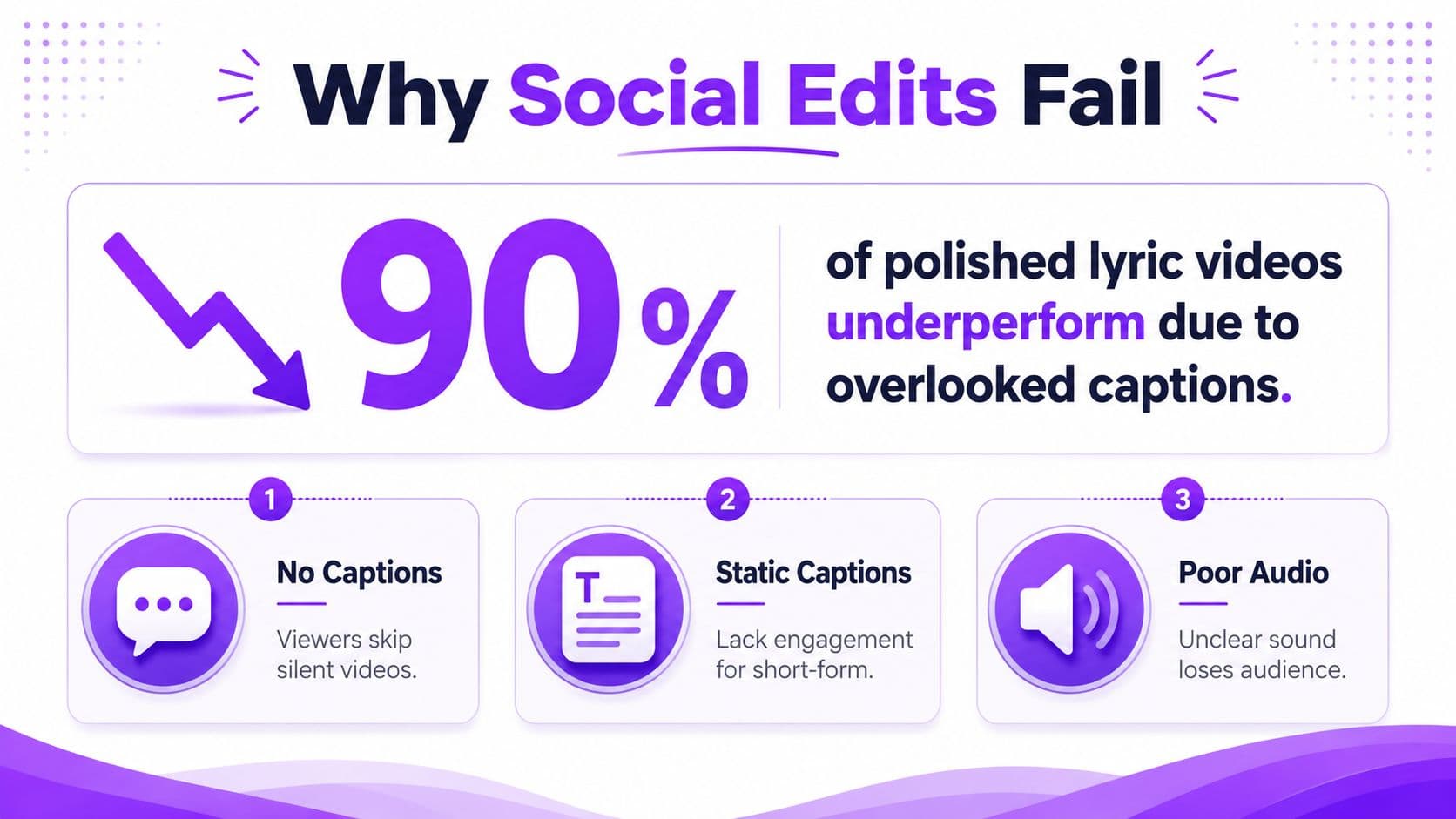
Why Most Social Edits Underperform Before You Even Start
The fastest way to waste a strong edit is to build it for the wrong frame first. I've watched clean lyric videos lose momentum because the opening line arrived too late, the title card swallowed the first second, or the lower third looked fine in a desktop timeline and then vanished behind native interface bars once it hit TikTok or Reels. The edit itself was not the problem. The plan was.
Start with the platform, not the timeline
The platform decides the frame before the editor does. Rev reports that 71% of videos created by companies are made for use on social media, which shows how common this workflow has become, and it also explains why broad, one-size-fits-all editing breaks down. Rev's video marketing statistics also found that 79% of people enjoy watching brand video content online, while fewer than 3% actively dislike it, so the opportunity is there, but the cut still has to fit the place where people watch it.
That means the first decision is not font, transitions, or background motion. It is the primary platform. If the video is built for TikTok first, the cut needs to respect vertical framing, quick payoffs, and a hook that lands immediately. If the same master file will also run on Reels, Shorts, or feed placements, you are already planning variants, not just exports.
Practical rule: write the hook line before you open the editor. If you cannot say what the first frame promises, the cut will usually drift.
A good working brief can fit on one page. Pick the main platform, lock the target runtime, write the hook in plain language, and map the beats where the visual should change. For a lyric or karaoke video, that beat map might line up verses with typography changes, chorus swells with background motion, and the CTA with the song's fade. That kind of planning saves more time than any preset.
Treat one edit as a family of versions
The old “publish once and move on” mindset does not fit social distribution anymore. A polished master cut can still become a bad TikTok if the framing is off, or a weak Reel if the pacing feels too slow. The better approach is to think in versions, not masterpieces.
That does not mean creating separate projects from scratch every time. It means deciding in advance which parts are fixed and which parts can move. The body of the song or message stays stable. The hook, intro treatment, CTA, and even typography style can change by platform or by test. That is why editing for social media works best when the timeline is assembled with reuse in mind.
For creators who ship weekly, especially in lyric and karaoke formats, this mindset matters more than fancy motion graphics. You can reuse source audio, the lyric bed, and background animation, then swap the opening phrase or the on-screen emphasis. The result is faster production and cleaner testing, because each export is answering a different question.
If you want a starting point for that planning process, the social publishing advice in MyKaraoke Video's best practices guide fits naturally with a platform-first brief. It is a useful companion when you are deciding what to keep consistent and what to vary.
Use a four-part pre-edit ritual
Before I touch a timeline, I run the same sequence:
- Choose the primary platform. TikTok, Reels, Shorts, feed, or YouTube long-form.
- Write the hook line. If the first line does not create curiosity, the rest will not matter.
- Set the runtime. Keep it aligned to the platform's likely attention window.
- Sketch the beat map. Pair visual changes with lyric phrases or speech turns.
That ritual sounds simple because it is. The complicated part happens later, when you start making decisions inside the editor. If the pre-edit brief is clear, those decisions stop being guesswork.
Framing, Aspect Ratios, and Platform Safe Zones
Aspect ratio is where a lot of “good enough” edits break. A clean 16:9 export that looks great on YouTube can still fail on vertical apps because the faces, text, or product details sit exactly where the platform overlays live. Cross-posting only works when you frame for the platform's UI, not just for the footage.
Match the frame to the destination
For TikTok, Reels, and Shorts, 9:16 vertical is the native frame. Feed placements often use 1:1, and standard YouTube video still lives comfortably in 16:9. Those are basic specs, but the core issue is what survives inside them. If you're reusing one master cut across multiple channels, the important elements need to stay inside the safe zone so they don't get chopped or covered.
Keep the important content in the center band of the vertical frame, not near the bottom edge or right side.
That's the layout rule most creators skip. The bottom roughly 15% of vertical video should stay clear because interface controls sit there, and the right edge is risky because progress and engagement elements crowd that side. The practical result is simple. Don't park a face, lyric line, CTA, or product label close to the edges if the video is meant to travel between apps.
For a useful visual example of close framing in a product context, highlight mattress features on camera shows how a tight shot can keep attention on the feature that matters. That same thinking helps with lyric videos too, because the viewer should never have to hunt for the point of the frame.
Reframe the master cut without killing quality
Cross-posting doesn't mean stretching or blindly cropping. It means deciding what the viewer must see, then reframing around that priority. If you're moving from horizontal to vertical, don't squeeze the full scene into a phone-shaped box. Cut for the subject, not for completeness.
That's where previewing on an actual phone matters. Reframing on desktop can make the export look sharper than it really is, and any awkward text placement becomes obvious only after the file lands in a real feed. A quick phone preview catches the same failures every time, captions over faces, CTA buttons overlapping text, and awkward blank space where the eye expects motion.
The internal spec guide for this workflow is MyKaraoke Video's social media video specs, which lines up neatly with the rule that the platform frame comes first. If your central content survives the phone preview, your edit is much more likely to survive the scroll.
Pacing, Cuts, and Holding Attention Beat by Beat
Once the frame is right, attention becomes the next constraint. I edit social clips differently from long-form work because the viewer is deciding in real time whether the clip deserves another second. Every cut has a job, and every pause needs a reason to stay.
Remove dead air before you polish anything
The strongest pacing move is often deletion. Cut the intro if it does not earn its place, and let the opening frame do the work. A practical editing rule is to get the first line of audio on screen fast, then keep visual changes coming often enough that the eye does not settle. That usually means placing new visual elements every few seconds so the clip keeps resetting attention instead of drifting.
That rule maps cleanly to lyric videos. A verse can breathe a little longer if the typography is carrying the emotion. A chorus can move faster because the viewer already knows the pattern and wants payoff. The edit should follow that shift, not resist it.
Jump cuts, B-roll swaps, zoom changes, and background motion shifts all do the same basic job. They keep the eye from settling into boredom. When I'm cutting talking content, I use those resets aggressively. When I'm cutting karaoke, I use them more sparingly, because the lyric timing itself is part of the rhythm.
The question is not whether the edit looks busy. The question is whether the viewer gets a new reason to keep watching before attention drops.
Let the music or speech set the cut rhythm
A lyric video and a creator talking-head clip need different tempos. In a lyric video, the pacing can feel slower because the typography is doing some of the visual work. In a talking edit, jump cuts usually have to carry more of the burden, because the speaker's face and voice need to stay active and readable.
For karaoke, I usually pace verses with steadier motion and then increase visual energy on the chorus. That can mean a faster background shift, a subtle zoom, or a cut that lands on a stronger beat. None of that is flashy by itself, but together it makes the video feel intentional instead of static.
The infographic below is a useful shorthand for the sequence I use when attention starts to sag.
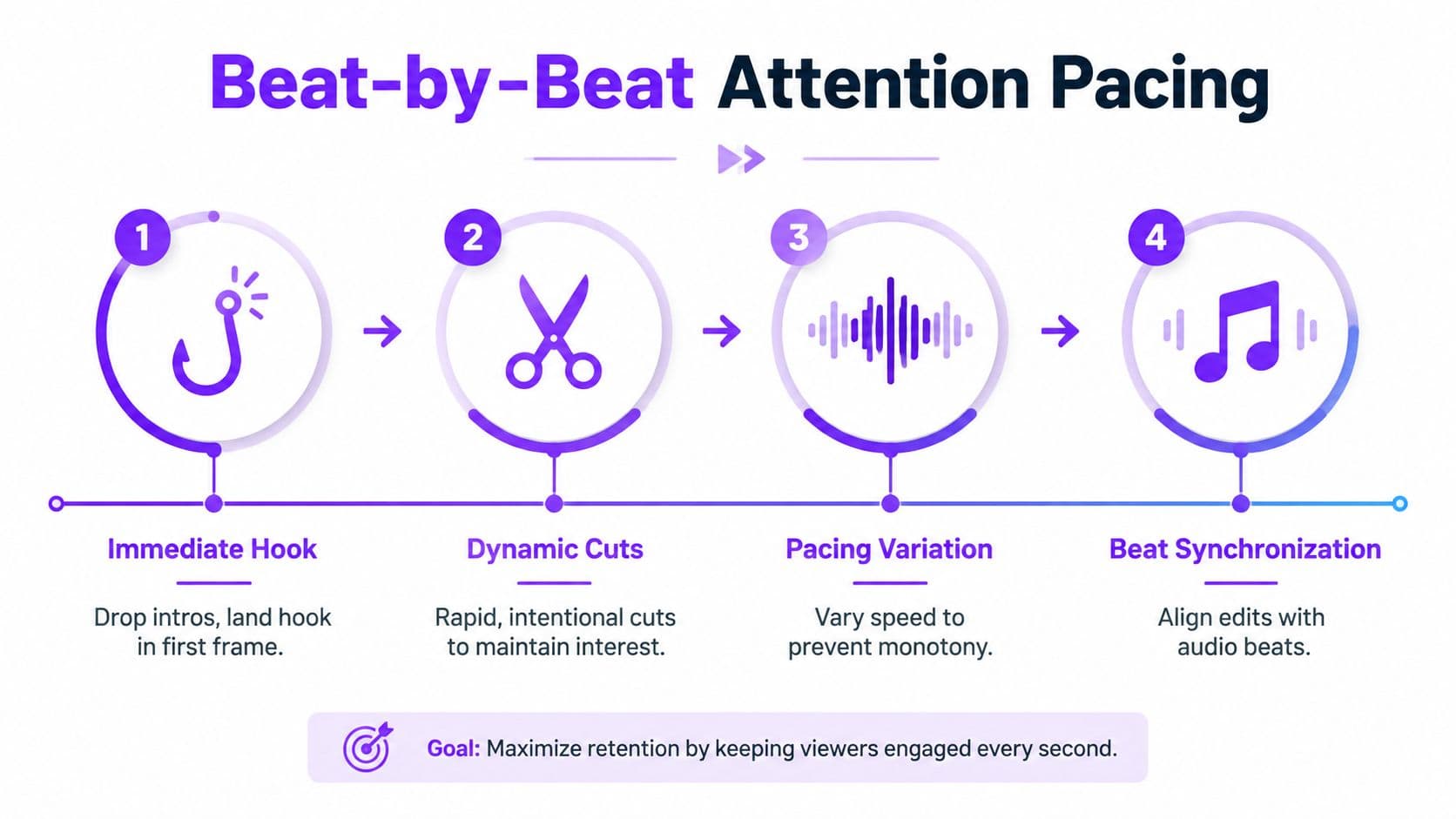
The common mistake is to add cuts because the timeline feels empty. That usually creates noise, not momentum. A better cut is one that lands on a lyric change, a beat change, or a visual idea the viewer can process right away.
A measurement mindset helps here. Treat each cut as a hypothesis. If one hook variant holds attention longer in the analytics, keep that shape. If a faster sequence causes drop-off, slow the next version down and test again. That is the essential trade-off in social editing; speed can buy retention, but only if the viewer still has time to read, hear, and understand what changed.
Captions, Subtitles, and Audio Mixing That Lift Engagement
Captions and audio sit in the same decision tree, even if editing apps split them across different panels. If the words are hard to read and the mix is muddy, the clip loses access and momentum at the same time. In social video, that is core delivery, not a finishing touch.
Animated captions earn their place
Caption style has to match where the video will be watched. Fast scrolling, silent playback, and small screens all punish text that blends into the background or disappears too quickly. That is why caption design should be treated as a format choice, not decoration.
Animated captions usually outperform static text in short-form edits because motion keeps the eye locked in. A dataset-backed editing guide reports that animated captions were used in 78.6% of clips, which lines up with what creators see in practice on mobile. Video editing tips
Readable first, stylish second. If the viewer cannot read the lyric or subtitle in a quick glance, the caption style is too decorative.
For lyric and karaoke content, I keep the type large, avoid thin fonts, and maintain contrast against changing backgrounds. If the background moves, the text needs to stay calm. If the text is animated, the motion should support readability, not compete with it. Safe-zone placement matters too. Keep captions inside the area that survives platform UI, especially on vertical uploads where bottom controls can cover the lower edge of the frame.
Balance the mix for phone speakers and human voices
Audio mixing for social clips is less about studio polish and more about intelligibility. Voice, vocals, and music need a clear hierarchy. The spoken line or lyric should stay forward first, then the music should support it instead of burying it. That matters even more for karaoke tracks that someone else may later use as backing under a live voice.
I usually keep a clean master with enough headroom that the user's voice can sit comfortably over the music later. If the song bed is already too hot, there is nowhere to go. Ambient sound and effects should stay subtle enough that the lyric remains the focus.
If closed captions are part of the workflow, the internal guide at how to add closed captioning to a video fits this mix-first approach. The same rule applies either way. The words have to stay legible, and the sound has to support the message instead of muddying it.
Export Settings for TikTok, Reels, Shorts, and YouTube
Most export mistakes happen because creators guess at specs instead of standardizing them. A clear preset removes that friction. If you're editing every week, you want settings you can trust without reopening the export panel and debating frame rate like it's a new project.
Use platform-ready defaults
For vertical social uploads, start with the destination in mind. TikTok and Reels should stay in 1080 x 1920 vertical, with H.264 compression and a frame rate that matches your source. YouTube Shorts should also stay vertical, with a little extra bitrate headroom if your editor allows it, because platforms compress aggressively after upload. Long-form YouTube still benefits from 16:9 exports, usually in 1080p or 4K depending on your source and delivery needs.
Social platform export settings
| Platform | Resolution | Codec | Bitrate | Frame rate |
|---|---|---|---|---|
| TikTok | 1080 x 1920 | H.264 | 10 to 15 Mbps | Match source |
| Instagram Reels | Vertical match | H.264 | Platform-safe vertical export | Match source |
| YouTube Shorts | Vertical match | H.264 | Slightly higher than basic vertical export | Match source |
| YouTube long-form | 16:9, 1080p or 4K | H.264 | Source-appropriate export | Match source |
The exact numbers above are the practical default pattern I'd save as a preset, then adjust only when the source footage demands it. Exporting slightly above the platform target usually gives cleaner final playback after recompression, because the platform has a better file to work from.
Save one export preset for vertical social, one for long-form YouTube, and stop rebuilding the same choices from scratch.
Color space also matters. Keep the image within a safe, standard delivery workflow so the file doesn't shift oddly between your editor, your phone, and the app feed. If your color looks right on the timeline but wrong on mobile, the export chain, not the cut, is usually the issue.
Editing as a Measurement System You Can Test
The strongest social editors I know don't just make better-looking cuts. They make testable ones. Every hook, CTA, and caption choice becomes a variable that can be changed without rebuilding the whole video.
Keep the body constant and swap the variables
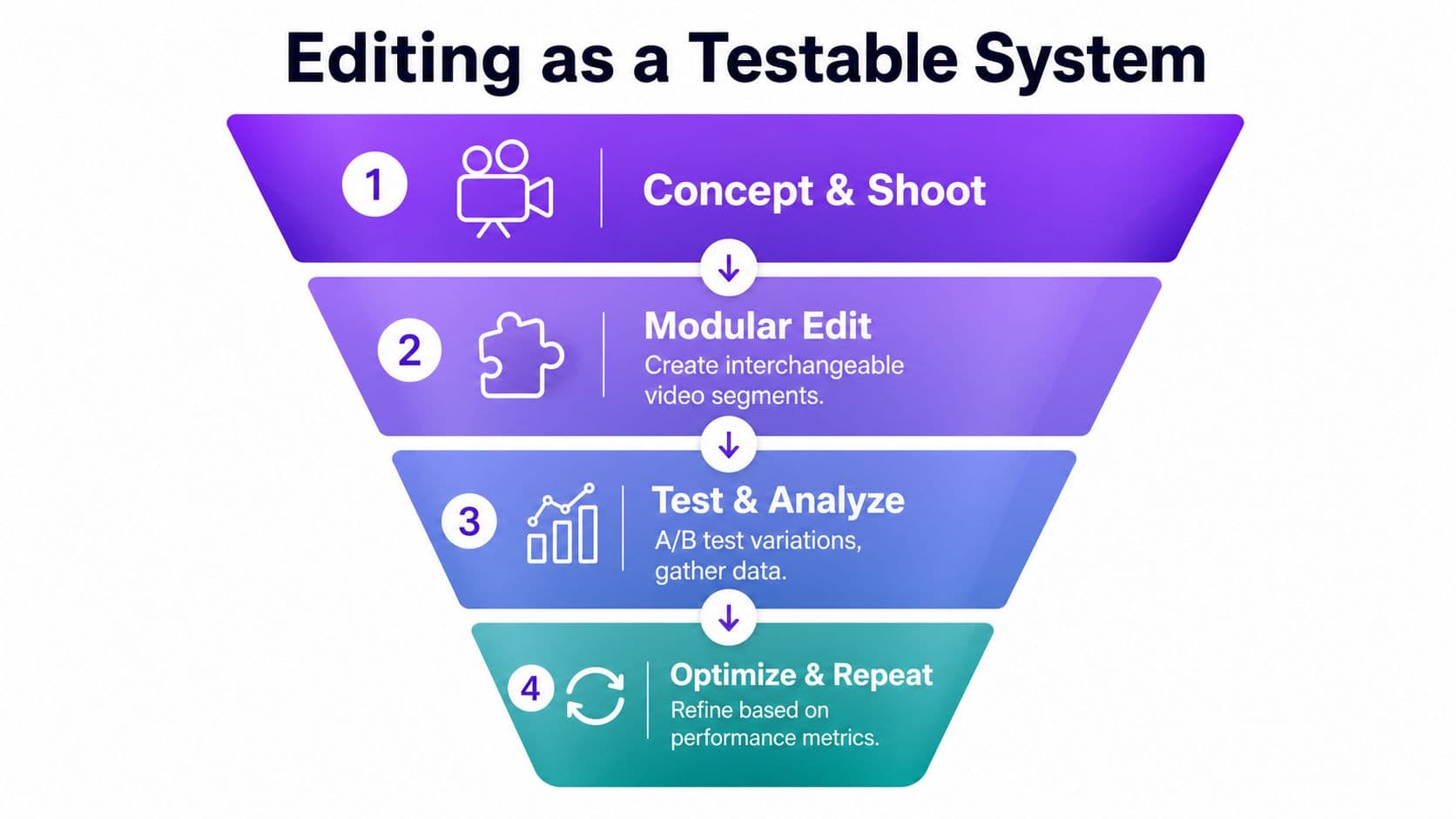
Recent workflow guidance for social ads recommends modular editing, which means keeping the body of the video stable while testing different hooks, then testing CTAs and platform polish separately. That approach works because it isolates what changed. If the hook is the only new part, you know where to look when retention shifts. If the CTA is the only change, you can compare response without guessing.
For lyric and karaoke creators, this is unusually easy to apply. One song can produce multiple edits without re-recording anything. The intro line can change, the typography can change, and the background motion can change while the underlying track stays the same. That makes the edit less like a final object and more like an experiment.
Build an asset bank before you need it
An asset bank saves time when you're shipping often. Keep reusable hooks, demo clips, testimonials, CTA lines, and background treatments in one place so you can assemble variants quickly. You're not trying to make every version unique. You're trying to make each version answer one question.
The analytics window matters too. Guidance for social ad workflows recommends waiting 3 to 7 days before treating performance as mature enough to inform the next edit. Video editing for social media makes the same point in workflow terms, and it's the right mindset for creators who want to improve through iteration instead of instinct.
I also use that window to compare versions of the same song or idea. One intro might pull viewers in faster. Another might be better for saves or replays. You won't know unless the versions are clean enough to compare.
The infographic below captures that modular logic well.
Building Lyric and Karaoke Videos With MyKaraoke Video
A practical tool matters most when it collapses the parts that usually slow you down. MyKaraoke Video is a browser-based option for turning a song into a lyric or karaoke video without installing desktop software, and its workflow matches the measurement mindset pretty well because you can swap lyrics, timing, typography, and background choices without rebuilding the whole project from scratch. It also includes real-time preview, so you can check how a cut behaves while you edit, not after export.
A repeatable production flow
The cleanest path is straightforward. Upload the music file, paste or edit the lyrics, run the automatic AI lyrics sync, then fine-tune timing in the sync editor if a line lands early or late. After that, customize the fonts, colors, and background motion in real time, watch the preview, and export the finished video as 1080p MP4 in a vertical or square format that suits the platform.
That workflow saves the worst kind of time loss, the kind caused by wrestling with alignment on a clunky timeline. If you make karaoke or lyric videos every week, the value is not just speed. It's consistency. The same song can become a tighter vertical cut, a square feed version, or a different hook variant without starting over.
Why modular editing fits karaoke work
Karaoke and lyric content is naturally modular. You can test whether a shorter intro lands better, whether one font reads faster on mobile, or whether a more active background improves watch time. You can also vary the timing of lyric reveals without re-recording the song, which makes the edit a test bed instead of a one-off render.
That's where the measurement mindset pays off. Keep the body of the video stable, swap the hook or typography, and compare the results after the platform has had time to settle. The goal isn't to guess which version feels nicest in the editor. The goal is to learn which version survives the scroll.
A checklist worth reusing
- Platform-first brief: decide where the video will live before opening the editor.
- Hook locked in the first line: the opening needs a job, not a warm-up.
- Central-band framing: keep faces, lyrics, and product details away from the edges.
- Two-to-three-second visual resets: let the eye meet something new before attention fades.
- Animated captions: use motion when it helps readability.
- Balanced audio: keep the lyric or voice clear over the music bed.
- Platform-correct export specs: save presets for vertical and long-form outputs.
- Modular hook variants for testing: change one thing at a time.
- 3 to 7 day analytics review: let the data mature before iterating.
The point is simple. A finished edit isn't the finish line, it's a hypothesis. MyKaraoke Video is useful when you want that hypothesis to turn into a fast, repeatable workflow for lyric and karaoke content, with timing, preview, and export handled in one browser tab. If you're ready to cut less friction from your process and ship versions that are built to be tested, visit MyKaraoke Video and try the workflow on your next song.