Not so long ago, making a decent lyric video meant shelling out for expensive desktop software and spending hours manually syncing every single word. Thankfully, those days are over. A good lyric video maker online free has completely changed the game for musicians, offering intuitive tools that make professional-quality video accessible to anyone.
Why Online Lyric Video Makers Are a Game-Changer for Musicians
I remember the old way of doing things. For an independent artist, just creating a simple lyric video was a huge pain. You had to navigate complex programs like Adobe After Effects, which came with a steep learning curve and a hefty price tag. Then came the tedious part: spending countless hours painstakingly timing each lyric to the audio. It was frustrating, to say the least.
This whole process was a massive barrier for talented musicians who wanted to tap into the promotional power of platforms like YouTube and TikTok. In today’s world, having engaging video content isn't just a bonus—it's essential for growing your audience.
The Move to Smarter, More Accessible Tools
This is where modern online tools like MyKaraoke Video come in. They’ve managed to solve these exact problems by replacing clunky software and manual work with smart, automated features that run right in your browser. This shift has truly leveled the playing field, giving creators powerful tools regardless of their budget or technical skills.
The explosive growth in the AI video generator market really highlights this trend. The market is projected to jump from $534.4 million in 2024 to an incredible $2,562.9 million by 2032, and it's all driven by the demand for easier content creation. You can find more insights on this video marketing shift over at SellersCommerce.
This move to browser-based solutions is about more than just convenience; it’s about fundamentally changing how artists connect with their fans. It lets you create content quickly, so you can release videos for every single, B-side, or demo without draining your bank account.
The real benefit is straightforward: You spend less time fighting with technology and more time on your music and connecting with your audience. It puts high-quality promotion within reach for everyone.
An online lyric video maker is no longer just a "nice-to-have"—it's a core part of any artist's promotional strategy. Here’s a quick rundown of why they’re so crucial:
- It's Budget-Friendly: You can forget about expensive software licenses and the need for a high-powered computer.
- It Saves You Time: AI-powered features handle the most tedious task for you: syncing lyrics to the music.
- Anyone Can Do It: If you have an internet connection, you can create a professional-looking video, no prior editing experience needed.
Getting Your Audio and Lyrics Ready for a Flawless Video
Think of your audio and lyrics as the foundation of your lyric video. If this foundation is shaky, the whole thing will feel off, no matter how cool your visuals are. Honestly, starting with top-notch assets is the single best thing you can do to make the creative process smooth, especially when you're using a free online lyric video maker.
This all starts with your audio file. You need to use the best possible version of your song. Ideally, that means a final, mastered track—either a high-bitrate MP3 (320kbps) or, even better, a lossless format like WAV. Trying to work with a rough demo or a low-quality file is just asking for a headache, leading to sync problems and a final video that sounds muddy. A clean audio track is absolutely essential for a professional result.
Getting Your Lyrics Text-Perfect
With your audio ready to go, let's turn to the lyrics. The most common mistake I see? Typos. Nothing breaks the spell for a viewer faster than a misspelled word flashing across the screen.
Here's a simple trick I've used for years: read your lyrics out loud while the song is playing. This little exercise forces you to catch mistakes your eyes might just skim over, and it guarantees the text on screen matches the actual vocal performance.
Next up, get your lyrics into a plain text file (.txt). This is the universal format that plays nicely with almost any online tool. You'll want to structure the text exactly how you envision it appearing on screen.
- Use single line breaks for phrases you want to keep together on one line.
- Use double line breaks to create a natural pause between sections, like separating a verse from the chorus.
This basic formatting acts as a roadmap for the lyric video maker, which saves you a ton of manual tweaking down the line.
Your Pre-Production Checklist for a Professional Lyric Video
Use this checklist to ensure your audio and lyric files are perfectly optimized before you start the creation process.
| Asset | Requirement | Pro Tip |
|---|---|---|
| Audio File | WAV or 320kbps MP3 format. | Export directly from your final master session to avoid any quality loss from re-encoding. |
| Audio Quality | Free of clicks, pops, hiss, or background noise. | Use noise reduction tools before uploading. Even a slight cleanup can make a huge difference. |
| Lyric File | Plain Text (.txt) file format. | Avoid using Word or Google Docs, as they can add hidden formatting that causes import errors. |
| Lyric Accuracy | 100% free of spelling and grammatical errors. | Have a friend proofread it for you. A fresh pair of eyes always catches something you missed. |
| Lyric Formatting | Single and double line breaks used for timing. | Think about the rhythm. Break lines where the singer naturally pauses to make the timing feel more intuitive. |
Nailing these details upfront makes the entire process faster and more enjoyable. A little prep work here saves a lot of frustration later.
Polishing Your Audio for That Pro Sound
Even a professionally mastered track can have tiny imperfections, like a faint electronic hiss or a low hum. Taking a moment to clean these up will seriously elevate the quality of your finished video. To get that crisp, clean sound, it's worth learning how to remove noise from your video online for free; it can make a surprisingly big impact.
This is especially critical for artists who might be recording in a home studio or a less-than-perfect environment. If you're wrestling with unwanted sounds in your recording, our guide on how to remove background noise from audio walks you through the exact steps to get a clean, studio-quality sound. Taking care of this now sets you up for a much better final product.
Finding the Perfect Rhythm with Lyric Syncing
Once your audio and lyrics are prepped, it's time for the most crucial part of the process: syncing. This is where the magic really happens, bringing your words and music together into one seamless, engaging experience for your audience. Using a modern lyric video maker online free gives you two fantastic options for tackling this, each with its own strengths depending on your project and creative vision.
First up is the AI-powered automatic syncing. This is an absolute game-changer, especially when you're short on time. The tech is smart—it scans the waveform and vocals of your audio track and then intelligently places each line of your lyrics on the timeline with surprisingly good accuracy. For anyone on a deadline, this means you can get a fully synced video ready in minutes, not hours.
This handy flowchart shows how your core assets—the song, the words, and your visuals—all feed into creating the final video.
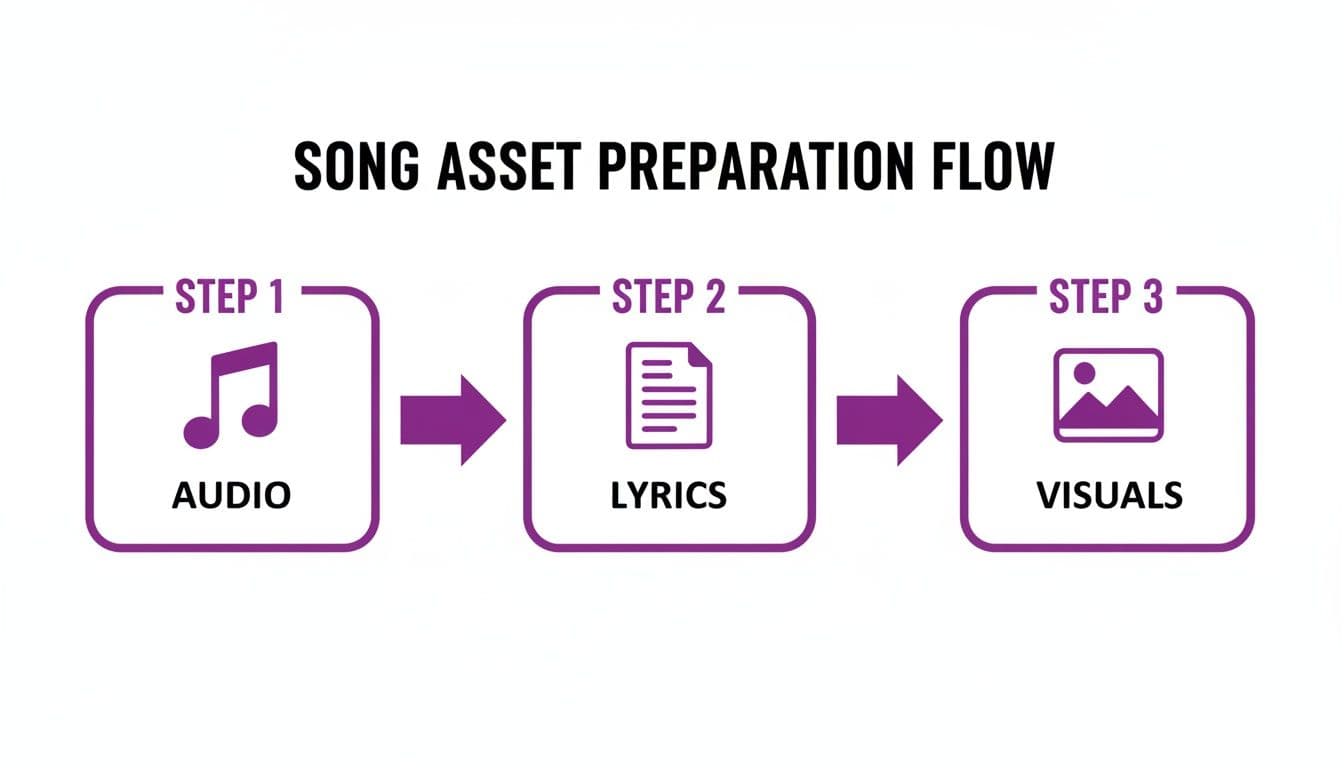
It’s a great reminder that a standout video is built on the quality of its parts. Nailing the prep work makes the syncing process that much smoother.
The Power of Manual Control
While the AI can get you 90% of the way there, that last 10% is where you can really add your own artistic touch. That's where manual syncing comes into play. Any good lyric video maker will provide a timeline editor, giving you the power to nudge, tweak, and perfect every single detail until it feels just right.
Think about it: what if your vocalist holds a powerful note at the end of a chorus? The AI might place the next line a fraction of a second too soon. With manual controls, you can simply drag that timestamp back a bit, letting the emotion of the music breathe. It’s this fine-tuning that elevates a lyric video from just good to truly great. If you want to get more into the nuts and bolts, our guide on how to sync audio with video has some extra tips.
My advice? Use a hybrid approach. Let the automatic sync do the initial heavy lifting. Then, dive into the timeline to make those small, personal adjustments that really capture the song's unique character.
Creative Syncing Techniques
The manual editor isn't just for fixing timing issues; it's a creative playground. You can play with how the lyrics appear on screen to really enhance the story you're telling.
Here are a few techniques I use all the time:
- Splitting Lines for Emphasis: Got a really potent phrase? Don't be afraid to break it up. A line like "I will never let you go" hits harder if "I will never" appears first, followed by a slight pause before "let you go" fades in. It adds so much dramatic weight.
- Merging Lines for Flow: On the flip side, if a vocalist delivers two short lines in quick succession, merging them into a single timed block can look much cleaner. It helps the visuals match the rapid-fire energy of the performance.
- Building Anticipation: Try tightening the timing of the lyrics just before the chorus hits. This subtle speed-up creates a sense of tension and makes the release into the main hook feel even bigger and more satisfying.
These are the kinds of details that make a video feel professional and intentional. Having both automated and manual tools in a free platform like MyKaraoke Video gives you the best of both worlds—you can work fast without ever sacrificing your creative control.
Designing a Visual Experience That Resonates with Fans
Alright, your lyrics are perfectly timed up with the music. Now for the fun part: making it look good. This is where you get to decide the whole vibe of your video, turning simple text into something that actually connects with your listeners. The right design choices—from the font you pick to the background you use—are what separate an amateur video from a professional one.
Finding the Right Font
Think of your font as the voice of your lyrics. It has to match the personality of the song. Got an upbeat, modern pop track? A clean, bold sans-serif font like Montserrat or Poppins is a great fit. If you're working on an emotional ballad, a classic serif font like Lora or Playfair Display can really sell that heartfelt mood.
A font isn’t just about looking cool; it’s about being readable. Your number one job is to make sure people can actually read the words while the song is playing. Always test your font against your background to make sure it’s crystal clear.
This is where a good lyric video maker online free becomes your best friend. A tool like MyKaraoke Video gives you a whole library of fonts to play with. You can click through them and see, in real-time, how a simple font change completely alters the feel of your project.
Choosing Your Color Palette
Color is all about emotion. It's what makes your video feel exciting, somber, or dreamy. The most important rule here is the relationship between your text and background color. You need high contrast. It’s a simple trick, but it’s non-negotiable for readability—think white text on a dark background or black text on a light one.
Once you’ve got contrast sorted, you can get creative.
- Warm Colors (Reds, Oranges, Yellows): These are great for bringing energy, passion, and happiness. Perfect for a rock anthem or an upbeat love song.
- Cool Colors (Blues, Greens, Purples): These tend to feel calmer, more introspective, or even a bit melancholy. They work incredibly well for reflective tracks or ambient music.
A good starting point is to pull one or two main colors from your album art or artist branding. Then, pick a text color that really pops against it.
Selecting the Perfect Background
Your background sets the stage. It adds context and depth, preventing your video from just being words on a solid color. You’ve got a few solid options here, each with its own effect.
Using a static image, like your album cover or a professional press photo, is a smart move for branding. It keeps things cohesive with your other promo materials and puts the focus squarely on the lyrics.
If you want something with a bit more life, a video loop is the way to go. Subtle motion—think slow-moving clouds, gentle water ripples, or abstract light effects—adds a layer of polish that feels high-end without being distracting. As you get more comfortable, you can even explore how AI tools for text-to-video conversion can help generate unique visuals based on your song's themes, taking some of the manual work out of the process.
In the end, your background, colors, and fonts should all feel like they’re part of the same story your music is telling. Don't be afraid to experiment until you land on a look that just feels right.
You've put in the work, syncing every word and dialing in the visuals. Now it's time for the final, crucial step: getting your lyric video out into the world. Honestly, how you export and share your creation is just as important as how you made it. The right settings can make the difference between a video that looks professional and one that gets lost in the noise.
Let's talk about quality. For most platforms, especially YouTube, 1080p (1920x1080 pixels) is the sweet spot. It delivers that crisp, high-definition look everyone expects. Going lower can make your video appear blurry, particularly on larger screens. While 4K is an option, it's usually overkill for lyric videos and creates massive files that are a pain to upload.
Nailing the Aspect Ratio for Each Platform
One size definitely does not fit all in the world of social media. Your video's shape, or aspect ratio, has to be right for the platform you're targeting.
- 16:9 (Widescreen): This is the classic landscape format. Think YouTube, Vimeo, or a standard Facebook feed video. It’s perfect for desktops and TVs.
- 9:16 (Vertical): Absolutely essential for grabbing attention on mobile. This is what you need for Instagram Stories, Reels, TikTok, and YouTube Shorts. It fills the whole phone screen for a much more immersive feel.
- 1:1 (Square): A solid, versatile choice for your main Instagram or Facebook grid posts. It looks good on just about any device.
Fortunately, MyKaraoke Video lets you pick the aspect ratio you need before you even hit the export button. This way, you know it's already optimized for your platform of choice, with no weird cropping or black bars.
Getting Your Video Discovered
Once you've got the video file, don't just rush to upload it. A few minutes of prep work can dramatically increase how many people find and watch it.
It all starts with a smart title. Instead of something vague like "My New Song," be specific. Use a format like "The Wanderers - 'Midnight Drive' (Official Lyric Video)." This simple change makes your video infinitely more searchable.
Your description is prime real estate for search engines. I always recommend dropping in links to your social media, streaming profiles, and official website. It’s also a great idea to paste the full song lyrics here, giving search engines more text to crawl.
Finally, never, ever settle for a random thumbnail. Your thumbnail is your video's first impression, and it’s often the deciding factor in whether someone clicks. Create a custom one using a great-looking still from the video or your album art. Overlay the song title in a bold, easy-to-read font to make it pop.
If you find your exported file is a bit too beefy for a particular platform, don't worry. You can check out a guide on the best video compressor to shrink the file size without killing the quality. Taking these extra steps ensures all your hard work gets the eyeballs it deserves.
Got Questions About Free Lyric Video Makers? We’ve Got Answers.
Jumping into any new creative tool can feel a little daunting. When you’re looking for a lyric video maker online free, you're probably wondering what's actually possible without opening your wallet, how much of your time it’s going to take, and what rookie mistakes to watch out for.
Getting these things straight from the get-go makes the whole process smoother. Let's break down the common questions we hear from artists all the time.
Can I Really Make a Professional-Looking Lyric Video for Free?
Yes, you absolutely can. The idea that "free" means "low-quality" is a thing of the past. Many powerful online tools, including MyKaraoke Video, give you everything you need to produce something slick and professional without asking for a credit card.
On a free plan, you can typically expect:
- Automatic lyrics syncing to do the heavy lifting.
- Manual timing controls for fine-tuning.
- A good selection of fonts and full color customization.
- The ability to upload your own background images or videos.
So, what's the catch? Usually, paid plans offer premium features like 4K exports or removing a small watermark. But the free versions almost always let you export a crisp 1080p video, which is the gold standard for YouTube, Instagram, and just about anywhere else you’d want to share it.
How Long Does It Actually Take to Make One?
This is where you'll really appreciate modern tools. It’s way faster than you think. For a standard three-minute song, once you upload your audio and lyrics, the automatic sync usually works its magic in just a couple of minutes.
After that, the creative part is up to you. Most people spend somewhere between 20 and 45 minutes tweaking the timing, playing with fonts and colors, and choosing the right background. If you're in a rush and have your assets ready, you can easily go from zero to a finished video in under 30 minutes.
What Are the Most Common Mistakes to Avoid?
Honestly, the biggest slip-ups often happen before you even start designing. Nailing the prep work will save you a ton of headaches and make your final video look so much better.
- Starting with Bad Audio: Always, always use the highest-quality audio file you have. Compressed, muddy audio will cheapen the entire vibe, no matter how cool your visuals are.
- Forgetting to Proofread: A simple typo can completely pull a viewer out of the moment. Give your lyrics a quick once-over before you upload them—it’s a two-minute task that makes a world of difference.
- Making the Text Unreadable: This one is huge. Avoid clashing colors (like yellow text on a white background) or wild, overly-stylized fonts that are hard to read. The lyrics are the star of the show, so make sure people can actually see them.
- Skipping the Final Review: The AI sync is incredibly accurate, but it’s not always perfect. Take five minutes to watch the video all the way through and nudge any words that feel slightly off-beat. It’s that final polish that separates the good from the great.
Ready to give it a shot? MyKaraoke Video has all the tools you need to create a stunning lyric video in minutes, completely free. From AI-powered syncing to full visual customization, we've got you covered. Start creating your next video today!
