44% of U.S. music listeners were at least somewhat uncomfortable with original songs performed by an AI voice, according to Luminate's 2025 midyear music report. That number reframes what an AI music video creator has to solve. Making pictures move is now the fast part. Making words land on time, keeping a singer recognizable, and proving you had permission to publish are the slow, skilled parts.
Think of the tool as a junior editor at your desk. It can mark, cut, and render quickly. It can't decide what you own, what your audience will accept, or what label the finished video needs.
What an AI Music Video Creator Actually Makes
An AI music video creator takes audio you already control, or sometimes a text prompt, and returns a timed visual such as a lyric video, karaoke video, generated footage, or hybrid edit. That single sentence matters because the name covers four different jobs. A tool that's excellent at highlighting words may be useless at inventing a performer, and a tool that invents cinematic shots may never give you editable lyric timing.
The junior editor analogy helps here. A good assistant can place markers, try backgrounds, and export drafts while you direct. The assistant doesn't sign releases, choose your audience promise, or know whether a cover song is cleared. You still make those calls.
Why the category feels crowded
This isn't a weekend experiment anymore. A 2025 strategic market report on generative AI in music estimated global revenue at approximately $419.85 million in 2024**, representing a compound annual growth rate of 53.34% from 2019. The same forecast projected growth to about **$4.3 billion by 2029. Cloud-based solutions accounted for 74.69% of 2024 revenue in that report, which explains why so many tools now run in a browser instead of asking you to install an edit suite.
Money doesn't tell you which output you need, though. Pick the output first, then judge the app. If you're comparing options across these categories, you can find AI tools for music videos and sort them by the job below rather than by the prettiest demo clip.
Four outputs people mean by AI music video creator
| Output | What the AI does | Best when | Main watch-out |
|---|---|---|---|
| Lyric video | Syncs readable lyrics to the existing vocal | Promoting an original song or cover you may post | Melismas, repeats and long instrumentals drift |
| Karaoke video | Separates or ducks the lead vocal and highlights words | Karaoke channels, rehearsals and venue tracks | Bleed from doubles, duets and loud mixes |
| Generative visual | Builds new shots from a prompt, stills or the audio | Mood clips, teasers and social cuts | Identity drift and unreadable lyrics during motion |
| Hybrid edit | Assembles short approved clips to beats or phrases | A full song video you still want to direct | Review time grows if the whole song is one generation |
Read the rows plainly. A lyric video keeps the vocal and makes the words readable. A karaoke video removes or ducks the lead so someone else can sing. A generative visual invents shots you didn't film. A hybrid edit stitches short approved pieces together under your direction.
Choose one row before you judge any app. A captioning tool will disappoint someone who wanted a synthetic performance, and a face generator will frustrate someone who only needed clean sing-along timing.
How Timing Pictures and Audio Fit Together
Don't picture one magic prompt box. Picture four desks passing the same song along a bench. Each desk can do its job well and still hand the next desk a problem, so you need to know where to inspect the work.
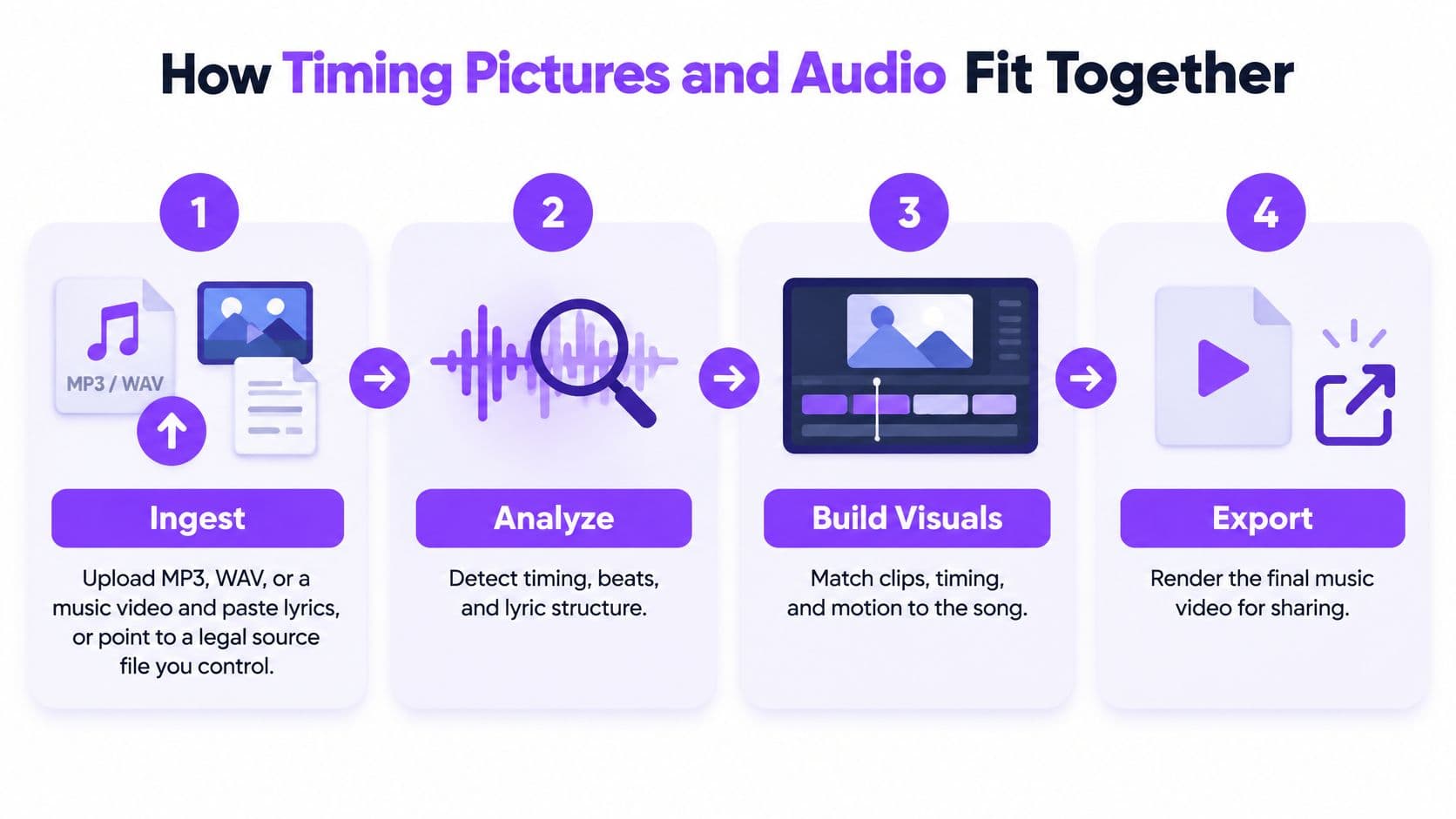
The four desks
- Ingest: You upload an MP3, WAV, or music video and paste the lyrics, or point to a legal source file you control. Clean input saves repair work later, so use the final mix and the exact lyric sheet, including repeats and ad-libs you want shown.
- Separate: A model may split lead vocal, accompaniment, and sometimes backing singers. A karaoke cut drops or lowers the lead. A lyric cut keeps it. This desk is like pulling one voice out of a choir recording, so doubles and harmonies can leave ghosts behind.
- Align: The system matches each word to a moment in the audio. This is forced alignment, not ordinary speech captions.
- Picture and export: Templates, uploaded footage, or short generated clips lock to beats or lyric phrases, then render to a deterministic file such as a 1080p MP4. Deterministic means the export follows the timeline you approved instead of improvising a new cut.
If you want a closer look at that handoff between sound and picture, our guide to matching audio to video walks through the sync decisions in plain terms.
Why singing breaks ordinary captions
Speech captions assume short, clear syllables. Singing stretches vowels, adds vibrato, jumps in pitch, and hides the voice behind drums and guitars. A held note can carry one syllable across several beats, which is called a melisma. Ordinary transcription hears that as a blur.
A peer-reviewed study on singing alignment reported that polyphonic-data training improved both transcription and alignment across multiple established test datasets, while an earlier alignment system achieved approximately 1.27 seconds of average alignment error. Polyphonic means the model learned from full mixes with instruments present, not only clean vocal tracks. That matters because your uploaded song is a full mix, not a studio vocal stem.
A 1.27 second error is easy to picture. The highlight reaches the next word while the singer is still finishing the previous one. On a karaoke screen, the room sings early, laughs, and loses trust in the track. That's why automatic timestamps are a first pass, not a finished edit.
Where you should nudge by hand
Check the places where alignment predictably wobbles:
- Long passages without lyrics: The model has no words to anchor to, so the next line can arrive early.
- Melismas and held vowels: One syllable spans many notes and confuses word boundaries.
- Backing vocals and ad-libs: The system may follow the louder harmony instead of the lead.
- Repeated choruses: Identical words can attach to the wrong repeat.
Flag any segment where confidence is low or timing jumps sharply between neighboring words. Then do the simplest check on the desk. Play the chorus once with your eyes on the highlighted word, not on the waveform. If your eye and ear agree, the audience will too.
Controls That Keep a Music Video Watchable
A pretty still frame is like a sharp photograph of a dancer mid-fall. It tells you nothing about the movement before or after. Watchability comes from controls you can set and check, grouped here as type, time, and motion.
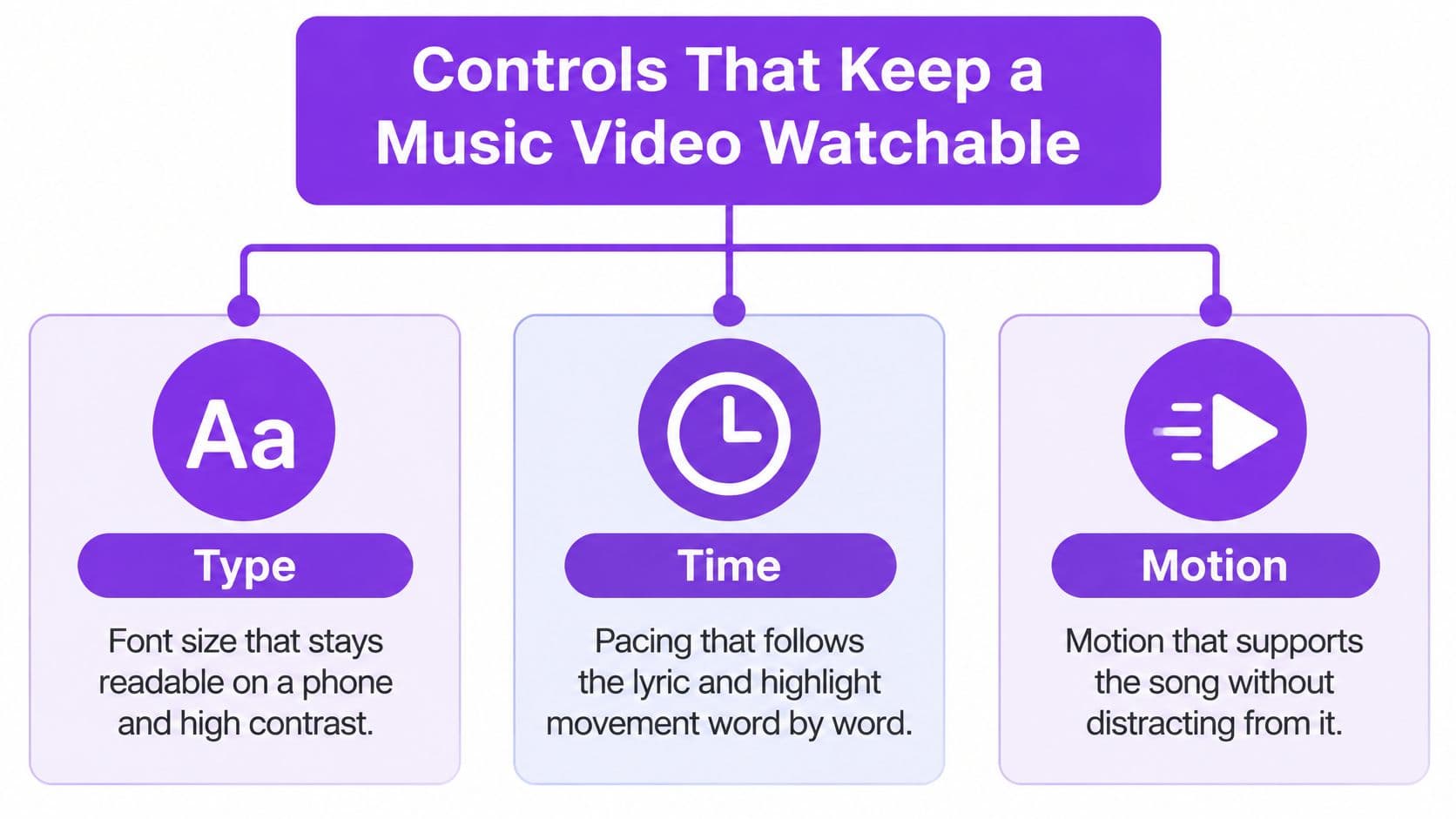
Type you can read on a phone
Set font size for the smallest screen your audience uses, not for your monitor. Keep high contrast between text and background, and prefer a highlight that moves word by word instead of dumping a whole line at once. Word level movement is what lets a singer breathe in the right place.
Two optional layers help specific audiences. Chord symbols above lyrics let a band play along. A translation line below each lyric helps multilingual rooms follow the meaning, not just the sounds. Turn these on only when they'll be used, because every extra line shrinks the main lyric.
Time you can correct
Demand a manual nudge after auto-sync. You should be able to drag a word earlier or later without rebuilding the whole song. For duets, ask for a separate color per singer so two people don't guess who owns the next line.
Export choice is part of time control too. You may need the same edit with vocals for promotion, without vocals for a sing-along, or as a transparent lyric layer laid over other footage. If a tool locks you into one version, you'll rebuild the timing work elsewhere.
Motion that doesn't fight the words
Video generation research evaluates outputs with metrics such as Fréchet Video Distance, frame consistency, and motion consistency, according to a Springer review of video generation evaluation. One reported model result in that review achieved an FVD of 260.1 alongside an FID of 39.00 and an Inception Score of 38.89. You don't need to memorize those scores. The lesson is that one image quality number can look fine while motion fails, so ask which checks a tool runs across frames.
In practice, constrain four things:
- Shot duration: Keep shots short enough that you can approve each one.
- Camera motion: Lock the move, such as a slow push in, instead of letting the frame wander.
- Subject identity: Keep the same face, outfit, and instrument across cuts.
- Transition timing: Cut on beat or phrase boundaries, not mid-word.
Reject any clip where the singer's face changes between shots or the room jumps around the performer. Those failures hit lyric readability first, because the viewer's eye leaves the words to solve the picture.
Five-item watch test: The chorus highlight stays on the word. The instrumental gap holds without drift. The smallest phone crop keeps text legible. A cut lands on the snare. The singer is the same person in every shot.
AI Workflows Compared with a Traditional Edit
Keep the comparison fair by using the same job both ways: one three-minute original song, not a film shoot. That constraint is like timing two cooks on the same recipe. It stops a glossy production budget from hiding the everyday edit work.
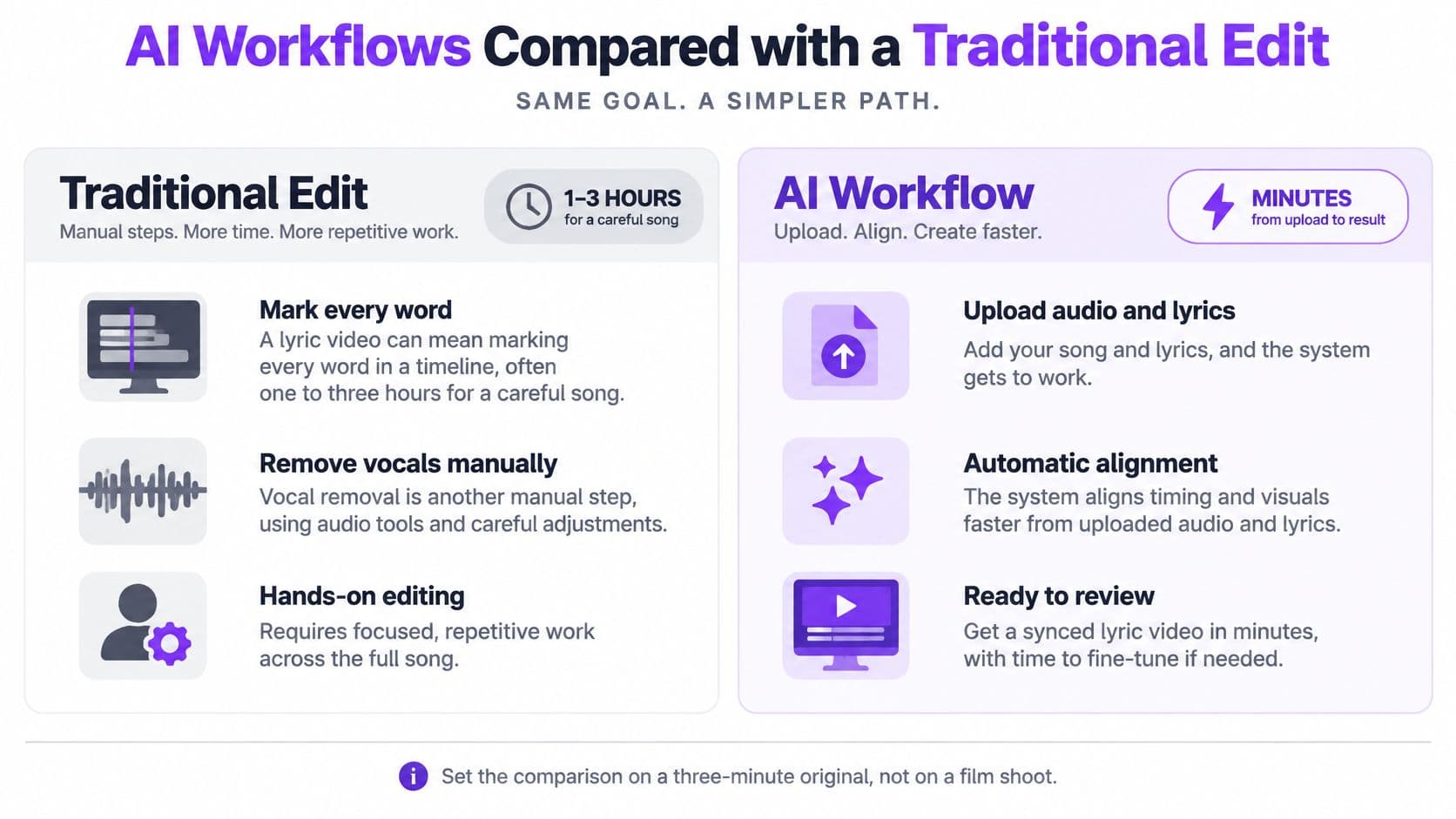
Traditional edit versus an AI music video creator
| Job | Traditional edit | AI creator | What you still do |
|---|---|---|---|
| Lyric timing | Manual markers, often 1-3 hours | Auto alignment in minutes, then nudges | Fix melismas and choruses |
| Lead vocal removal | Stem session or an engineer | Built-in separation on the mix | Check bleed and doubles |
| Pictures | Shoot, stock or motion graphics | Templates or short generated clips | Reject drift and unreadable type |
| Export | Desktop NLE render | Browser file such as 1080p MP4 | Pick vocal-on or vocal-off |
The traditional path earns its keep through craft. You place every marker, shape every title, and control every frame in a timeline. The cost is time, plus separate sessions for stems, graphics, and rendering. If you're weighing that route, Image Studio's guide to AI editing gives useful context on where automation now sits inside wider edit workflows, and our own video editing software comparison sets browser tools beside desktop editors.
The AI path returns a draft quickly. Alignment, separation, and templates replace the blank timeline. But the honest losses sit beside the gains. You trade some frame level craft for speed, you still fix bad sync by hand, and generated faces can cost more review time than a simple background ever would.
Who should stay, who should switch
Stay with the traditional bay for a label visual with a named director. Stay there when the video must match an existing brand film shot by shot. Stay there for any image of a real performer who hasn't approved a synthetic likeness.
Switch when speed is the actual constraint. A solo artist posting a lyric video in release week doesn't need a title sequence built from scratch. A karaoke channel batching a catalogue needs repeatable timing and exports. An event host who needs a sing-along by Friday needs a draft today.
The AI is a fast assistant editor, not a cheaper director.
One row doesn't shrink in either workflow. Rights paperwork takes the same human time whether a person or a model placed the markers. Skipping it is the expensive mistake, because a takedown erases every hour the faster workflow saved.
Where Musicians and Channels Use These Tools
A song needs different visual treatment depending on where people will watch or sing along. A phone screen, a karaoke display, and a rehearsal room each call for different choices in text size, timing, and file format.
The supply of AI-generated music is also growing. A 2025 industry report citing Deezer data stated that AI-generated tracks represented 18% of all daily uploads on the streaming service in 2025. The same report cited a CISAC projection that AI music could account for 20% of global streaming revenue by 2028. Faster production can mean more songs competing for attention, making clear, appropriately labeled visual packaging useful.
Four scenes from a normal week
The singer-songwriter needs a lyric video that keeps their vocal in the mix. Chords above the words can help the band rehearse from the same file. On a phone, lyrics should be large enough to read without competing with the performance.
The karaoke channel operator needs a different cut: vocals removed, duet lines distinguished by color, and exports suited to the playback setup. For a catalogue, consistent timing and layout make batches easier to check than a new visual treatment for every song.
The social creator may cut a 15 to 30 second chorus teaser from an approved phrase. A stable shot can keep attention on the words. If the teaser becomes an ad, the ShortGenius AI video ad maker belongs to the neighboring short-form ad workflow, while the music cut still needs accurate timing and clear rights records.
The event host prepares a sing-along for a room rather than a feed. Large type and clear highlights help an audience follow the lyrics together. The file also needs to work with the venue's playback setup.
Genre clues in the demand
Genres built around clearly delivered words, such as pop and hip-hop and rap, often suit lyric videos, karaoke cuts, and vertical chorus clips. The words carry much of the song's identity, so mistimed text can confuse listeners or make the clip harder to sing along with.
Other genres call for different visual choices. A rock band may use chords and a steady background; an electronic producer may prefer a short mood loop. Match the format to how the audience will watch, and keep any rights or audience labels accurate wherever the video is posted.
Rights Disclosure and Audience Trust
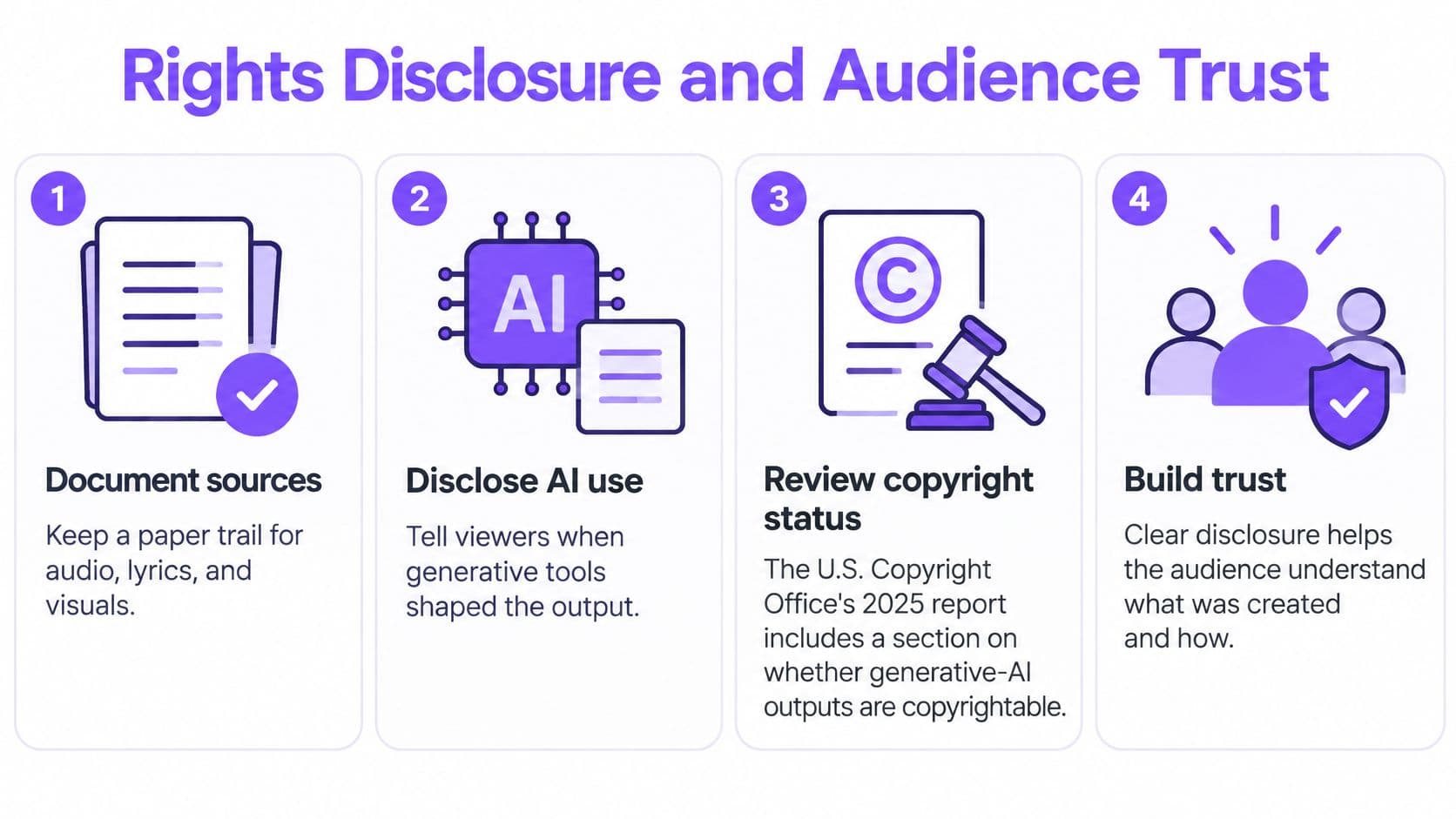
Generation may take minutes; documenting permission takes deliberate work. A rights record works like a production log: it shows who supplied each part and what permission applies.
The U.S. Copyright Office's annual report includes a section on the copyrightability of generative AI outputs. For each video, keep a concise record that a collaborator or platform could review.
Keep one file per asset
Record the master owner, the lyric writer and any applicable cover license. Note whether a real person's face or voice appears, whether they gave permission, which tool generated or altered the material, and what you disclosed to the platform and audience.
Check the specific use before publishing. Fair use guidelines for music and video can help explain why private, short, or noncommercial use does not automatically clear a public upload. Fair use depends on the circumstances of a particular use, not on a blanket rule.
Separate three cases before you publish
Your own vocal with timed lyrics may present a clearer rights path when you also have permission to use the pictures and other inputs. A licensed cover requires checking whether the license allows the specific video you plan to post, including a karaoke version. A synthetic performer or face swap raises a consent question if it imitates a real person. Get that person's permission, or do not present the video as their performance.
A musical style and a person's likeness are different things. If viewers could reasonably believe that an artist sang, appeared in, or approved the video, make the distinction clear in your records and labeling.
Label for the audience you actually have
Use plain language that describes what viewers are seeing. AI-assisted edit can describe a tool timing, cleaning, or assembling material you supplied. Synthetic performer signals that the singer or face was generated. The label should match the content, not make viewers guess.
For example, a lyric video using your own recording calls for a different description than a clip with a generated singer. Ask whether the label would prevent a reasonable viewer from mistaking one for the other. Keep a plan for correcting or removing the video if a likeness is misidentified.
If viewers could think a real singer performed or approved the clip, say clearly what was generated or do not publish it.
Choose a Creator and Start a Lyric Cut
Judge tools with a pass-fail sheet, like checking a venue's fire exits before admiring the stage lights. The basics decide whether the show can happen at all.
Pass or fail when choosing an AI music video creator
| Check | Pass | Fail |
|---|---|---|
| Lyric timing | Word-level sync you can nudge | Locked auto captions |
| Audio handling | Your file in, vocal on or off | No separation and no vocal-keep option |
| Picture control | Fonts, colors, chords, translation, live preview | One uneditable style |
| Export | Clean 1080p and a karaoke-software option if you need it | Watermarked preview only |
| Rights | You supply audio and lyrics you can use | Training on your masters with no opt-out |
Fail any generator that invents a celebrity face for your song. That's not a feature gap. It's a consent problem delivered as a preset.
For musicians and karaoke channels who need a readable sing-along rather than a synthetic actor, we built MyKaraoke Video for that narrower job. You upload a song and paste lyrics, and the AI removes the vocals and syncs every word to produce a sing-along video in about two minutes. The controls that matter here are vocal separation, word-level lyric timing, translation, chord detection, and pitch shifting. Karaoke videos include duet mode with a colour for each singer and offer MP3+G export for KJ software on Premium. Lyric videos can keep your vocal and, on Premium, export a transparent background. Prices and plan limits change, so check current plan details on the site before buying.
State the decision in one line. Use a generative video model when you need new shots you can clear. Use MyKaraoke Video when the song is yours to time and the audience came to read or sing.
Start small. Pick one chorus you can legally use, run the lyric path and the karaoke path, and keep the rights note in the same folder as the MP4.
Bring one chorus you own or may use, paste the exact lyrics, and let MyKaraoke Video separate the vocal, sync each word, and preview your type, colors, chords, and translation before export. You'll get a readable lyric or karaoke cut you can nudge by hand, plus a clean file to keep beside your rights note. Start with that single chorus today and judge the result by the watch test, not by the demo reel.
