You have a finished track, a release date, and one missing asset. The single goes live soon, but the lyric video still needs synced words, readable typography, and visuals that look deliberate rather than rushed. A tool that saves time on captions may give you little control over timing. A powerful editor may turn a simple upload into a long post-production session.
The best software to make lyric videos depends on the job. This comparison groups tools by their strongest use case: browser-based lyric and karaoke makers, general online editors, beginner-friendly desktop software, and professional motion-design applications. Each entry focuses on practical strengths, real limitations, pricing direction where the supplied product information provides it, and how the workflow compares with a browser-based karaoke option such as MyKaraoke Video.
1. MyKaraoke Video
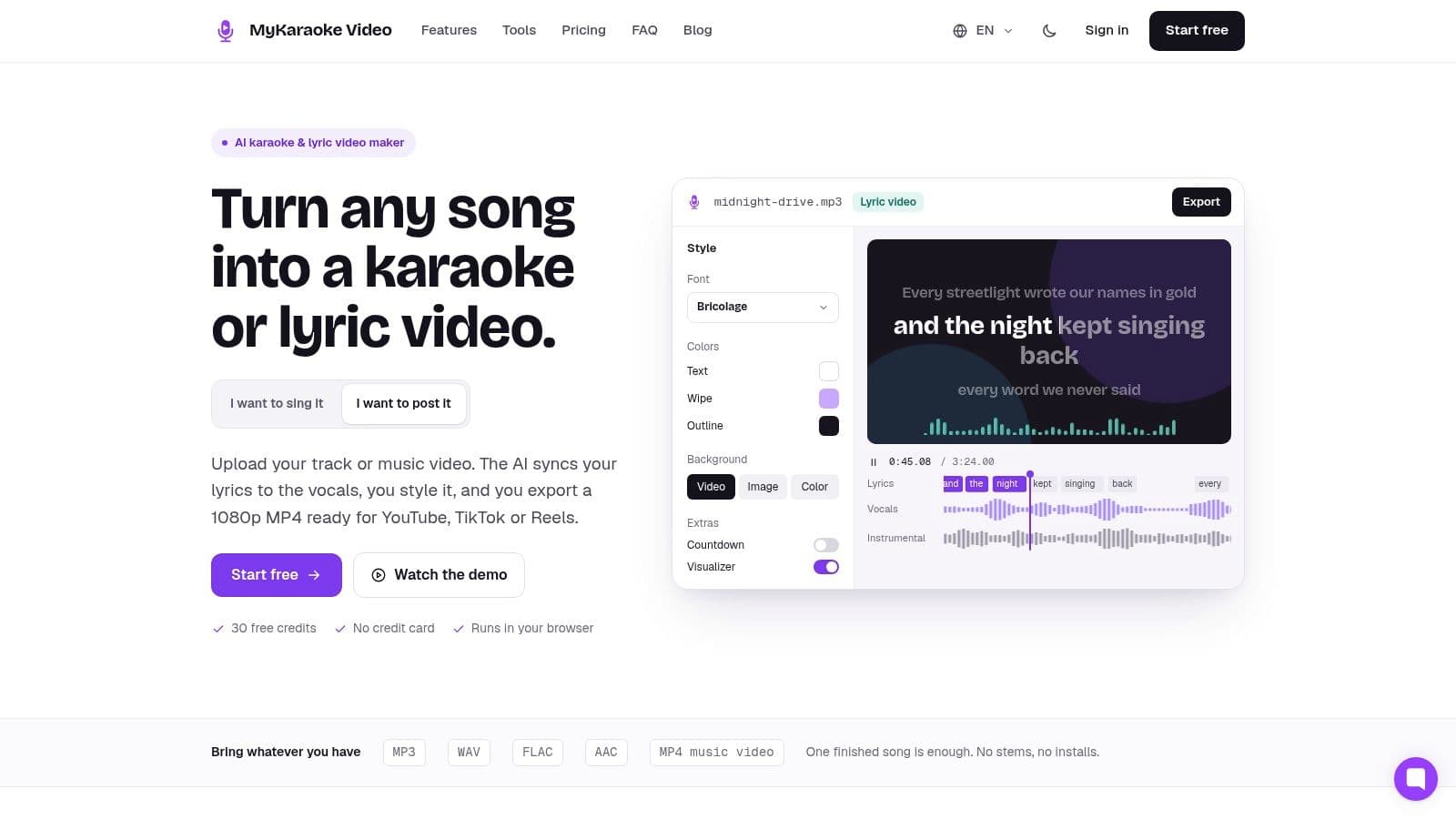
MyKaraoke Video is built for the part of lyric-video production that usually consumes the most patience: getting words to land at the right moment. You upload an audio or music-video file, paste lyrics or let the system generate them, then review the result in a browser. Its AI can separate vocals, transcribe lyrics, and create word-level synchronization before rendering the video in the cloud.
That workflow suits creators who need a finished karaoke or lyric video without installing a desktop editor. The Sync Editor is the important part. Automatic timing gives you a starting point, but you can nudge words and lines against the beat instead of accepting an opaque result. The Advanced Editor adds multi-track stacking, animations, overlays, visualizers, countdowns, and background image or video support.
Best for controlled karaoke production
The customization is deeper than a basic caption tool. You get more than 1,500 fonts, karaoke, scrolling, duet, and dual-language layouts, plus presets for different presentation styles. That matters when you're producing recurring channel content, bilingual videos, event material, or a series that needs a consistent visual identity.
The browser workflow also removes a common bottleneck. Cloud rendering can produce 1080p MP4 output without requiring a powerful local machine. Premium export options include transparent-background video and MP3+G, which is useful for KJs and karaoke software workflows.
Practical rule: Let AI create the first timing pass, then correct the chorus, fast phrases, and word endings manually.
The pricing model is flexible. New signups receive 30 credits valid for 365 days, with no card required, while pay-as-you-go credits cost $0.10 each**. A typical video uses about 8 to 12 credits, depending on length and export options. The Standard plan costs **$7.99 per month for 300 credits, and Premium costs $14.99 per month for 600 credits. Those figures and plan details are provided on MyKaraoke Video.
The main limitations are predictable. AI transcription and vocal separation work best with clear recordings and widely spoken languages. Rare languages, noisy mixes, or unusual vocal arrangements may need pasted lyrics and manual correction. You're also responsible for obtaining the rights to use a song commercially.
2. Videobolt
Videobolt is the strongest choice here when you want a polished template quickly. Its browser-based lyric-video workflow combines designed typography, motion presets, and an AI line-timing option that listens to the track and places lyric lines automatically. You can get from audio and lyrics to a presentable draft without building every animation from scratch.
That speed comes from accepting a defined visual system. Templates may include camera movement, particles, transitions, and kinetic type treatments that already work together. For a creator preparing a release asset on a short schedule, that's useful. You're choosing and adapting a visual direction rather than animating each lyric block yourself.
Where the template approach helps
Videobolt works best for artists, labels, and marketing teams that need consistency across several videos. Its knowledge base includes lyric-video guidance, and higher-tier plans connect with Adobe After Effects and Premiere workflows. Those integrations can help when a browser draft needs to move into a larger production pipeline.
The trade-off is creative range. A template can look professional while still feeling like a template, especially if the typography, transitions, and background treatment don't reflect the song. The AI timing also reduces setup work, but you should still review line changes against vocals and musical breaks.
- Best use: Fast, designed lyric videos with a recognizable template style.
- Strong point: AI-assisted line timing and ready-made motion design.
- Limitation: Bespoke layouts and unusual visual concepts may fight the template logic.
- Website: Videobolt
Videobolt is a better fit than a full desktop editor when presentation matters but you don't want to spend time learning keyframes. It's less suitable when exact word-level karaoke highlighting is the central requirement.
3. Renderforest
Renderforest suits creators who need a visual direction before they need detailed karaoke control. Its AI Music Video Generator analyzes a track and produces visuals that respond to its mood and pacing. You can add editable lyrics, then adjust the result in the platform's timeline and template editor.
That workflow gets you past the blank canvas quickly. A generated sequence can suggest the background treatment, movement, and overall tone for a release asset. It works well for social clips, campaign variants, and early concepts where a finished visual style matters more than custom animation for every lyric line.
A practical test is to compare it with a browser-based karaoke workflow. Renderforest can create a more atmospheric first pass, while a karaoke-focused tool gives you closer control over lyric changes and vocal timing. If the song depends on precise word highlighting, you will need to inspect and correct the generated result rather than trust the first version.
Use it to find the visual direction
The template library makes experimentation quick. Try several moods, add the lyrics, and export variations for promotion without building each scene from scratch. This is less demanding than producing a complete music video in a professional editor.
The limits appear during cleanup. AI visuals may need repeated adjustments so text placement follows the song structure and stays readable. Templates also constrain unusual layouts, custom transitions, and motion that must follow individual words.
Treat the generated sequence as a starting point, not proof that every lyric change is readable.
- Best use: Fast concept development and social-ready lyric clips.
- Strong point: AI visuals that respond to a track's mood and pacing.
- Limitation: Precise lyric timing and bespoke animation may require extra cleanup.
- Website: Renderforest
Choose Renderforest for atmosphere and quick visual exploration. Choose a dedicated karaoke workflow when exact lyric timing is the main job.
4. Kapwing
Kapwing suits creators who need lyric timing, captions, and general editing in one browser workspace. Its Lyric Video Maker offers a guided starting point, while subtitle tools support SRT and VTT imports, timing edits, and text changes on the timeline.
Start with the song and an initial caption pass, then correct the lyrics before adding footage, images, or branded elements. This workflow works well for social teams and non-editors. Collaboration also helps when one person prepares the words and another reviews the visual treatment.
Best for campaign-ready lyric clips
Kapwing's advantage is the space around the lyrics. You can build a square or vertical social cut from the same project, add supporting footage, and keep text editing accessible without opening a desktop editor. For a quick campaign asset, that broader workflow matters more than specialist karaoke controls.
The trade-off becomes clear in a browser-based karaoke test. Kapwing lets you adjust caption blocks, but word-level highlighting and tightly timed vocal changes take manual work. Repeated phrases, ad-libs, and layered vocals deserve a full playback check rather than trust in the first generated pass.
Browser limits also appear as projects grow. Multiple video layers, animated backgrounds, long audio files, and dense text treatments can slow editing. Some advanced features require a paid plan, so check current limits before making Kapwing part of a recurring process.
Use Kapwing when the lyric video supports a wider content campaign. Choose a karaoke-focused tool when exact word timing is the main job, or a desktop editor when complex motion and large projects take priority.
5. VEED.IO
VEED.IO suits creators who need one browser project to serve several jobs. Its editor combines auto-subtitles, on-canvas text editing, typography effects, music-video tools, and visualizer elements. Build the lyric video first, then adapt it for social clips, campaign graphics, or branded content without switching applications.
For a quick template-led clip, that breadth saves setup time. Start with the generated captions, correct misheard lyrics, and adjust the blocks on the timeline before adding footage or effects. Songs with repeated lines, ad-libs, layered vocals, or fast phrasing still require a full playback review. Automatic captions provide a starting point, not finished karaoke timing.
A broad editor with a clear timing limit
VEED's strongest use case is a release that needs several formats. You can add footage, stock elements, waveform treatments, brand assets, and animated text in the browser. Higher-tier plans include brand kits, which help teams keep colors, fonts, and other visual elements consistent across exports.
The trade-off appears in a browser-based karaoke workflow. VEED lets you edit caption blocks, but detailed word-level synchronization takes more manual work than a tool built around timed singing. Heavy projects can also affect browser performance, while some features require a paid plan. A simple lyric clip may not need the extra editor features, but a wider campaign can justify them.
Timing check: Review every chorus and fast vocal phrase at full playback speed, not only in the editor preview.
Use VEED.IO for branded lyric videos that also need footage and social adaptations. Choose a dedicated karaoke editor for tighter vocal sync. For other workflow options, compare VEED alternatives for lyric-video creation.
- Best use: Multi-format lyric content with branding and footage.
- Strong point: Broad browser editing and caption tools.
- Limitation: Less specialized control for exact karaoke synchronization.
- Website: VEED.IO
6. Canva
Choose Canva when the lyric video must fit an existing release campaign. The same workspace can handle thumbnails, social posts, album announcements, lyric-video templates, captions, typography, and exports for different formats.
Its job is brand consistency, not precise karaoke timing. An artist team or marketing department can set colors, fonts, logos, and recurring layouts, then reuse them across campaign assets. Templates give non-designers a credible starting point without building every scene from a blank timeline.
A useful workflow is to create the visual system first, then add the song and captions. Canva's caption generator can produce a draft, but fast vocals and chorus changes still need manual review. Caption editing is less granular than a dedicated sync editor, and its animation controls offer less depth than professional motion software.
That limit matters in a browser-based karaoke workflow. Canva works well for a lyric announcement, teaser, or branded short clip. A full sing-along video needs closer word-level alignment, which means more cleanup or a different tool.
- Best use: Brand-consistent lyric videos tied to wider campaign assets.
- Strong point: Templates, brand kits, and easy multi-format design.
- Limitation: Caption cleanup and detailed motion control are limited.
- Website: Canva lyric-video templates
Canva earns its place when the release needs a coordinated visual package. Use a specialized timing workflow when viewers must follow and sing every word.
7. Wondershare Filmora
Filmora is a practical middle ground for creators moving beyond browser templates. Its desktop timeline gives lyric videos more editing control without the dense workflow of high-end post-production software. AI auto-captions, dynamic caption styles, and beat detection can speed up the first draft, especially when the goal is a polished short clip rather than intricate motion design.
The waveform and timeline make manual correction manageable. You can place lyric blocks, adjust their duration, and refine changes against the audio instead of accepting automated timing. Beat detection can suggest likely transition points, though you still need to listen through the song. Fast vocals and tightly timed karaoke lines will require hands-on cleanup.
Filmora fits repeated local production well. Desktop editing reduces dependence on browser performance, while layered tracks support more involved arrangements than a basic template editor. Caption presets also provide a starting point for animated text without requiring every word to be keyframed manually.
Its limits appear when the project needs advanced compositing, detailed color work, or intricate motion graphics. DaVinci Resolve and After Effects offer greater finishing depth. Licensing and pricing can change, so review the current terms before adopting Filmora for regular releases.
- Best use: Beginner-friendly desktop editing with stronger timeline control.
- Strong point: Auto-captions, beat assistance, and accessible on-timeline styling.
- Limitation: Fewer high-end finishing tools than professional applications.
- Website: Wondershare Filmora
Choose Filmora when a browser-based karaoke workflow feels too restrictive, but a full professional editor would add more setup than the song needs. It is a sensible route into timeline-based lyric editing, with enough control for clean, repeatable releases.
8. DaVinci Resolve Free and DaVinci Resolve Studio
A polished lyric video can begin as a simple text track, then grow into a full release video with footage, graphics, color work, and detailed audio treatment. DaVinci Resolve handles that progression better than most desktop editors in this list. It supports subtitle tracks, SRT and TTML import and export, precise timeline editing, color grading, audio work, and compositing. The free version is capable enough for serious projects. Studio adds Neural Engine features and more effects.
Resolve suits bespoke finishing rather than instant karaoke production. It does not provide built-in automatic lyric timing in this workflow, so lyrics are usually timed by hand or imported as an SRT created elsewhere. That setup takes longer than browser-based karaoke tools, especially for a full song, but it gives you direct control over every cue.
The payoff is consistency. Subtitle data can stay separate from the rendered image, making revisions easier. You can also reuse the timed text while changing backgrounds, footage, typography, or color treatment.
Expect a real learning curve. Resolve exposes far more post-production controls than a browser editor, and a short, simple track may not justify that setup. Choose it when finishing quality and future flexibility matter more than speed.
- Best use: Precise desktop editing, finishing, color, and audio control.
- Strong point: Highly capable free base version and dependable subtitle workflow.
- Limitation: Manual timing or pre-generated SRT is normally required.
- Website: DaVinci Resolve
Use this video-editing software comparison to judge whether Resolve's broader toolset justifies the added learning time.
9. Adobe After Effects
Choose After Effects when the visual treatment matters as much as the words. It is built for bespoke motion design, with detailed control over kinetic typography, text animators, expressions, keyframes, masks, transitions, and layered compositions. That makes it a strong fit for a lyric video with its own visual language rather than a modified template.
A browser-based karaoke workflow is faster for accurate timing. After Effects gives you more control over what happens after the timing is set. You can import an SRT, time words manually, then animate each phrase to match the song's mood, artwork, and structure. Templates, presets, plugins, and the wider Adobe ecosystem can speed up parts of the process, but they do not remove the need for creative and technical decisions.
A short teaser may be manageable. A full track with dense lyrics requires repeated timing checks, keyframes, and revisions. Text can enter, react, transform, and disappear exactly when you want, but every custom choice adds production time.
The learning curve and subscription model also matter. After Effects is difficult to justify for readable lyrics over a static background. It earns its place when custom animation is the deliverable.
- Best use: Original kinetic typography and high-control motion graphics.
- Strong point: Extensive customization for distinctive lyric aesthetics.
- Limitation: Manual sync, substantial learning time, and subscription cost.
- Website: Adobe After Effects
After Effects is a specialist choice, not the quickest route to a synchronized karaoke file. Use it when the concept depends on animation that template-based or browser tools cannot provide.
10. CapCut
CapCut suits creators who need a lyric clip ready for a social feed quickly. Its desktop, mobile, and web versions combine templates, caption tools, effects, and platform-focused exports. A short song excerpt can become animated text over a vertical background without opening a specialist motion-graphics editor.
The practical advantage is speed. You can adapt a chorus, apply a visual treatment, and export from a familiar short-form workflow. The free core editor supports casual projects, though features and pricing vary by platform and region.
Best for fast social clips
CapCut becomes less predictable when accurate full-song timing matters. Auto Lyrics has changed or disappeared on some platforms, so manual captions may be required. That adds checking and correction work, especially when every word must follow the vocal closely.
Use CapCut for quick vertical content rather than detailed karaoke production. A browser-based workflow with dedicated word timing gives you more consistent sync control, while CapCut offers faster styling and social editing.
- Best use: Fast vertical lyric clips for social platforms.
- Strong point: Templates, effects, and mobile-friendly editing.
- Limitation: Auto-lyrics availability varies, and advanced features differ by platform.
- Website: CapCut
For practical TikTok production choices, see this guide to making a lyric video for TikTok.
Top 10 Lyric Video Software Comparison
| Tool | Core features | Quality (★) | Value & Pricing (💰) | Target (👥) | Unique selling points (✨) |
|---|---|---|---|---|---|
| MyKaraoke Video 🏆 | AI vocal removal, auto word-sync, precise Sync Editor, cloud 1080p MP4, 1,500+ fonts | ★★★★★ | 💰 Free trial (30 credits); PAYG $0.10/credit; Std $7.99/mo; Premium $14.99/mo | 👥 Karaoke channels, creators, KJs, worship leaders | ✨ In-browser cloud rendering, duet & dual-language layouts, MP3+G/transparent exports |
| Videobolt | Template-driven lyric templates + AI line-timing | ★★★★ | 💰 Template-based pricing; higher tiers for integrations | 👥 Fast-turnaround creators, marketers | ✨ Designer templates for polished, quick results |
| Renderforest | AI music-video generator + editable subtitles | ★★★★ | 💰 Template/credits model; good for social clips | 👥 Social content creators, brands | ✨ AI visuals that react to mood & beats |
| Kapwing | Lyric Video Maker, auto-subtitling, collaboration | ★★★★ | 💰 Free tier; subscription unlocks exports & features | 👥 Small teams, social creators, non-editors | ✨ Easy collaboration + robust subtitle tools |
| VEED.IO | Auto-subtitles, typography, visualizers, social exports | ★★★ | 💰 Free tier; paid plans for brand kits & higher limits | 👥 Cross-platform publishers, social creators | ✨ Quick on-canvas editing + waveform visualizers |
| Canva | Lyric-friendly templates, brand kits, auto captions | ★★★★ | 💰 Free tier; Pro subscription for brand features | 👥 Marketers, campaign creators, small businesses | ✨ Massive template library + brand consistency |
| Wondershare Filmora | Desktop editor, AI captions, beat detection, timeline | ★★★★ | 💰 One-time & subscription licenses; tiers vary | 👥 Beginners wanting desktop control | ✨ Beat-detection + easy timeline caption styling |
| DaVinci Resolve (Free/Studio) | Precise timeline subtitles, pro color & audio tools | ★★★★★ | 💰 Free (powerful); Studio one-time license for pro FX | 👥 Professional editors, music producers | ✨ Pro-grade finishing, robust subtitle workflow |
| Adobe After Effects | Advanced text animation, keyframing, expressions | ★★★★★ | 💰 Subscription (Adobe Creative Cloud) | 👥 Motion designers, filmmakers | ✨ Unlimited creative control for kinetic typography |
| CapCut | Short-form templates, caption tools, multi-platform apps | ★★★ | 💰 Generous free tier; region-varying pro features | 👥 TikTok/short-form creators, casual users | ✨ Fast trend-driven templates and mobile-first tools |
Match Your Lyric Video Tool to the Job at Hand
Start with the output you need, not the longest feature list. If the priority is timed lyrics, fast turnaround, and a clean 1080p file, a browser-based lyric or karaoke maker is usually the most direct route. MyKaraoke Video, Videobolt, and similar tools reduce installation and setup work, but they serve different priorities. MyKaraoke Video emphasizes word-level sync and karaoke controls. Videobolt emphasizes designed templates.
Choose a general online editor when the lyric video must sit inside a wider campaign. Kapwing, VEED.IO, Canva, and Renderforest are more useful when you also need branded footage, social variants, visual assets, or collaborative editing. Their caption tools can create a strong first pass, but they may require more manual correction for singing than a dedicated karaoke workflow.
Desktop software makes more sense when timeline control matters. Filmora is easier to approach, while DaVinci Resolve gives you deeper control over subtitles, audio, color, and finishing. After Effects belongs at the top end of the range. It's the right choice for bespoke motion design, not for avoiding manual work.
A practical selection path looks like this:
- Choose a browser karaoke maker when accurate synchronized lyrics and speed matter most.
- Choose a general online editor when one project must produce several branded content formats.
- Choose desktop software when you need deeper timeline, audio, or finishing control.
- Choose After Effects when custom typography and motion design define the creative brief.
Check the rights before publishing. A lyric video may involve separate rights in the sound recording, composition, lyrics, and synchronization. ASCAP's YouTube guidance explains synchronization as the right to copy and distribute a musical work in audiovisual form, while YouTube's Creator Music restrictions state that certain licensed tracks cannot be used for lyric or karaoke videos. Confirm the master recording, composition, lyrics, synchronization permission, territory, monetization terms, translation rights, and platform restrictions.
Test a free option or trial with one real track before adopting a tool. Check the language support, listen for timing errors in the chorus and fast verses, inspect readability in both widescreen and vertical formats, and compare the per-video cost at your expected monthly volume. If you're publishing for audiences who rely on captions, review contrast, safe margins, line length, and timing as accessibility requirements, not decorative details.
For broader publishing, include the adaptation plan in your first edit. Short-form video can receive 2.5 times more engagement than long-form video, according to Hypebot's report citing Yaguara data. That doesn't mean every song needs a vertical cut, but it does mean your chosen workflow should make responsive layouts practical rather than forcing you to rebuild the project.
One final test is more useful than another feature comparison. Run one track through two shortlisted tools, correct the same difficult lyric passage in each, and keep the tool that needs the least manual correction while still giving you the visual control you need. For many creators, that test separates a fast first impression from a workflow they can actually use for every release.
https://ihateposting.com/blog/post-a-youtube-video-to-instagram
MyKaraoke Video combines automatic lyric syncing, vocal separation, a precise timing editor, flexible layouts, and cloud-rendered 1080p exports in a browser workflow. If timed karaoke or lyric videos are your priority, test one real track in MyKaraoke Video and compare how much correction it needs against your current tool.
