If you want to grow a karaoke channel, thinking in playlists isn't just a good idea—it's everything. I've seen countless channels spin their wheels focusing on single song uploads, but the ones that really take off are built around a playlist-first strategy. Using a tool like a dedicated playlist YouTube maker, such as MyKaraoke Video, helps you shift your mindset from one-off videos to creating entire collections that people will binge for hours.
Think about it: nobody goes to a karaoke night to sing just one song. They want a whole night of music, and that's exactly what your channel should offer.
Why Playlists Are Your Karaoke Channel's Secret Weapon
Let's cut to the chase. When someone searches for karaoke, they're usually planning a party, setting a specific mood, or just killing a few hours with friends. A single video might scratch an immediate itch, but a well-curated playlist solves their entire problem. This is the single biggest difference between a channel that grows and one that stagnates.
Imagine someone stumbles upon your "90s Rock Anthems Karaoke" playlist. Instead of watching one three-minute video and bouncing, they're likely to let the whole thing play. Suddenly, a single view turns into a 60-minute session. That’s a massive signal to YouTube that your content is valuable, and it all comes down to boosting one of the platform's most important metrics: watch time.
The Power of Binge-Worthy Content
When you start thinking like a playlist curator instead of just a video uploader, your whole strategy changes for the better. You start asking how your videos can flow together to create a seamless experience. This approach pays off in several huge ways for your channel's growth:
- Keeps People Watching Longer: Someone who clicks on a playlist is already telling you they want more of that specific vibe. They’re primed to stick around.
- Boosts Your Session Watch Time: The YouTube algorithm absolutely rewards channels that keep people on the platform. Playlists are the easiest, most organic way to do this.
- Gets You Discovered More Often: Well-optimized playlists can rank in YouTube search results right alongside individual videos, doubling your chances of being found.
Here's the bottom line: stop serving snacks and start serving a full-course meal. A playlist sends a powerful message to your audience: "I have everything you need for your party right here."
This isn't just a hunch; it's backed by how millions of people already use the platform. Playlists are the main way music is consumed on YouTube, with the biggest ones racking up billions of views. By creating themed karaoke collections, you’re tapping directly into a viewing habit that’s already deeply ingrained. You can get a sense of the sheer scale of this by checking out industry analysis on sites like routenote.com.
How to Streamline Your Karaoke Video Production
Before you can even think about building killer playlists, you need a solid library of videos. A random, scattershot approach to making your videos just won't cut it—it leads to a chaotic channel that confuses viewers. What you're really aiming for is an efficient system, a repeatable workflow that lets you pump out dozens of playlist-ready videos without pulling your hair out.
This is where a tool built for the job, like MyKaraoke Video, really shines. It’s not just about making a single video; it’s about setting up a scalable process. You can lock in presets for your fonts, colors, and backgrounds. This means every single video you produce instantly matches your channel's brand. That consistency looks professional and, more importantly, it helps your audience recognize your content in a heartbeat.
Mastering the AI-Powered Workflow
Let's be honest, the biggest time-suck in making karaoke videos has always been syncing the lyrics. Manually timing every single word is a nightmare and can easily take hours for just one song. Thankfully, modern tools have pretty much solved this problem.
With an AI-powered sync editor, you just upload your audio track and paste in the lyrics. The software does the heavy lifting, automatically lining up the text with the music. Suddenly, your job shifts from tedious manual labor to quality control. You’re just there to make a few small tweaks to get the timing perfect. For any serious karaoke channel, learning how to convert audio to video is ground zero, and this kind of AI assistance makes it unbelievably efficient.
This streamlined production process is the foundation for building playlists that keep people watching.
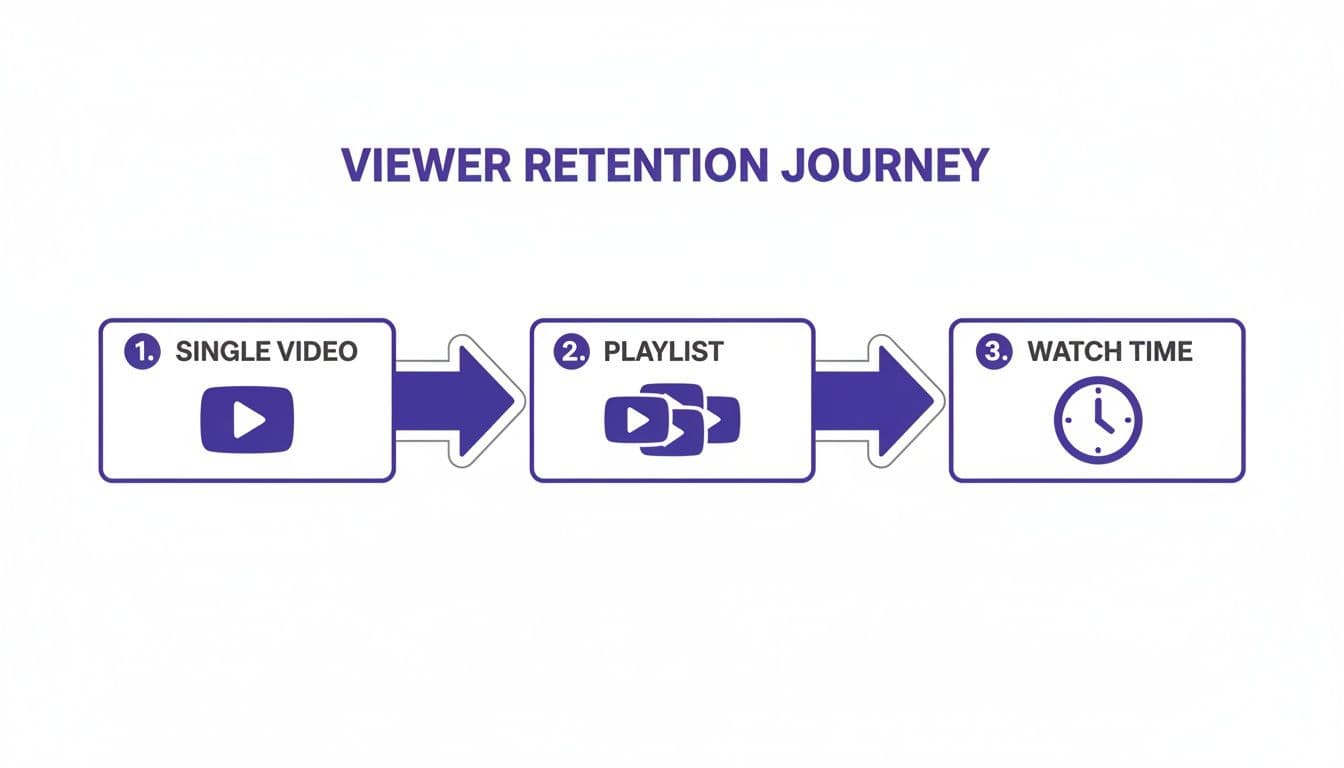
As you can see, a smoother production engine lets you build out those crucial playlists faster, which is what really drives up your channel's total watch time.
From Single Files to a Bulk Library
Once you've got the look and timing of your video just right, the next hurdle is getting organized for the upload. A messy folder of video files on your computer will translate directly into a messy YouTube channel. Trust me, getting your organization down is a non-negotiable for anyone serious about this.
Start using a consistent file naming system from day one. It sounds simple, but a clear, searchable format will save you from massive headaches down the road.
Here are a few structures I’ve seen work well:
- For standard tracks:
Song Title - Artist Name (Karaoke).mp4 - To group by genre:
80sRock - Song Title - Artist Name (Karaoke).mp4 - For duet versions:
Duet - Song Title - Artist 1 & Artist 2 (Karaoke).mp4
A system like this makes it a breeze to find and group your videos when it's time to assemble your playlists. On that note, always look for tools with a bulk export feature. The ability to queue up and render a dozen videos overnight means you spend your time actually creating, not just staring at a progress bar.
The goal here is to build an assembly line, not a one-off workshop. When you systemize your production, you free up the creative energy you need to build the engaging playlists that will actually grow your channel. For a deeper dive into this, check out our guide on https://www.mykaraoke.video/blog/video-production-best-practices.
Fine-Tuning Your Videos for Maximum Discovery
Getting your karaoke videos uploaded is a fantastic first step, but it’s really just the starting line. The real work begins now: making sure people can actually find what you’ve created. This is where a solid YouTube SEO strategy becomes your channel’s best friend.
Think of each video as a new door into your channel. Your job is to label that door so clearly that the right people—your future subscribers—walk right through it.
Crafting Titles That Get Clicks
Your video title is, without a doubt, the most critical piece of the SEO puzzle. It has to be descriptive, compelling, and loaded with the exact phrases your audience is searching for. A lazy title like "Song Title - Artist (Karaoke)" just isn't going to cut it. You're leaving views on the table.
You have to get inside the searcher's head. What are they really looking for? A specific genre? A track from a certain decade? A stripped-down acoustic version?
Here are a few title formulas that have worked wonders for me:
- Genre Focus:
80s Rock Karaoke: Livin' on a Prayer - Bon Jovi (No Vocals) - Mood Focus:
Emotional Ballad Karaoke: Someone Like You - Adele (Piano Version) - Occasion Focus:
Party Starter Karaoke: Uptown Funk - Bruno Mars (Lyrics) - Format Focus:
Duet Karaoke: Shallow - Lady Gaga & Bradley Cooper (With Lyrics)
See the difference? Each one adds crucial context. Little details like "No Vocals," "Piano Version," or "Duet" target incredibly specific searches. This helps you sidestep the crowded competition and pull in viewers who know exactly what they want.
Before we dive into descriptions, let's look at how a few small tweaks to your titles can make a huge impact on your video's visibility.
Karaoke Video SEO Title Formulas
| Search Intent | Standard Title | SEO-Optimized Title |
|---|---|---|
| Looking for a classic 80s hit | Livin' on a Prayer Karaoke | 80s Rock Anthem Karaoke: Livin' on a Prayer - Bon Jovi (Studio Quality) |
| Wants a sad, emotional song | Someone Like You - Karaoke | Emotional Piano Karaoke: Someone Like You - Adele (Acoustic Lyrics) |
| Needs a song for a party | Uptown Funk (Karaoke Version) | Party Starter Karaoke: Uptown Funk - Bruno Mars (With On-Screen Lyrics) |
A well-crafted title acts as a powerful signpost, guiding both the YouTube algorithm and potential viewers directly to your content.
Writing Descriptions That Do the Heavy Lifting
Your video description is your chance to give both viewers and the YouTube algorithm some much-needed context. A blank description is a wasted opportunity. When you write a detailed description, you're telling YouTube precisely what your video is about, which massively influences how often it gets recommended.
To really nail this, you'll want to explore some professional keyword research tools and techniques. They help you uncover the exact terms people are using to find content like yours.
My Pro Tip: Blend natural, human-readable sentences with a clean list of your most important keywords. This approach satisfies your audience and the search algorithm at the same time.
For instance, start with a quick sentence or two about the track and what makes your version special. Then, add a bulleted list of related terms someone might search for:
- 80s rock karaoke hits
- Bon Jovi karaoke no vocals
- Classic rock sing-along
- Best party songs for karaoke
This simple strategy helps your video show up for a much wider variety of searches. If you want to go deeper on this, our guide on YouTube SEO optimization tips is packed with more advanced tactics.
Using Tags to Cover All Your Bases
Tags have become less critical over the years, but they still have a purpose. Think of them as a safety net. They help YouTube categorize your content and can catch traffic from common misspellings or related terms you couldn't fit into your title and description.
Your very first tag should always be your primary keyword—often, the full video title itself. From there, branch out with variations. For our Bon Jovi track, a solid set of tags would look something like this:
Livin on a Prayer karaokeBon Jovi karaoke80s karaokerock karaokeliving on a prayer lyrics
By taking the time to optimize your titles, descriptions, and tags for every single video, you're doing more than just uploading files. You're carefully building a searchable, discoverable library of content, one video at a time.
How to Build Playlists That Hook Your Audience
Alright, you've got your videos exported and ready to go. Now, we move from making individual tracks to building the very heart of a successful karaoke channel: the playlist. This is where you graduate from simply uploading videos to creating powerful, themed collections that can keep people singing for hours.
Think of yourself less as a video archivist and more as the ultimate party DJ. Your real job is to craft a specific vibe—a flow that pulls people in and makes them want to stick around for the next song, and the one after that. Instead of just lumping random tracks together, you’re building curated experiences, like a "90s Pop Karaoke Party" or an "Acoustic Guitar Sing-Along."
Architecting Your Playlist for Engagement
The first move is to pick a theme that actually connects with people. Sure, a broad category like "Pop Karaoke" is a start, but getting specific is where the magic happens. The more niche your theme, the better you can serve a dedicated audience looking for exactly what you're offering.
Here are a few thematic ideas I've seen work incredibly well:
- Go by Decade: Playlists like "80s Rock Anthems" or "2000s R&B Hits" are pure gold. They tap directly into powerful nostalgia.
- Drill Down by Genre: Think "Country Karaoke Classics" or "Indie Pop Sing-Alongs." These attract die-hard fans of that particular style.
- Serve a Mood or Occasion: This is next-level thinking. A playlist like "Sad Karaoke Songs for a Broken Heart" or "Ultimate Duets for Couples" solves a specific emotional or social need at that very moment.
Once you’ve locked in a theme, the actual sequence of your videos is critical. You're creating a journey, not just a list. A common mistake is front-loading all your biggest hits. A much smarter play is to kick things off with a well-known banger to grab attention, then weave in some deeper cuts, sprinkling other popular songs throughout to keep the energy up. This simple trick prevents people from bailing after the first few tracks.
Optimizing Your Playlist for Discovery
A perfectly crafted playlist is completely useless if nobody can find it. This brings us to the crucial step of playlist SEO. Just like your individual videos, the playlist itself needs a solid title and description to show up in YouTube search results.
Your playlist title has to be clear, descriptive, and packed with the right keywords. "My Karaoke Faves" is a massive missed opportunity. Something like "90s Pop Karaoke Party (Britney Spears, Backstreet Boys, Spice Girls)" is infinitely better. It nails the theme, the decade, and includes artist names people are actively searching for.
The description is where you can really sell it. Use this space to:
- Set the vibe: Write a quick sentence or two explaining what the playlist is for. For example, "The ultimate collection of 90s pop hits for your next karaoke night."
- List key artists/songs: Mentioning popular names helps you show up in more searches.
- Weave in keywords: Naturally work in terms like "90s sing-along," "pop music karaoke," and "full karaoke playlist."
Pro Tip: In your playlist settings, check the box to set it as an "Official Series." This is a powerful but often ignored feature. Ticking this box tells YouTube these videos are meant to be watched in sequence. The algorithm loves this and is more likely to recommend the next video in your series, which is exactly what you want to happen.
On a platform where over 500 hours of video are uploaded every single minute, this "playlist-first" mindset is a game-changer. Playlists act as your channel's programming guide, cutting right through the noise. A well-built 30-song playlist can easily lock in over three hours of watch time from a single viewer—a metric the algorithm pays very close attention to. If you want to dive deeper into YouTube's viewing habits, you can leverage them for channel growth on recurpost.com. By building these curated experiences, you turn a single click into a long, satisfying karaoke session.
Driving Traffic to Your Playlists for Channel Growth
Creating killer playlists is just the start. The real magic happens when you get them in front of an audience, because that’s what truly sparks channel growth. A smart, proactive promotion strategy is what turns all your hard work into actual views, watch time, and new subscribers.
You don't need a huge marketing budget. It's really about being clever with the tools YouTube already gives you. Your goal is to guide viewers from one video into a long, satisfying binge-session of your content. Think of it as creating a web where every path leads to more of your videos.
Use Your Channel as a Promotional Hub
Your YouTube channel homepage is your digital storefront, so make sure your best playlists are front and center. Don't just let them sit hidden away on the "Playlists" tab. Instead, build custom sections on your homepage that shine a spotlight on your most popular or newest collections.
A featured section titled something like "80s Rock Karaoke Party" is way more compelling than a generic feed of your latest uploads.
Beyond the homepage, your individual videos are your secret weapons for promotion. This is where End Screens and Cards become absolutely essential.
- End Screens: At the end of every single video, you should have an element linking directly to a relevant playlist. If someone just finished a power ballad from Queen, your End Screen should immediately point them to your "Classic Rock Karaoke" playlist. It's a no-brainer.
- Cards: You can use cards to drop a subtle hint mid-video. For instance, during a quiet acoustic track, a card could pop up suggesting, "Love this vibe? Check out our 'Acoustic Sing-Along' playlist!"
By strategically weaving these internal links throughout your content, you build a self-sustaining ecosystem. Viewers never hit a dead end. They are always given a clear, tempting next step that keeps them on your channel longer.
Expand Your Reach Beyond YouTube
While on-platform promotion is your foundation, you can't afford to ignore the potential of bringing in traffic from elsewhere. Sharing your playlists on social media is a fantastic way to reel in new viewers who might not have found you otherwise.
Whip up some eye-catching graphics or short video clips that preview a few songs from a playlist. Share these on Instagram, Facebook, or even TikTok, always with a direct link back to the full playlist on YouTube.
You should also tap into the online communities where karaoke fans already hang out. Look for relevant subreddits, Facebook Groups, or online forums dedicated to music and singing. Just remember to lead with value, not spam. A post that says, "Hey everyone, I put together a huge playlist of 90s R&B duets for anyone planning a karaoke night!" will get a much better response than a lazy "Check out my channel."
Music is the lifeblood of YouTube, and playlists are what keep that heart pumping. The platform's algorithm is practically built to funnel people searching for songs into music and lyric video playlists—a behavior you can tap into for some serious organic growth.
For more deep-dive strategies, check out our comprehensive guide on essential YouTube channel growth tips.
Burning Questions About Karaoke Playlists
When you first start building out your channel with a playlist-first mindset, a few questions always seem to come up. Honestly, getting these right from the beginning can be the difference between a channel that fizzles out and one that gains real momentum.
Let's walk through some of the most common hurdles I see creators face and how to clear them.
How Many Videos Should I Start a Playlist With?
This is the big one, the classic quality vs. quantity debate. While there's no single magic number, a solid starting point is 10-15 videos. That’s the sweet spot where a playlist feels substantial enough to be a real collection, often giving you over an hour of continuous playback. That's gold for boosting your channel's watch time.
The real key, though, is to focus on a tight, specific theme. A perfectly curated 12-song playlist of "80s Power Ballads" will crush a bloated, random 50-song list every time. Once your channel and video library grow, you can definitely expand those popular playlists to 50 or even 100+ videos. They can become the go-to resource for that niche.
Should I Make New Videos or Just Organize My Old Ones?
You should absolutely do both. In fact, they work together beautifully.
The easiest first step is to organize your existing videos into themed playlists. This is a quick win that instantly makes your channel feel more professional and binge-worthy for anyone who stumbles upon it. Just look at your most popular videos—they'll often give you great ideas for your first few themes.
This creates a powerful feedback loop. Use your analytics to see which playlists get the most views and watch time. If your "Classic Rock Karaoke" collection is taking off, that’s your signal to fire up your playlist YouTube maker and produce a new batch of videos to expand that specific playlist. Performance should always guide creation.
How Often Should I Update My Playlists?
This really depends on the type of playlist.
For your evergreen collections, like "70s Disco Hits," you can just add new videos as you make them. There's no need to constantly reorder them or anything.
But for trend-based playlists, like "Top Hits," updating them monthly or quarterly is a smart move. You can even signal how fresh it is by adding the current year or month to the title, like "Top Pop Hits Karaoke 2024."
Regularly adding new videos to any playlist sends great signals to YouTube's algorithm. It shows your content is active and relevant, which can help it show up more in search and recommendations. More importantly, it gives your subscribers a reason to keep coming back for more.
Ready to stop spending hours on manual lyric syncing? MyKaraoke Video transforms your favorite songs into professional karaoke videos in minutes with AI-powered tools. Start creating your first video for free at https://www.mykaraoke.video and build your binge-worthy playlists today.
