Creating a lyric video does more than just put words on a screen; it transforms a song from a passive listening experience into an active, engaging one for your fans. It's about syncing text to your audio and wrapping it in compelling visuals, turning your music into a powerful way to connect with your audience.
Why Lyric Videos Are a Must-Have for Artists
Have you ever wondered what makes certain songs stick and become global anthems? More often than not, it's the lyrics. When fans can see, read, and sing along to the words, it creates a connection that goes far deeper than just listening. Lyric videos aren't just a nice-to-have anymore; they've become an essential part of an artist's digital toolkit.
The appetite for this kind of content is huge. People actively search for lyric videos to learn the words to a new favorite song, to get a better handle on its meaning, or just to have a fun karaoke session at home. That kind of active participation is what turns a casual listener into a true fan.
Bridging the Gap Between Artist and Audience
Making these videos isn't just a creative exercise—it's a smart strategic move that benefits artists and content creators in very real ways.
Here's what you stand to gain:
- Boosted Engagement: It's simple—videos with lyrics tend to have higher watch times. People stick around longer when they're following along with the words.
- Deeper Fan Connection: Lyrics tell the story behind your music. When your audience can see that story unfold, it resonates on a much more profound level. If you're interested in the psychology behind this, exploring the power of song lyrics offers some great insights into how words influence our emotional response.
- Wider Accessibility: You instantly make your music more accessible to a broader audience, including non-native speakers and those who are hard of hearing.
For years, the biggest roadblock for most creators was the software. It was either clunky and expensive, or you were stuck with the incredibly tedious task of syncing every single word by hand. A three-minute song could easily take hours of painstaking work.
Thankfully, the tools available today have completely changed the game. Modern, browser-based solutions have made it possible for anyone to create a professional-looking lyric video without all the frustration. This guide is all about showing you how to bypass those old hurdles and start turning your music into a captivating visual story that will grab your audience and not let go.
Before you even think about fancy animations or slick visuals, you have to get your raw materials in order. Trust me, a polished final video is impossible without a solid foundation, and for lyric videos, that means two things: clean audio and perfectly formatted text. Nail this part, and you'll save yourself a world of headaches down the road.
It's like cooking a great meal—you start with the best ingredients. For your audio, that means using the highest quality file you can get your hands on. A lossless WAV file is the absolute best-case scenario because it's pure, uncompressed audio. If you have to work with a compressed file, make sure it’s a high-bitrate MP3, ideally 320kbps, to keep as much of the original sound quality as possible.
Getting Your Audio Track Ready
A clean track is everything. Any background hiss, annoying clicks, or low hums in your original file will stick out like a sore thumb in the final video, completely pulling your audience out of the experience.
While there’s some powerful audio software out there, a little prep work can make a huge difference. If you hear any of those imperfections, it's absolutely worth the time to clean them up first. Learning how to remove background noise from audio is one of those skills that can immediately take your projects from looking amateur to feeling professional. A clean track lets the music and lyrics shine without any distractions.
Prepping Your Lyrics for a Smooth Sync
Just as important as the audio is how you handle the lyrics. You can't just copy and paste a block of text from a website and expect it to work. The goal here is to format the text so it’s easy to read and even easier to sync up later. Put yourself in the shoes of someone trying to sing along.
Here are a few tips I always follow:
- Break It Down: Chop long sentences into shorter, more manageable lines. A great rule of thumb is to create a new line wherever the singer naturally takes a breath or pauses.
- Proofread, Then Proofread Again: Typos are incredibly distracting and look unprofessional. They can totally break the viewer's immersion. Read through your lyrics a couple of times to catch any spelling or grammar mistakes.
- Map Out the Song: In your text file, add labels like
[Verse 1],[Chorus], or[Bridge]. These won't show up in the final video, but they act as invaluable guideposts when you're syncing, helping you keep track of where you are in the song.
The time you invest in prep work pays off tenfold in the final product. A pristine audio file and a thoughtfully formatted lyric sheet are the twin pillars of any great lyric video.
This isn't just about getting the technical details right; it's about giving your audience what they actually want. A 2017 survey found that the top reasons people search for lyrics are to understand the words (81%) and to sing along (72%).
What’s more, that same study revealed that 69% of music listeners specifically seek out lyric videos. The demand for clear, well-timed content is massive. You can dig into more of these fascinating consumer insights on Statista to see for yourself. Taking these extra prep steps is how you meet that demand and create something people will love.
Getting Your Lyrics Perfectly Synced: AI Speed Meets Human Touch
This is where the magic really happens. Syncing your lyrics to the music is what transforms a simple text file and an audio track into a compelling lyric video. For years, this was the most grueling, time-consuming part of the whole process, but now, we have some incredible tools that make it faster and more intuitive than ever before. The secret is knowing when to let the AI do the heavy lifting and when to jump in for that final, human polish.
Think of it as a two-stage process. First, you unleash the power of AI. Modern lyric video makers can analyze your audio and pre-timed lyrics, automatically snapping each word to the corresponding vocal. This first pass gets you incredibly close to a finished product in just a matter of minutes. Seriously, what used to take hours of manual tapping can now be roughed out while you grab a coffee.
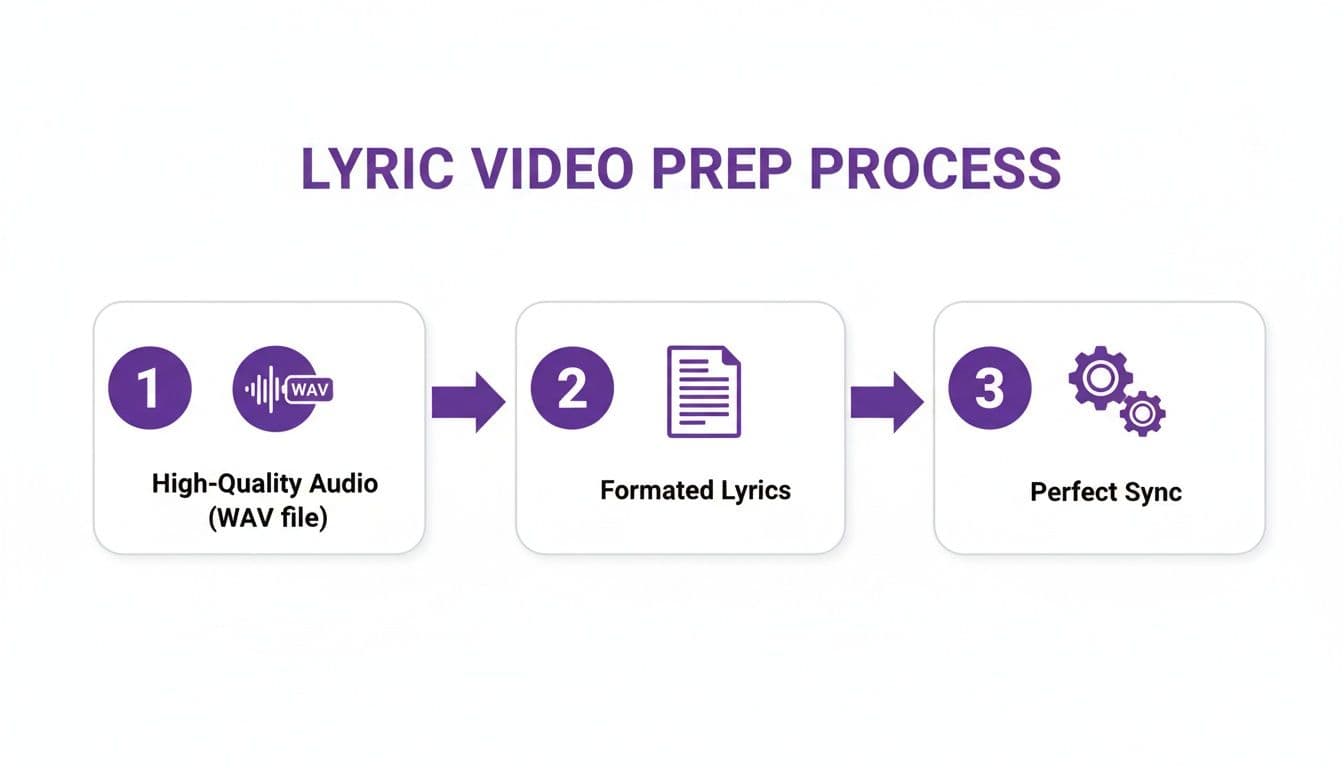
The workflow above shows why starting with clean audio and accurate lyrics is so important—it gives the AI the best possible foundation to build upon.
The Human Element: Fine-Tuning Your Sync
AI is amazing, but it's not a musician. It can get you about 90% of the way there, but that last 10% is where you, the creator, step in to add the artistry. This is where you move from automation to manual control, using a sync editor to nail the timing down to the millisecond.
Most sync editors give you a visual representation of the audio—the waveform—right alongside your lyrics. This lets you see the peaks and valleys in the sound, making it easy to pinpoint exactly where a word or syllable starts and ends. You can typically just drag and resize the timing blocks for individual words or even entire lines. This granular control is what allows you to match the unique rhythm and emotion of the artist's performance.
When you're ready to explore different platforms for this, checking out the top AI video generator tools can give you a great head start on finding the one that fits your workflow best.
My Go-To Pro Tip: Get friendly with your keyboard shortcuts. Nearly every editor lets you use the spacebar to play and pause. I find the most intuitive way to sync is to play a line and tap the spacebar right at the beginning of each word. It feels much more natural than clicking and dragging everything.
Syncing Methods Compared AI vs Manual
Choosing between AI and manual syncing isn't an either/or decision; it's about using them together. Here’s a quick breakdown to help you understand the strengths of each approach.
| Feature | AI Automatic Syncing | Manual Sync Editor |
|---|---|---|
| Speed | Extremely fast, generating a full sync in minutes. | Slower and more methodical, requiring word-by-word or line-by-line adjustments. |
| Accuracy | High, often getting 90-95% of the timing right, but can miss nuances. | Potentially 100% accurate, as you have full control down to the millisecond. |
| Best For | Initial drafts, standard vocal deliveries, and projects with tight deadlines. | Final polishing, capturing unique cadences, fast rap verses, and emotional ballads. |
| Effort Required | Minimal upfront effort; just upload your files and let the algorithm work. | Requires focus and a good ear to perfect the timing and match the artist's feel. |
Ultimately, the best workflow is to let the AI create the first draft and then use the manual editor to refine it. This gives you professional-level results without the hours of tedious labor.
Matching Your Syncing Style to the Music
Not all songs are created equal, and your syncing technique shouldn't be either. You have to adapt your approach to fit the genre and feel of the track.
- Flowing Ballads: For slower, more emotional songs with long, drawn-out notes, you might not need to sync every single word. A gentle, line-by-line reveal can feel much more elegant. Focus on making the start and end of each phrase feel perfectly in tune with the singer's breath and phrasing.
- Rapid-Fire Rap: This is the polar opposite. For fast-paced hip-hop or metal, word-by-word (and sometimes even syllable-by-syllable) timing is non-negotiable. The sync editor is your best friend here, allowing you to capture that percussive, rhythmic delivery that makes the genre so powerful.
This manual refinement is what separates an amateur lyric video from a professional one. That attention to detail really pays off in how people connect with the music. In fact, some studies have shown as much as a 60% jump in fan engagement when lyrics are precisely synced. It just makes the experience that much more immersive.
To get even better at this, it helps to understand the tools at your disposal. If you want to dive deeper, check out our detailed guide on the best subtitle editor software, as many of the same principles and tools apply.
Designing Your Video's Visual Style and Animation
Alright, you’ve wrestled with the timing and your lyrics are perfectly synced. The hard part is over. Now for the fun stuff: playing director and giving your video a unique look and feel. This is your chance to inject some personality and make sure the visuals don't just show the words, but actually enhance the song's emotion.
Think of your visual style as another instrument in the mix. For a high-energy rock anthem, a bold, punchy font might be perfect. For a stripped-back acoustic track, maybe a more delicate, handwritten script feels right. The same goes for color. Bright, high-contrast colors can build excitement, while a more muted, cinematic palette can create a feeling of intimacy. Every choice you make should serve the music.
Choosing Your Core Visual Elements
Before you even think about making things move, you need to lock in the foundational design. These are the core pieces that create a cohesive, professional aesthetic that feels true to you as an artist.
Here’s what to focus on first:
- Typography: Your font choice is everything. Readability is king, but after that, it's all about personality. Does the font feel modern or vintage? Aggressive or soft? Pick one that matches the song's vibe.
- Color Palette: Keep it simple. Stick to two or three main colors—one for your text, one for the background, and maybe a third for an accent or highlight. This will keep your video looking clean and intentional, not cluttered.
- Backgrounds: A solid color background can work wonders, but a custom background really levels things up. Try using your official album art, a subtle looping video, or an abstract texture to create a stronger brand identity.
The goal isn't just to make it look cool; it's to create a visual world that feels authentic to the music. Every design choice should feel like it belongs to the song, enhancing the listener's emotional connection rather than distracting from it.
Bringing Your Lyrics to Life with Animation
Animation is what turns a static screen of words into a dynamic, engaging experience. It’s how you guide the viewer's eye, add emphasis, and give your video that polished, professional edge.
The classic karaoke-style highlight, where each word lights up as it's sung, is a fantastic choice for encouraging sing-alongs. It's direct, intuitive, and everyone gets it. But for a different feel, you have plenty of other options.
- Pop-Up Effects: Having words appear one by one with a subtle bounce or fade can create a really energetic, playful rhythm.
- Line-by-Line Reveals: A much gentler approach where entire lines fade in smoothly. This is perfect for ballads or songs with a slower, more deliberate pace.
- Kinetic Typography: This is a more advanced technique where you animate individual letters or words to move across the screen, creating a stunning visual story.
These aren't just cosmetic effects; they genuinely influence how your audience experiences the music. Good animation makes the video more immersive, which is key to keeping people watching.
And that engagement really matters. One analysis found a 34% jump in the use of lyric features among long-term subscribers, showing just how much these details can build a loyal following. If you're curious, you can explore the full report on lyric feature engagement to see the data for yourself.
To get started with these techniques, you can learn more about creating powerful animated text for videos and find the perfect style for your project. Don’t be afraid to experiment until you find the combination that makes your music truly shine.
Getting Your Video Out There: Exporting and Publishing for Maximum Reach
You've done the hard work. The lyrics hit their cues perfectly, the visuals are slick, and the track sounds amazing. Now it’s time to share your masterpiece with the world. But hold on—exporting and publishing aren't just afterthoughts. How you handle these final steps can make or break your video's success.
The technical settings you pick here will dictate how your video looks on a phone, a tablet, or a big screen. Get it wrong, and all that time you spent perfecting the visuals goes to waste in a blurry, pixelated mess. Let's make sure that doesn't happen.
Nailing the Perfect Export Settings
I've learned from experience that keeping things simple is usually the best approach. The go-to format for pretty much any platform you can think of is an MP4 file using the H.264 codec. It's the industry standard for a reason: it gives you a fantastic-looking video without creating a gigantic file that takes all day to upload.
For resolution, 1080p (1920x1080 pixels) is your magic number. This resolution is perfect for YouTube, Instagram, and even TikTok. It keeps your text sharp and your graphics clean, delivering that professional quality viewers expect.
A quick pro-tip: Don't get caught up in the 4K hype. While you can export in 4K, 1080p is more than enough for lyric videos. It also ensures a smoother playback experience for viewers who don't have super-fast internet. Consistency and accessibility beat raw resolution every time.
Helping People Find Your Video
Uploading your video is one thing; getting people to actually watch it is another. You need to give the platform’s algorithm some clues so it knows who to show your video to. This is where a little bit of search optimization (SEO) makes a huge difference.
Your title is your hook. It’s the first thing anyone sees, so it needs to be direct and packed with the right information. I stick to a formula that has never failed me:
- Format: Artist Name - Song Title (Official Lyric Video)
- Example: The Wanderers - Chasing Stars (Official Lyric Video)
This simple structure tells both humans and search engines exactly what the video is. No confusion, just clarity.
Next up, the description. A lot of people just drop a Spotify link and call it a day, but that’s a massive missed opportunity. Paste the song's full lyrics right into the description box. Why? Because now your video will show up in search results anytime someone types a line from your song into Google or YouTube. It’s a game-changer for discoverability.
Finally, let's talk tags. Tags help categorize your video and connect it to a wider audience. Think about what a fan would type into the search bar. Good tags to start with are:
#[ArtistName]Lyrics#[SongTitle]Lyrics#LyricVideo#Karaoke#[Genre](e.g., #IndiePop, #Rock)
By putting out a steady stream of high-quality, properly optimized lyric videos, you're not just uploading content—you're building a reliable library for your fans. This is how you grow a subscriber base and eventually open up opportunities to monetize your channel as your views and authority climb.
Got Questions About Making Lyric Videos?
Jumping into any new creative project always brings up a few questions, and making lyric videos is no exception. You might be wondering about the technical nitty-gritty or just how much time you should block out in your calendar. Getting those answers upfront can make all the difference.
Let's clear the air and tackle some of the most common questions people have when they're just getting started.
What’s the Best Audio File Format to Use?
For the best possible sound, you absolutely want to start with a high-quality audio file. Think lossless formats like WAV or, at the very least, a high-bitrate MP3 (320kbps).
While most tools are pretty flexible, the quality of your source audio directly shapes the final listening experience. A crisp, clean track is non-negotiable for a great sing-along. You really can't fix bad audio later in the video process, so starting with a great file is one of the smartest moves you can make.
When sorrows like sea billows roll. This powerful line from the hymn ‘It Is Well With My Soul’ hits harder when you know the story behind it—a man grieving the loss of his four daughters at sea. Your lyrics tell a story, and a clean audio track ensures that story is heard clearly, without distraction.
Can I Put My Own Logo or Branding on the Video?
Of course! Adding your own branding is a huge part of building an identity for your channel or your music. It's incredibly easy to upload a static logo or even use a custom video background that already has your branding baked in. This is a standard feature you should expect from any modern lyric video maker.
A pro tip is to place your logo in a corner where it’s visible but doesn't get in the way of the lyrics. It’s a simple touch that makes your music video lyrics look instantly more professional and reminds viewers who you are.
How Long Does This Actually Take?
This is the best part. The total time really depends on how deep you want to go with customization, but the core process is surprisingly quick.
For a typical three or four-minute song, the AI-powered syncing can knock out a fully timed draft in just a couple of minutes. After that, you'll probably spend another 15-20 minutes tweaking the timings to perfection and dialing in the look and feel.
When you compare that to the hours of painstaking manual work in traditional video editors, the difference is night and day. You can realistically go from start to finish on a professional-quality lyric video in well under 30 minutes. That kind of speed means you can create more content, more often.
Ready to stop spending hours on tedious manual syncing and start creating stunning lyric videos in minutes? MyKaraoke Video provides all the tools you need, from AI-powered syncing to complete visual customization, all within your browser. Start creating your first lyric video for free today at https://www.mykaraoke.video.
