You know the moment. You want to sing a favorite track at a party, post a quick karaoke clip, or make a lyric video for your channel, and there's no usable vocal-free track anywhere. You search YouTube, dig through old forums, try a random app, and still end up with either a muddy backing track or a separate editing job you didn't sign up for.
That's why AI vocal remover tools have become so useful. They don't just help you strip a singer out of a mix. They give creators, musicians, event hosts, and karaoke channel managers a practical way to turn almost any song into something you can readily use.
The space is growing fast. The AI vocal remover market was valued at USD 180 million in 2024 and is projected to grow at a 17.2% CAGR from 2025 to 2034, according to Market.us research on the AI vocal remover market. That demand makes sense. More people want custom karaoke tracks, quick content, and flexible audio they can shape into videos, rehearsals, and social posts.
The Magic of Instant Karaoke Tracks
A few years ago, making your own karaoke version of a song felt like a workaround. You needed editing software, patience, and low expectations. Now an AI vocal remover can give you a usable backing track in minutes, which changes the whole creative process.
That matters if you're making sing-along clips, planning an event setlist, or building a music channel around covers and lyric content. It also matters if you're an artist trying to turn your catalog into more formats. If you're thinking beyond one upload, this guide on how musicians can build an online presence is a solid companion because the karaoke version, lyric video, and short-form clip can all support the same audience-building effort.
One helpful mindset shift is this. Don't think of an AI vocal remover as a magic erase button. Think of it as the first half of a production chain.
- For karaoke nights: You need a clean backing track that keeps the groove and cue points.
- For social content: You need speed, consistency, and a format people can watch with sound off or on.
- For lyric videos: You need timing, readable words, and a final exported video, not just an audio file.
Practical rule: A separated instrumental is only useful if it gets you closer to the format you plan to publish.
That's the gap many beginners hit. They get the backing track, then stall. If you want a broader look at that first step, this overview of an AI vocal remover workflow for karaoke creators helps connect the audio side to real use cases.
How AI Vocal Removers Actually Work
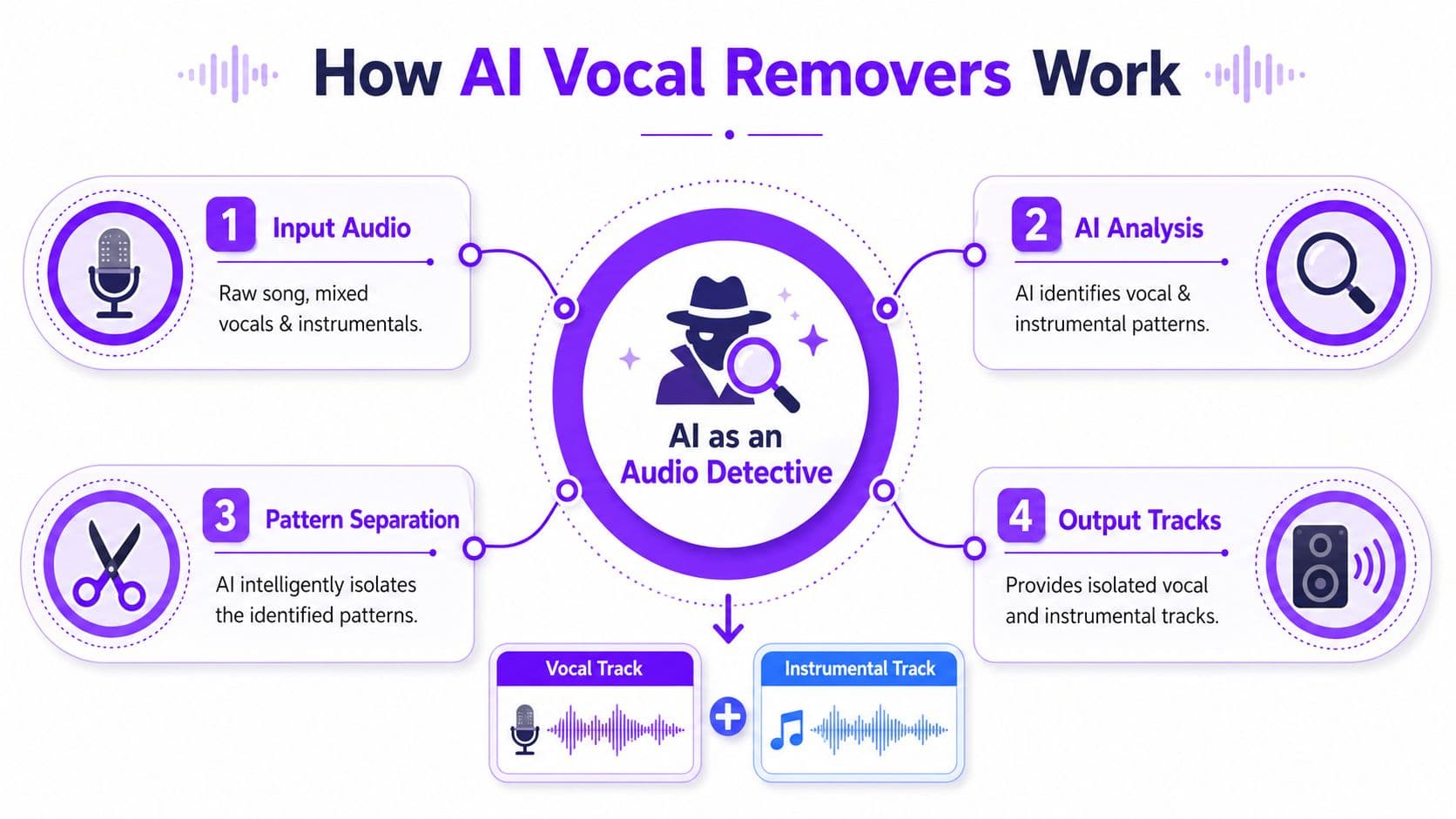
A finished song is one packed audio file. The lead voice, drums, guitars, synths, and effects all live together in that final mix. An AI vocal remover cannot reach back into the original recording session and pull out untouched studio parts. What it can do is listen for patterns that usually belong to a human voice, then separate those patterns from the rest of the music.
That sounds abstract until you picture what the software is "looking" at.
The spectrogram idea
Audio software often turns sound into a spectrogram, which is a visual map of audio over time. One axis shows when something happens. Another shows whether it is low, mid, or high in pitch. The brightness shows how strong that sound is. In plain language, it is a picture of where the energy in a song lives.
According to this explanation of AI separation technology, many AI vocal remover systems study that spectrogram and estimate a time-frequency mask for the vocal. Then the software uses that mask to pull the voice forward or reduce it so you get a backing track.
If that phrase feels technical, break it into three simple parts:
- Time is when the sound happens
- Frequency is how low or high the sound is
- Mask is the model's estimate of what belongs to the singer
A cleaner estimate usually means a cleaner separation.
You can hear why this matters in a chorus. A held vocal note may sit in a similar range as a synth pad or guitar. The model has to decide, moment by moment, which energy belongs to the singer and which belongs to the arrangement. That is less like pressing mute and more like tracing one voice in a crowded room.
Why some songs separate better than others
Some tracks are easy. Others are a wrestling match.
A dry lead vocal over a simple arrangement gives the model clearer clues. A dense pop chorus with stacked harmonies, wide reverb, distorted guitars, and bright synths gives it far more overlap to sort through. The challenge is not volume alone. It is similarity.
| Situation | Why it gets tricky |
|---|---|
| Lead vocal and synth share similar frequency areas | The model can confuse one for the other |
| Big reverb tails | Vocal energy spreads across time and space |
| Backing vocals stacked with pads | Separation boundaries get blurry |
| Distorted guitars and aggressive vocals | Both can occupy dense midrange zones |
This is why one song comes back surprisingly clean while another has watery artifacts, missing snare hits, or faint ghost vocals. The software is making a highly informed estimate, not recovering hidden original stems.
If you have only used older karaoke gear, the difference is worth noting. Traditional systems often rely on simpler center-channel tricks, while AI models try to identify vocal patterns across the whole mix. This explainer on how karaoke machines work gives useful context for that older approach.
What “stems” means for karaoke creators
You will see the word stems everywhere. In creator-friendly terms, stems are separated parts of a song, such as the lead vocal and the music-only layer.
For karaoke, the music layer is only step one. The vocal layer matters too, because it lets you check what was removed, spot leftover phrases, and hear whether the separation damaged important cues. That review step saves time later when you start syncing lyrics and building a sing-along video.
That last part is easy to miss. Plenty of guides stop once you have the music-only file. A stronger workflow closes the loop by using the separated audio to make a finished karaoke video people can read, sing, and share.
Achieving the Best Quality Separations
The fastest way to get disappointing results is to feed an AI vocal remover a poor source file and expect studio-grade output. Separation quality starts long before you click upload.
Use the cleanest file you can access. Lossless formats such as WAV or FLAC are ideal, and a strong MP3 can still work well. What hurts most is audio that's already been compressed too heavily, clipped, or passed through multiple exports.
Start with the source, not the software
If a song already sounds smeared, crunchy, or oddly phasey before processing, the AI has less to work with. It can only separate what it can recognize.
Here's what usually helps most:
- Choose a clean master: Avoid screen-recorded audio, low-quality downloads, or files ripped from noisy sources.
- Prefer full songs over clips: Short excerpts can still work, but a complete file often gives the model more context.
- Watch for loudness damage: If the source is aggressively distorted, the artifacts may become more obvious after separation.
A lot of people blame the tool when the actual issue is input quality.
Learn the common artifacts
Even strong separations can leave traces. Once you know what to listen for, you can judge the output much more accurately.
Three issues show up often:
- Vocal bleed: You still hear faint parts of the lead vocal, usually in choruses or sustained notes.
- Phasing: The backing track sounds hollow or swirly, especially in the center image.
- Watery texture: Cymbals, pads, and reverbs can sound smeared, almost like underwater digital shimmer.
None of these automatically ruins a karaoke track. For many uses, especially party playback or quick social content, a slight artifact matters less than timing, energy, and readability of the final video.
The right question isn't “Is this perfectly clean?” It's “Will this sound convincing in the final context?”
Quality and speed don't always align
People often want two things at once. They want the cleanest possible separation, and they want it instantly. Those goals can pull against each other.
Recent data shows a 65% surge in users demanding real-time processing for live streaming and event videos, yet 78% of top AI vocal remover tools still require 10 to 45 seconds of processing time per file, according to LALAL.AI trend analysis on real-time media processing. That gap tells you something important. Faster workflows are in demand, but many tools still make you choose between speed and refinement.
A simple quality checklist
Before you commit to a track, listen for these points:
| Check | What you want to hear |
|---|---|
| Intro and outro | Natural ambience, no obvious pumping |
| Verse sections | Minimal leftover lead vocal |
| Chorus | Stable backing track, no major collapse |
| Drums and bass | Punch remains intact |
| Sustained instruments | No excessive swirling or metallic smear |
If the file passes most of those checks, it's probably good enough to move into karaoke production. If it fails badly in the chorus, try another tool or another source file before spending time on lyrics and video.
A Practical Workflow for Creating Karaoke Tracks
A good karaoke track doesn't come from one click. It comes from a short chain of sensible decisions. When people get frustrated, it's usually because they rush one step and have to fix it later.
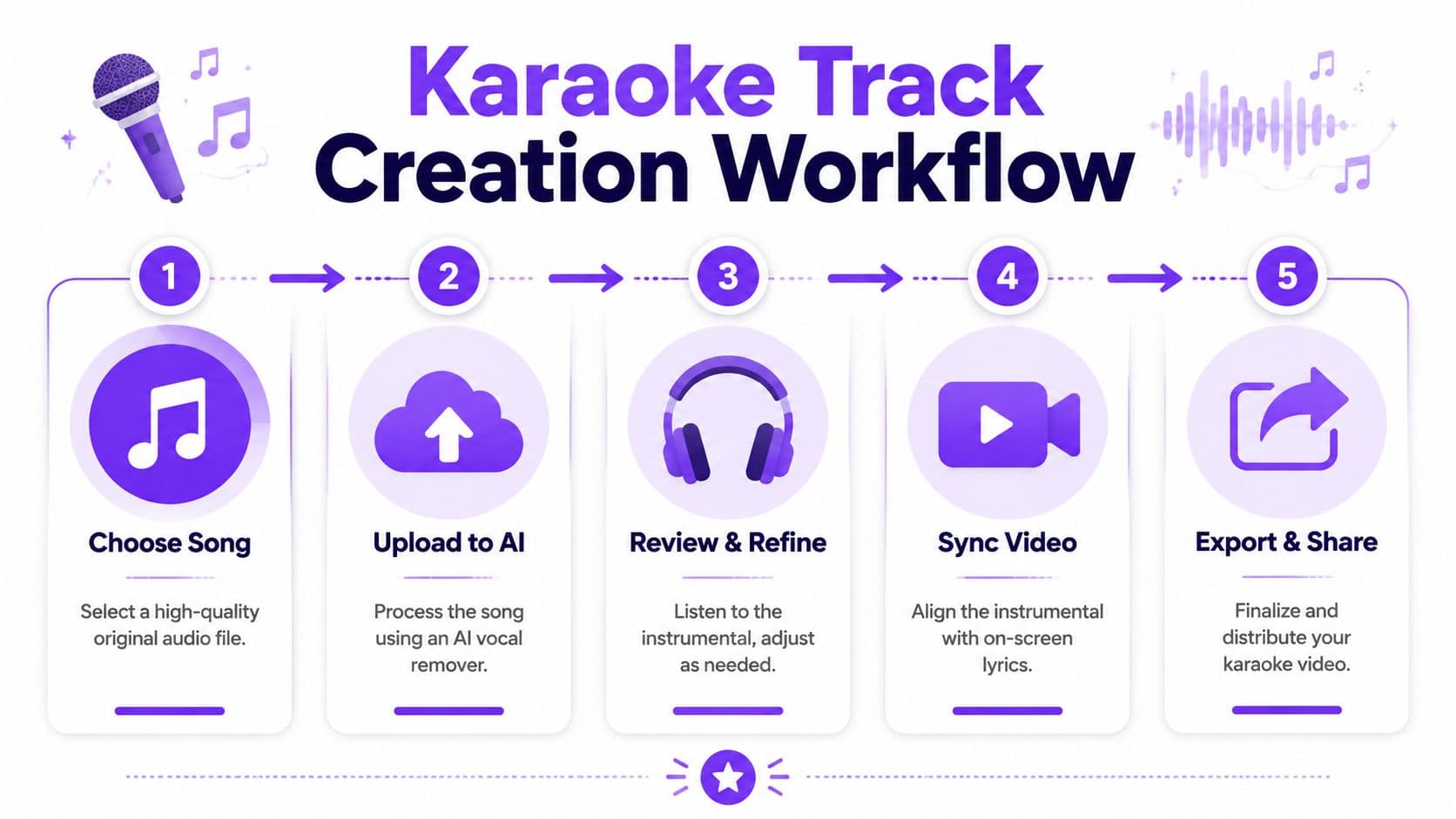
Here's a clean workflow you can repeat.
Step one: choose the right song file
Start with the highest-quality version you can legally use. Don't grab the first random copy you find.
If you're choosing between files, pick the one that sounds most open and least harsh before any processing. Strong source audio gives the AI clearer vocal and non-vocal cues.
Step two: run separation and save both outputs
Upload the song into your chosen AI vocal remover and export both the backing track and isolated vocal if the tool offers both. Even if you only need the backing track, keeping the vocal stem helps you evaluate what the model did.
This is also where web-based and desktop tools differ a bit:
- Browser tools: Fast to access, simple for one-off jobs, easy for non-technical users
- Desktop apps: Useful if you process lots of tracks, want local control, or prefer working offline
If you want a practical starting point for mobile-friendly or browser-first tools, this list of vocal remover app options for karaoke creation gives you a sense of what to compare.
Step three: audition like a mixer, not a fan
Don't just listen to whether the song feels familiar. Listen for whether it's usable.
Try this short review method:
- Check the chorus first. That's where many tools struggle most.
- Solo your attention on the center. Lead vocals usually sit there, so leftover traces often show up in that space.
- Listen on two systems. Headphones reveal artifacts. Speakers reveal whether the track still feels musical.
If the instrumental feels slightly imperfect on headphones but works well on speakers, it may still be perfectly fine for karaoke.
Step four: apply light cleanup
You don't need heavy mastering. Small moves usually do more good than big ones.
A few gentle fixes can help:
- Trim harshness: A light EQ cut in the edgy midrange can reduce the feeling of damage.
- Restore space: A touch of subtle reverb can glue small holes together.
- Control level jumps: Light compression can make the backing track feel steadier.
Keep it modest. Overprocessing often makes artifacts more obvious.
Step five: think about the final format early
Many tutorials often stop short. A karaoke track isn't finished when the vocal is gone. It's finished when the audience can sing with it.
If your end goal is YouTube, reels, event playback, or branded lyric content, start designing for that from the beginning. Think about pacing, lyric readability, and visual style while you're still evaluating the audio. If you create content regularly, this guide to stellar content in 2025 is useful because it frames production choices around audience experience rather than just technical output.
That shift changes your decision-making. A track that's slightly less pristine but easier to turn into a compelling video may be the smarter choice.
From Instrumental Track to Synced Karaoke Video
You remove the lead vocal, press play, and for a moment it feels like the job is done. Then the primary work begins. You still need words on screen, timed to the song closely enough that someone can sing along without guessing.
That is the step many guides skip.
A usable karaoke file is more than vocal-free audio. It is audio, lyrics, timing, and video working together. If one part is off, the whole experience feels clumsy. Great backing audio with late lyrics still makes singers stumble.

Manual lyric syncing usually turns into repetitive editor work. You drop in the song, paste lyrics, split lines, drag captions into place, replay the same phrase five times, export, notice one line is early, then open the project again. Nothing about that process is hard to understand. It is hard because it breaks creative momentum.
A simple analogy helps here. Audio separation is like clearing the stage. Karaoke production is like turning on the spotlights and handing the audience the script. Clearing the stage matters, but the performance still cannot start until the words appear at the right moment.
Why lyric timing becomes the real bottleneck
The switch from audio cleanup to subtitle-style editing trips up a lot of creators because it uses a different kind of attention. You stop listening for tone and start watching syllables hit the beat.
That creates a few common problems:
| Friction point | What it looks like in practice |
|---|---|
| Timing drift | A line starts fine, then slowly feels early or late by the end of the phrase |
| Editing fatigue | Tiny corrections consume more time than the audio work did |
| Uneven presentation | One song has clean pacing, the next feels crowded or awkward to read |
This matters even more for songs with pickups, rubato intros, or fast phrasing. A line can be technically close and still feel wrong to a singer. Karaoke timing has to feel musical, not just mathematically aligned.
The better workflow closes the loop
An end-to-end setup makes more sense than bouncing between separate tools. After you create the backing track, the next useful step is putting lyrics and timing in place in the same production flow.
MyKaraoke Video takes that practical approach. You upload the audio, add lyrics, sync them, and export a karaoke or lyric video from one workspace. That saves a lot of repetitive editor work and helps turn a separated song into something people can use and share.
Here is the key shift in mindset. Do not stop at "the vocal is gone." Stop at "the song is ready for someone to sing."
For creators, that is the ultimate finish line. A finished karaoke video gives you readable lyrics, natural timing, and a file you can post to YouTube, use at an event, or send to friends for a sing-along night.
Troubleshooting Common Vocal Removal Issues
When separation goes wrong, the fix usually isn't random trial and error. The symptom often points to a specific cause. Use this table like a quick studio note sheet.
Common AI Vocal Remover Issues and Fixes
| Problem | Likely Cause | Solution |
|---|---|---|
| You can still hear faint lead vocals | Dense chorus, stacked harmonies, or the voice overlaps strongly with instruments | Try a cleaner source file, compare another AI vocal remover, and lower expectations for heavily layered pop choruses |
| The instrumental sounds thin | The model removed some center-panned instruments along with the vocal | Add light EQ body, compare the vocal stem to hear what was lost, or test a different separation setting if available |
| The track has a watery or swirly texture | Reverb, cymbals, and sustained tones confused the model | Use subtle reverb or EQ to smooth it, and avoid overprocessing afterward |
| Drums feel weak after removal | Kick, snare, or percussion shared energy with the vocal region | Pick a different source version of the song or use the result only for casual karaoke rather than critical listening |
| The verse sounds fine but the chorus falls apart | More simultaneous layers enter during the chorus | Audition the hardest section first before committing to lyric syncing |
| The isolated vocal sounds strange too | The separation itself struggled, not just the instrumental side | Save time and switch tools or source audio before editing video |
| The timing feels off once lyrics are added | The audio is usable, but the video layer wasn't synced carefully | Use a workflow that supports lyric timing and preview inside the same project |
A lot of beginners keep trying to “repair” a bad separation with aggressive effects. Usually that makes things worse. If the source and the model are a poor match, the smarter move is to restart earlier in the chain.
Frequently Asked Questions About AI Vocal Removal
Can an AI vocal remover make an acapella too
Yes. Most tools that remove vocals can also isolate them. Instead of exporting the music-only track, you keep the vocal stem.
What file format should I start with
Use the cleanest source you have. WAV and FLAC are strong choices. A good MP3 can also work, but avoid low-quality or repeatedly compressed files.
Is it legal to use vocal removal results
That depends on how you use the song and what rights you have. Personal practice is different from commercial publishing, public performance, or monetized uploads. Check the copyright and licensing rules that apply to your use case.
Why doesn't every song separate cleanly
Because the vocal and instruments often occupy overlapping space in the mix. Some arrangements are simple and clear. Others are packed with layers, effects, and doubled parts that make separation harder.
Should I always choose the cleanest possible instrumental
Not necessarily. For a karaoke video, usability matters too. If one version sounds slightly cleaner but takes more editing work to turn into a finished video, another version may be the better production choice.
If you want to go from raw song file to finished karaoke video without juggling separate apps, MyKaraoke Video gives you a browser-based way to handle lyric syncing, editing, and export in one place. That's a practical next step when an AI vocal remover provides the backing track, but you still need the final video people can sing along with.