Setting up a good karaoke night is about more than just plugging in a microphone. It’s about creating an entire experience. The real magic happens when you blend the right hardware—mics, a mixer, and speakers—with smart software that handles the songs and lyrics. This combo is what turns a simple sing-along into a seamless, unforgettable performance for everyone.
Your Blueprint for an Unforgettable Karaoke Night
Let’s be real, a great karaoke night is something special. It's not just about singing along; it’s about the energy in the room, the quality of the sound, and that feeling of sharing a moment. This guide is all about helping you create that memorable atmosphere from the ground up.
We’ve moved way past those clunky, outdated machines with their tiny, tired song lists. Today, software-driven solutions have brought professional-grade setups into our living rooms, making them accessible for home enthusiasts and aspiring content creators alike.
The Pillars of a Modern Setup
We’re going to break down the essentials of a fantastic karaoke setup, focusing on a system that’s both powerful and easy to manage. Forget the old-school complexities that made this feel like a chore. Our goal is to build something that makes every performance feel polished and professional, without the headache.
We'll be walking through three key areas:
- Selecting the Right Gear: I'll show you equipment options that fit any budget, so you get the best possible sound without breaking the bank.
- Mastering Intuitive Software: The right software is the heart of your entire system. It’s what manages your song library and visuals, making everything run smoothly.
- Creating the Perfect Environment: We’ll talk about arranging your space to feel like a real stage, optimizing everything from the sound to the overall vibe.
More Than Just a Hobby
This global love for karaoke isn't just a passing trend; it's a massive, booming market. The surge in popularity proves that both home setups and commercial venues are in high demand. In fact, projections show the karaoke system market is set to hit USD 5,924.5 million in 2025, with some forecasts predicting another USD 442 million in growth by 2029.
This incredible expansion is being driven by digital platforms and smarter tech that make setting up a great karaoke experience easier than ever before. You can dive deeper into these market trends and see the data for yourself.
Think of this guide as your complete roadmap. Whether you're planning a killer living room party or building a YouTube channel, you’ll learn how to get every detail right for a memorable performance.
Choosing Your Karaoke Arsenal of Essential Gear
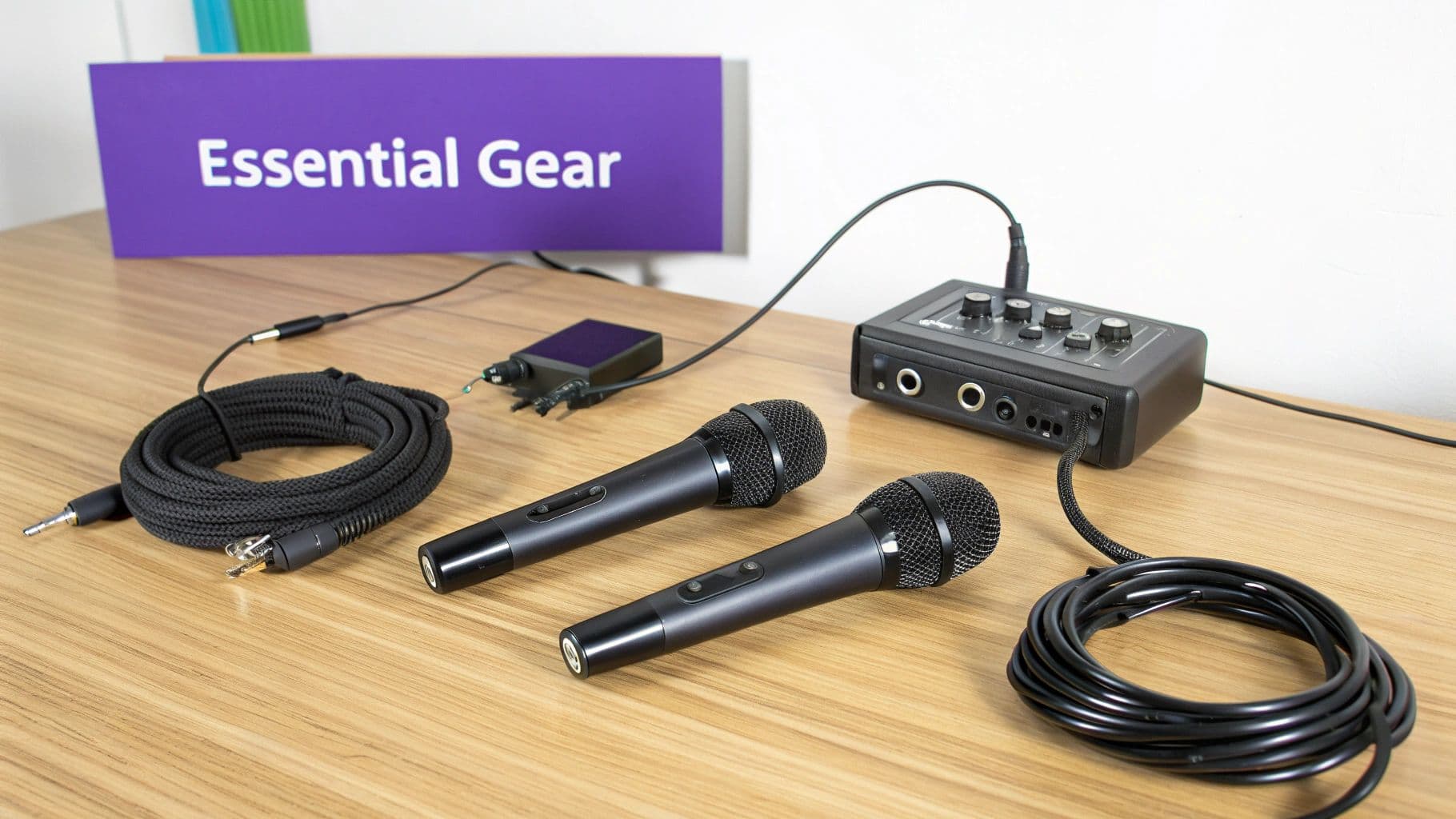
Before you ever queue up a song, the gear you choose sets the stage for every performance. The foundation of a truly great karaoke experience isn't the light show or the novelty props—it’s the hardware. Getting this part right is the single most important step, ensuring vocals are crisp, clear, and punch through the music.
Don't worry, this doesn't have to be a complicated or wallet-busting endeavor. Let's walk through the essential components you'll need, whether you're building a simple living room rig for family fun or a more polished system for creating professional-level content.
Microphones: The Voice of Your Party
Think of your microphone as the singer's direct connection to the music and the audience. This isn't the place to skimp. Your two main options are wired and wireless, and both have their place.
- Wired Microphones: These are the reliable workhorses of the karaoke world. A classic dynamic mic like the Shure SM58 is legendary for a reason—it’s built like a tank and delivers fantastic, clear sound. Wired mics are also generally more affordable and never run out of batteries, making them a bulletproof choice for a fixed home setup.
- Wireless Microphones: If you want the freedom to roam the stage (or the living room), wireless is your best bet. Systems from brands like Sennheiser or Shure's BLX series offer excellent quality without tying you down. The only catch? You have to remember to keep fresh batteries on hand to avoid any awkward mid-song dropouts.
For most situations, a quality dynamic microphone is the perfect tool for the job. They're designed to handle powerful vocals without distorting and are great at rejecting background noise—exactly what you need in a lively party environment.
If you want to dive deeper into specific models, our complete guide to the best professional karaoke equipment breaks down the top contenders.
The Mixer: Your Sound Command Center
If the microphone is the voice, the mixer is the brain of the operation. This is where you bring everything together, blending the vocals from your mics with the instrumental track from your laptop or karaoke player. Even a small, simple mixer can make a world of difference in your sound quality.
When you're shopping for a mixer, keep an eye out for these key features:
- Multiple Channels: At a bare minimum, you need at least two microphone inputs (the ones that look like a circle with three pins, called XLR) and a stereo input for your music source.
- Built-in Effects: Reverb is the secret sauce for karaoke. A touch of it gives vocals that professional, spacious sound you hear on recordings, which helps singers sound better and feel more confident.
- EQ Controls: Basic knobs for bass, mid, and treble (EQ) are a must. They let you shape the sound, cut out piercing feedback, and help the vocals sit perfectly in the mix instead of getting buried by the music.
Great entry-level options include small analog mixers from Yamaha's MG series or a Behringer Xenyx model. They give you all the essential controls without a frustrating learning curve.
Pro Tip: Avoid the temptation to just crank the volume knob on the microphone channel. The real magic is in finding the right balance between the mic level and the main music level. This simple adjustment prevents distortion and keeps vocals sounding clean and powerful.
Speakers and Display: Bringing the Performance to Life
Your speakers are what translate all your hard work into sound waves everyone can feel. While your home stereo might work in a pinch, a pair of powered PA speakers will deliver that authentic, room-filling sound that makes it feel like a real karaoke night. Brands like Mackie or JBL offer fantastic powered speakers that are incredibly easy to set up—just plug them into the wall for power and run a cable from your mixer.
For the visual side of things, just about any modern TV will do the trick. The most important factor is visibility. You need a screen that's large enough for both the singer and the audience to follow the lyrics without squinting. The simplest and most reliable way to get this done is by connecting your laptop directly to the TV with an HDMI cable.
This push for better home equipment is part of a much bigger trend. The global karaoke market is surging, driven by both commercial KTV bars and a massive increase in high-quality home setups. While fixed installations in bars led the market in 2023, the home and portable segments are catching up fast, with the Asia-Pacific region alone accounting for a 38.2% market share. It's clear that people everywhere are investing in a better singing experience.
To help you map out your own gear journey, here’s a quick comparison of what a setup might look like at different levels.
Karaoke Equipment Comparison for Different Setups
This table breaks down the essential hardware for three common scenarios, from a casual home party to a serious mobile rig.
| Component | Budget Home Setup | Semi-Pro Creator Setup | Professional Mobile Rig |
|---|---|---|---|
| Microphone(s) | 1-2 wired dynamic mics (e.g., Shure PGA48) | 2 high-quality wireless mics (e.g., Shure BLX288/PG58) | 4+ channel professional wireless system (e.g., Shure SLX-D) |
| Mixer | 4-channel analog mixer with reverb (e.g., Behringer Xenyx 802) | 8-12 channel mixer with better EQs and effects (e.g., Yamaha MG10XU) | 16+ channel digital mixer with advanced routing |
| Speakers | Existing home stereo or a pair of 8-inch powered speakers | A pair of 12-inch powered PA speakers (e.g., Mackie Thump) | A pair of 15-inch powered mains and a subwoofer (e.g., JBL EON) |
| Display | Living room TV (connected via HDMI) | Large TV or a portable projector and screen | Two large TVs or projectors for singer and audience |
| Karaoke Source | Laptop running MyKaraoke Video or YouTube | Dedicated laptop with professional software | Dedicated media laptop with redundant backups |
Ultimately, the right gear is what works for your space, your goals, and your budget. Start with the best you can afford for the most critical components—the mic and mixer—and you can always build out from there.
The Digital Heart of Your Setup: Karaoke Software
Once you’ve got your hardware sorted out, it's time to bring it all to life. Your software is the soul of any modern karaoke setup—it’s your song library, your teleprompter, and your creative engine all rolled into one. Believe me, we've come a long, long way from the days of clunky CD+G players and those tiny, limited song chips.
Today, the scene is all about flexible and powerful software that can turn a basic laptop into a pro-level karaoke machine. Whether you're looking at downloadable PC programs, massive streaming libraries, or innovative browser-based tools, the right software makes everything easier. This digital shift has completely changed the game, not just for home enthusiasts but for serious content creators, too.
The growth here is just staggering. The karaoke app market hit USD 6,186.13 million in 2023 and is on track to balloon to USD 14,814.88 million by 2032. That’s driven by a solid 10.19% growth rate year after year, which tells you just how much people want good, accessible karaoke. You can see more on the booming karaoke app market for yourself.
Exploring Your Software Options
Picking your karaoke software really defines the whole experience. There are a few different routes you can go, and each one has its pros and cons depending on what you’re trying to do.
- Streaming Services: Think of platforms like Singa or Karafun. You pay a monthly fee and get instant access to a massive, licensed library. This is the fastest way to get a huge songbook ready for a party where you need tons of variety.
- PC-Based Programs: Old-school KJs and serious hobbyists often lean on dedicated software like PCDJ Karaoki or Karma. These give you incredible control for managing your own local song files, handling singer rotations, and tweaking every little detail on the screen.
- Browser-Based Tools: This is the newest and, in many ways, the most flexible approach. Tools like MyKaraoke Video run right in your web browser, so there's nothing to download or install. They're especially brilliant for content creation, letting you turn any instrumental track into a custom karaoke video from literally any computer.
If you’re just starting, it can feel like a lot to choose from. For a deeper dive, we’ve put together a guide on what makes for good karaoke software right here.
The best advice I can give is to match the software to your main goal. Are you throwing parties or building a YouTube channel? Answering that one question will point you in the right direction fast.
Creating Your Own Karaoke Tracks: A Practical Walkthrough
So what happens when the song you really want isn't in any library? Or what if you're a musician and want to make lyric videos for your own original music? This is where modern creation tools step in and turn what used to be a major headache into a fun, creative process.
Let's walk through making a custom karaoke video from scratch. We'll use a browser-based tool like MyKaraoke Video as our example because it really shows how AI and smart design have made this accessible to anyone.
Here’s a peek at the MyKaraoke Video interface. Notice how clean it is—everything is laid out simply for uploading audio, dropping in lyrics, and styling the video.
This workspace is all about guiding you through the process, keeping the lyric editor and video preview front and center so you can see your changes in real-time.
Step 1: Upload Your Audio and Lyrics
Everything starts with your source files. First, you'll upload your audio track. This needs to be an instrumental or "backing track" version of the song. For the best results, use a high-quality MP3 or WAV file—it makes a huge difference in the final product.
Next up, the lyrics. Just copy and paste the entire song's text into the lyrics box. Don't worry about formatting it line-by-line just yet; the software is smart enough to handle that for you. This simple start gets the technical stuff out of the way so you can get to the creative part.
Step 2: Let AI Handle the Heavy Lifting
This is where the magic really happens. Instead of spending hours manually timing every single word to the music, you can use an AI-powered auto-sync feature. With just one click, the tool listens to your music and reads the lyrics, automatically lining them up with incredible accuracy.
What used to be the most tedious part of making a karaoke track—a process that could easily take an hour for a single song—is now done in less than 30 seconds. For anyone creating content regularly, this is an absolute game-changer. It frees you up to focus on making the video look great.
Step 3: Fine-Tuning with the Sync Editor
The AI gets you about 99% of the way there, but sometimes you want to make a few tweaks to match a singer's specific phrasing or a tricky rhythm. That's what the visual sync editor is for. You'll see the audio waveform right next to your lyrics, which are broken down word-by-word.
From here, you can just click and drag words or phrases to nudge their timing. Every adjustment you make updates the preview instantly, so you can see and hear the results on the fly. This hands-on control is what lets you get that perfectly polished, professional feel.
Customizing Your Video's Look and Feel
A great karaoke video isn't just about perfectly timed lyrics—it has to look good, too. The visual experience is a huge part of the fun, and modern tools give you total control over the video's aesthetic.
Key Customization Features:
- Backgrounds: Upload your own image or video, or pick from a built-in library. This is perfect for branding your channel's content or setting the right mood for the song.
- Fonts and Colors: Tweak the font, text size, and color of the lyrics. You can also change the "highlight" color that sweeps across the words, making it super easy for the singer to follow.
- Layout and Effects: You can decide exactly where the text appears on the screen and even add some subtle animations to make the whole thing feel more dynamic and engaging.
Once you’re happy with how everything looks and sounds, the last step is to export your video. You can usually choose the resolution, and 1080p MP4 is the gold standard for crisp output that looks great on YouTube, social media, or your TV at home. The entire flow—from uploading a track to exporting a finished video—can be done in just a few minutes, which really shows how much easier it is to set up amazing karaoke content today.
Connecting Everything for a Seamless Performance
Okay, you’ve picked out your gear and have the software ready to go. Now comes the hands-on part: plugging everything in. This is where all those individual components come together to form a single, cohesive karaoke machine. The mission is to create a clean, logical path for your sound and video, making sure everything flows exactly where it needs to without hums, buzzes, or delays.
Think of it like plumbing, but for audio and video. Every cable is a pipe, and each piece of equipment is a junction. Get the connections right, and it all just works. Get it wrong, and you'll be pulling your hair out over a silent microphone or that dreaded feedback squeal.
Mapping Your Audio and Video Signal Flow
At its heart, a modern karaoke setup has a really logical flow. Your laptop is the brain, the mixer is the command center, and the speakers and TV are your outputs. If you get this concept down, you'll be able to troubleshoot almost any issue that pops up later.
Here's the most common and effective way to chain your gear together:
- Laptop Audio to the Mixer: First, get the music from your laptop into the mixer. The easiest way is with a 3.5mm-to-dual-RCA or 3.5mm-to-dual-1/4" cable. Just plug the 3.5mm end into your laptop's headphone jack and the other ends into a stereo channel on your mixer.
- Mics into the Mixer: Next, plug your microphones into the XLR inputs on the mixer. Those are the circular inputs with three little pins. XLR cables are the pro choice for a reason—they deliver a clean, noise-free signal for vocals.
- Laptop Video to the Screen: This one's simple. Run an HDMI cable straight from your laptop to your TV or projector. HDMI handles the video for the lyrics beautifully. It also carries a copy of the audio, but we’re going to ignore that since our sound is being managed by the mixer.
- Mixed Sound to the Speakers: Finally, connect the main outputs from your mixer to your powered speakers. You'll typically use XLR or 1/4" TRS cables for this last step. This sends the final, blended mix of music and vocals out for everyone to enjoy.
Separating your audio and video paths like this is the secret to quality and control. By routing all the sound through the mixer, you can tweak the vocal and music volumes independently. This single step solves the number one karaoke problem: singers being drowned out by the backing track. If you're curious about how these principles apply more broadly, looking into the essential gear and software setup for live streaming can offer some really helpful parallel insights.
Conquering Common Connection Frustrations
Even with a perfect roadmap, you can still hit a few bumps. Knowing how to deal with the common culprits—audio delay, feedback, and mismatched levels—will make you look like a pro and keep the party going.
Eliminating Audio Delay (Latency) Ever hear that weird, off-putting lag between when someone sings into the mic and when their voice comes out of the speakers? That's latency. The cause is almost always trying to route the microphone through the laptop instead of directly into a proper mixer.
Key Takeaway: Always, always plug your microphones directly into an external audio mixer. A dedicated mixer processes sound almost instantly (usually under 10ms). A laptop's internal sound card, on the other hand, can introduce noticeable delays of 50ms or more—more than enough to completely throw off a singer's timing.
Preventing Microphone Feedback Ah, the dreaded feedback squeal. That ear-piercing shriek happens when a microphone picks up its own amplified sound from a speaker, creating an out-of-control sound loop. The fix is all about smart placement.
- Rule #1: Never point a microphone directly at a speaker. It’s that simple.
- Ideal Placement: Set up your speakers in front of the performance area, pointing out toward the audience. This directs the sound away from where the microphones are, preventing the loop from ever starting.
Achieving Perfect Sync Between Video and Audio Sometimes the lyrics on the screen don't quite line up with the music you're hearing. This is usually a software or computer processing issue, not a cable problem. A quick fix is to make sure your laptop isn't struggling with a bunch of other programs running in the background. For those peskier sync problems, our detailed guide on how to sync audio with video digs into more advanced solutions.
One last pro tip: don't neglect your cables. A messy pile of wires looks unprofessional and is a serious tripping hazard. Grab some simple Velcro ties or cable sleeves to bundle everything neatly. It's a small touch that makes a huge difference in safety and appearance.
Optimizing Your Space for Great Sound and Vibe
Even the best gear on the planet will sound terrible in a room with bad acoustics. This is where we go beyond just plugging things in and start turning your space into a proper karaoke stage. The real goal here is to manage all those sound reflections—the echo—and build an atmosphere that makes people want to sing.
You don't need to go out and buy a bunch of professional acoustic panels to hear a huge difference. Honestly, some simple, no-cost tweaks using stuff you probably already have can clean up the sound in a big way. The main villains you're fighting are hard, flat surfaces like bare walls, hardwood floors, and uncovered windows. They just love to bounce sound all over the place, making everything sound harsh and messy.
Taming Room Echo on a Budget
When it comes to karaoke sound, soft materials are your absolute best friend. Think of them as sound sponges. They soak up sound waves instead of letting them ricochet around, which immediately tightens up the music and makes vocals pop with clarity.
Here are a few easy wins:
- Throw down a rug. A thick area rug is probably the single most effective thing you can do to kill nasty reflections off the floor.
- Hang some curtains. Heavy drapes over windows are fantastic at absorbing those tinny, high-frequency echoes.
- Soften up your walls. Got a tapestry or a cool blanket? Hang it up. Even a bookshelf packed with books does a great job of breaking up a flat, reflective wall surface.
Of course, a killer performance is about more than just perfect audio—it's about the entire vibe. Creating a space that feels like a stage makes the whole experience more immersive and a lot more fun for everyone involved.
Pro Tip: If you're not sure how bad your echo is, try the "clap test." Stand in the middle of the room and give one loud, sharp clap. If you hear a kind of metallic, ringing decay, that's called flutter echo. The fix? Add more soft surfaces until that ring disappears.
Setting the Stage with Lighting and Layout
A little strategic lighting can completely change the mood of a room. You don't need a pro lighting rig; a few thoughtful touches are all it takes to create a real focal point for the singer.
Try using a few smart bulbs that let you change colors or dim the lights from your phone. Even a simple floor spotlight aimed at the performance area works wonders. The trick is to dim the main room lights just a bit and make the "stage" the brightest spot in the room. It’s a simple psychological hack that draws everyone’s attention right where you want it: on the performer.
How you arrange the room is just as important. Make sure your screen is positioned so both the singer and the audience can easily follow along with the lyrics. And try to arrange the seating to face the performance area—it creates a much more engaging and supportive feel for whoever is brave enough to grab the mic.
Before we get into the nitty-gritty of connecting your gear, it’s helpful to visualize how the sound will travel from its source to the speakers.
Here’s a look at the basic signal path for any solid karaoke setup.
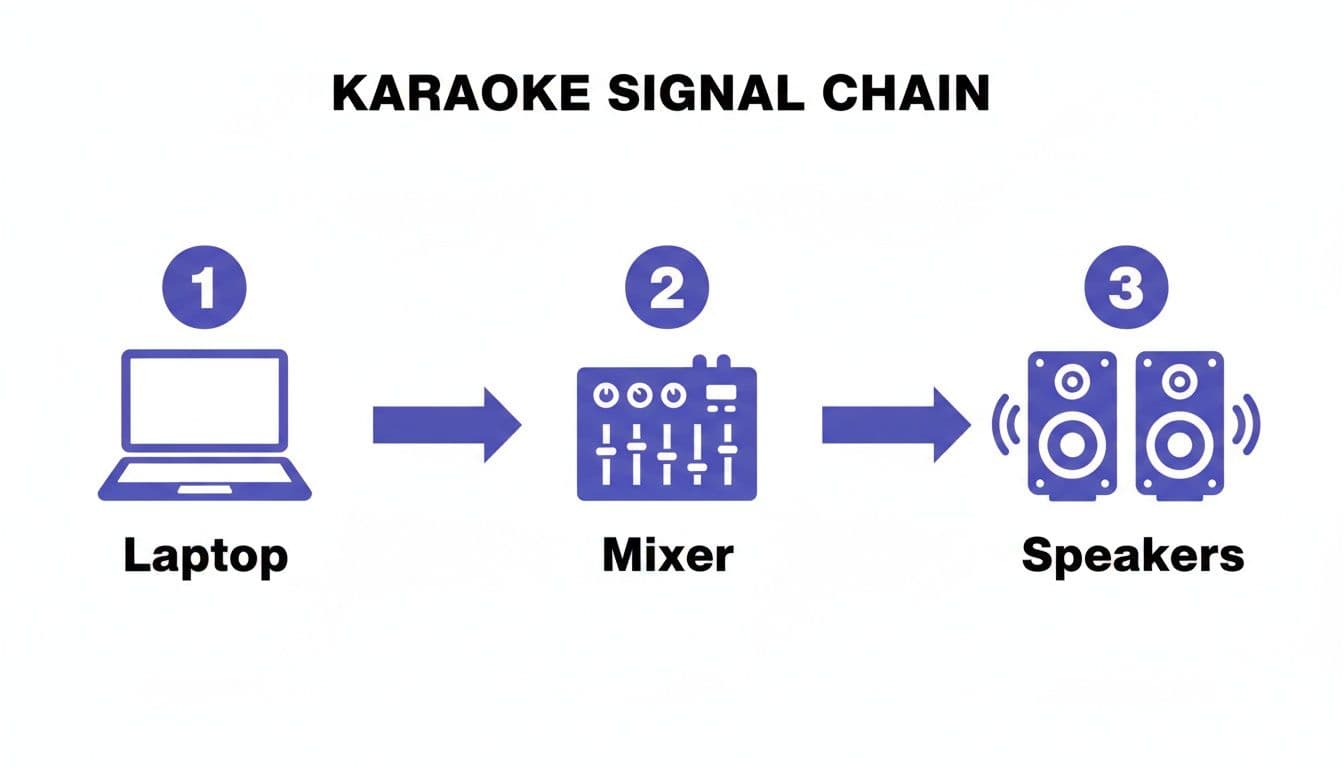
Following this flow ensures the music from your laptop and the vocals from the mic get blended together properly in the mixer before they hit the speakers. This is the key to getting that clear, powerful, and controlled sound you’re after.
Taking Your Karaoke Setup to the Next Level
Alright, so you've got the basics down. The sound is coming out of the speakers, and the lyrics are on the screen. Now, let's talk about the details—the little tweaks that separate a decent karaoke night from a truly epic one. These are the pro-level adjustments and quick fixes I've learned over the years to make every singer feel like a rockstar and keep the show running smoothly.
A little bit of polish can absolutely transform how a singer feels on the mic. The single most important effect you can add is reverb. Even the most basic mixers usually have it built-in. Just a touch of reverb adds space and gloss to a voice, smoothing over tiny imperfections and giving it that "studio recording" feel. It’s a huge confidence booster.
Dialing in the Perfect Vocal Mix
Don't be shy about playing with the knobs on your mixer. The key is subtlety—a little adjustment can make a massive difference.
- Compression: If your mixer has a compressor (sometimes it's just a single knob), use it lightly. It’s a great tool for reining in those singers who go from a whisper to a scream, keeping the overall volume consistent and professional.
- EQ Tweaks: Is a singer's voice getting lost in the music or sounding a bit muddy? Try rolling back the low-end frequencies just a bit. If they sound too sharp or thin, easing off the highs can help. You're aiming for clarity, not a total transformation of their voice.
My Personal Tip: Always start with every EQ and effect knob set to zero. Have a volunteer sing a song, and slowly turn up the reverb until their voice just starts to shimmer. You want to avoid the "singing in a canyon" effect. That small touch of reverb is often the secret sauce.
Quick Fixes for Common Karaoke Headaches
No matter how dialed-in your system is, things can still go wrong. Knowing what to look for will save you a ton of stress and keep the music going. Here are the most common culprits I run into and how to fix them fast.
| Problem | What's Probably Happening | The Quick Fix |
|---|---|---|
| Microphone keeps cutting out | Dead or dying batteries in a wireless mic, or you've got a bad XLR cable. | Always start with fresh, high-quality batteries. If you're using a wired mic, swap out the cable for one you know is good. Make sure it's clicked in firmly on both ends. |
| Audio sounds distorted or "fuzzy" | Your signal is too hot and is "clipping". This is almost always an issue with the gain setting on your mixer. | Find the "PEAK" or "CLIP" light on that mic's channel—it's usually red. Turn the gain knob (the one at the top) down until that light only blinks on the absolute loudest notes. |
| The karaoke software is laggy | Your computer is struggling to keep up. It's probably running out of processing power or RAM. | Kill every other program and browser tab you have open. Long-term, you might want to dedicate an older laptop just for karaoke so it isn't bogged down. |
Once you get comfortable with these little adjustments and troubleshooting tricks, you'll be able to handle just about anything. You'll keep the performances sounding fantastic and completely free of those awkward technical glitches.
Answering Your Top Karaoke Setup Questions
Diving into the world of audio gear can feel a bit overwhelming, and a few common questions always seem to surface when setting up a karaoke system. Let's tackle some of the most frequent ones with practical, no-nonsense answers.
Is a Mixer Really Necessary for a Home Setup?
Honestly, for a super basic, one-mic-and-a-speaker situation, you might squeak by without one. But if you care even a little bit about how things sound, a mixer is non-negotiable. It's the central hub that prevents audio distortion and gives you the kind of control you hear in professional setups.
Think of it this way: a mixer lets you independently balance the singer's vocals against the music track, which is absolutely critical. It’s also where you can add a touch of reverb to give vocals that polished, studio-like feel. Even an affordable, entry-level mixer will make a world of difference in your sound quality.
What's the Easiest Way to Get Karaoke Songs?
These days, software is your best friend. For pure convenience and variety, subscribing to a karaoke streaming service is a fantastic choice. You get instant access to a massive library of songs, which is perfect for parties where everyone has a different request.
However, if you're building a content channel or just want more creative freedom, a browser-based tool is the way to go. These tools let you take any instrumental track you own and turn it into a custom karaoke video, complete with perfectly synced lyrics. Your songbook becomes truly unlimited and personal.
Key Takeaway: The golden rule for stopping feedback is to never, ever point a microphone directly at a speaker. This simple positioning trick solves the problem 99% of the time.
How Do I Stop That Horrible Microphone Squeal?
That piercing, high-pitched screech is called feedback. It's basically a sound loop that gets created when your microphone picks up the sound coming out of your own speakers and then re-amplifies it. To kill the squeal, you have to break that loop.
The fix is usually about positioning. Make sure the singer and their microphone are standing behind the main PA speakers. This way, the sound is always projecting away from the mic. If you've repositioned everything and the squeal is still there, try turning down the microphone's gain knob or gently lowering the treble (high-frequency) EQ on your mixer.
Ready to create your own professional-grade karaoke videos in minutes? MyKaraoke Video uses AI to automatically sync lyrics to your music, giving you a custom song library with zero hassle. Start creating for free at https://www.mykaraoke.video.