Think of an online lyric video maker as your secret weapon for creating professional-looking lyric or karaoke videos right from your web browser. These tools are built to help artists and creators make compelling content without getting bogged down in complicated software or spending a fortune. They’re designed for speed, offering features like automatic lyric syncing, pre-made templates you can actually use, and simple export options.
Why Online Lyric Video Makers Are a Game-Changer for Artists
Not too long ago, making a slick lyric video was a real headache. You either had to hire a pricey motion graphics designer or spend countless hours trying to master complex software like Adobe After Effects. This put indie artists and creators on a tight budget at a huge disadvantage.
Now, things are different. An online lyric video maker completely levels the playing field, putting powerful creative tools right at your fingertips. Instead of production taking weeks, you can knock out a visually impressive video in a single afternoon. That kind of efficiency is a lifesaver when you're trying to keep up a steady stream of content for YouTube and Instagram.
The demand for these easy-to-use video tools is skyrocketing. The global market is projected to grow by an astounding USD 184.69 billion between 2025 and 2029. This explosive growth is fueled by one simple fact: lyric videos are an incredibly effective and affordable way for artists to get their music out there. You can read the full research about the growth of video creation tools to see just how much they're shaping content strategy today.
A Deeper Way to Connect with Your Fans
A lyric video isn’t just about putting words on a screen—it's about creating a genuine connection. When fans can read along, they get a much richer sense of the song's story and emotion. It transforms listening from a passive experience into an active one, building a stronger community around your music.
Just think about the benefits:
- Better Storytelling: The right font, colors, and background can dramatically amplify the song's mood and narrative.
- Greater Accessibility: On-screen lyrics open up your music to a wider audience, including people who are hard of hearing or don't speak the language fluently.
- Higher Engagement: On YouTube, you'll often see lyric videos with longer watch times and more comments because fans love to discuss line meanings and share their favorite parts.
A truly great lyric video feels like part of the song itself. The goal isn't just to show the words; it's to make the audience feel them through smart design and perfect timing.
When choosing a tool, it's crucial to focus on features that will actually make your life easier and your videos better. Some platforms are bare-bones, while others offer a full suite of professional-grade options.
Key Features of a Great Online Lyric Video Maker
| Feature | Why It Matters for Your Workflow | Real-World Application |
|---|---|---|
| Automatic Lyric Syncing | This is the single biggest time-saver. The AI listens to your track and aligns the lyrics for you, giving you a solid starting point. | You upload your song and lyrics, and the tool creates a synchronized draft in minutes, letting you jump straight to creative tweaks instead of tedious manual timing. |
| Customizable Templates | Good templates offer a professional foundation that you can still make your own, preventing every video from looking the same. | You find a template that matches your song's vibe—maybe a gritty, urban style for a hip-hop track—and then customize the fonts and colors to fit your brand. |
| Rich Typography Options | The font is the star of the show. Access to a wide range of fonts (and the ability to upload your own) is non-negotiable. | You use a delicate, handwritten font for a ballad to convey intimacy or a bold, sans-serif font for a rock anthem to project power. |
| Flexible Export Settings | You need to be able to export in various resolutions and aspect ratios (16:9 for YouTube, 9:16 for TikTok, etc.) without losing quality. | You export a high-res 1080p version for your main YouTube video and then easily re-export a vertical version for your Instagram Stories. |
Picking a tool with these core features ensures you're set up for success from the start, allowing you to focus on the creative side of things.
A Powerful Tool for Promotion and Growth
Beyond connecting with fans, lyric videos are incredibly effective marketing tools. They're often the first visual fans see for a new single, building hype and driving streams on Spotify and Apple Music long before an official music video drops.
And they’re super easy to repurpose. You can slice up a full-length video into short, attention-grabbing clips for social media. A punchy 15-second snippet of the chorus is perfect for an Instagram Reel or TikTok video, pulling people in and sending them to the full song.
This strategy lets you get maximum mileage out of one creative asset across all your channels. All of this, without needing a big production crew or a massive budget, makes an online lyric video maker a must-have in any modern artist's toolkit.
Getting Your First Lyric Video Project Off the Ground
Jumping into a lyric video maker for the first time should be fun, not a chore. The secret to a smooth, creative process is all about a little prep work. Before you even click "New Project," getting your key pieces in order will save you a ton of headaches later.
Think of it like getting your ingredients ready before you start cooking. For us, the main ingredients are a solid audio file and a clean copy of your lyrics. Nailing these two things from the start is the key.
Nail Down Your Core Assets First
Let’s start with the audio. Your track is the backbone of the entire video, so quality is everything. Always, and I mean always, start with the best version of your song you can get your hands on. That usually means a WAV or FLAC file. Sure, most tools will take an MP3, but a lossless format gives the AI the cleanest data to work with for syncing everything up.
Next, the lyrics. This seems almost too simple, but how you format them can be a massive time-saver. Don't just dump a wall of text from a notepad file.
Instead, open a simple text editor and type them out with a line break after each sung line. If there's a pause or a singer holds a word, add an extra line break there. This simple structure helps the software chop everything up and time it correctly right out of the gate.
My Go-To Trick: Before uploading, I always do a quick "table read." I play the song and read my formatted lyrics along with it. This five-minute check helps me catch typos and make sure my line breaks actually match the singer's natural phrasing. It's a tiny step that has saved me hours of annoying edits.
Setting Up Your Workspace
With your audio and lyrics prepped, it's time to build the project. Most online lyric video makers have a pretty similar starting point. You'll land on a dashboard, start a new project, give it a name, and then face your first big decision: the aspect ratio.
This is a bigger deal than you might think. Are you making this for a YouTube channel or for a TikTok clip?
- 16:9 (Horizontal): This is your classic widescreen format. Perfect for YouTube, Vimeo, and anything you'd watch on a desktop.
- 9:16 (Vertical): The go-to for Instagram Reels, TikTok, and YouTube Shorts.
- 1:1 (Square): A really flexible option that looks great in Instagram and Facebook feeds.
Pick the format that matches where you plan to share the video the most. You can often adapt it later, but starting with the right one ensures all your design elements look good from the beginning. Once you choose, the platform will ask for your audio file and your lyric text.
This is where the software starts doing its thing, turning your raw files into a timeline you can actually work with.
Finding Your Way Around the Editor
After everything is imported, you'll find yourself in the main editor. This is your creative cockpit. While every tool looks a bit different, they all share a few key components.
Here’s a snapshot of what a finished lyric video looks like in action. Notice how the words are timed to appear as the artist sings them.
That's our goal: text that's perfectly synced and easy to read, enhancing the song without being a distraction.
To get there, you'll be using a few main areas of the editor:
- The Timeline: This is mission control. You'll see your audio waveform here, with blocks of lyrics layered on top. This is where you'll be dragging, trimming, and nudging clips to get the timing just right.
- The Canvas (or Preview Window): This is your live preview. Every time you change a font, tweak a color, or add an effect, you'll see it happen here in real-time.
- The Customization Panel: This is the fun part. It’s your toolbox, filled with fonts, color palettes, animation effects, and background choices. This is where you give your video its unique visual personality.
Before you get into the nitty-gritty, just take a minute to poke around. Drag a lyric block on the timeline. Try out a weird font. Apply a cheesy animation. Getting a feel for the layout is the best way to get comfortable. If you want to go a step further and really sharpen your skills, check out these essential video editing tips for beginners. Understanding the fundamentals makes any tool feel more intuitive. Your first project is all about learning the ropes and finding a workflow that works for you.
Nailing the Perfect Lyric Sync
Timing is everything in a great lyric video. It's the invisible glue that connects the sound to the sight. When the words pop up on screen the exact moment they’re sung, your viewer gets lost in the music. But if that timing is off, even by a split second, the whole vibe feels clunky and amateur.
This is where a good online lyric video maker really shines, giving you the tools to get this crucial step just right.
The whole creation process really boils down to a few key stages. You prep your audio, build your visual layout, and then sync it all together.
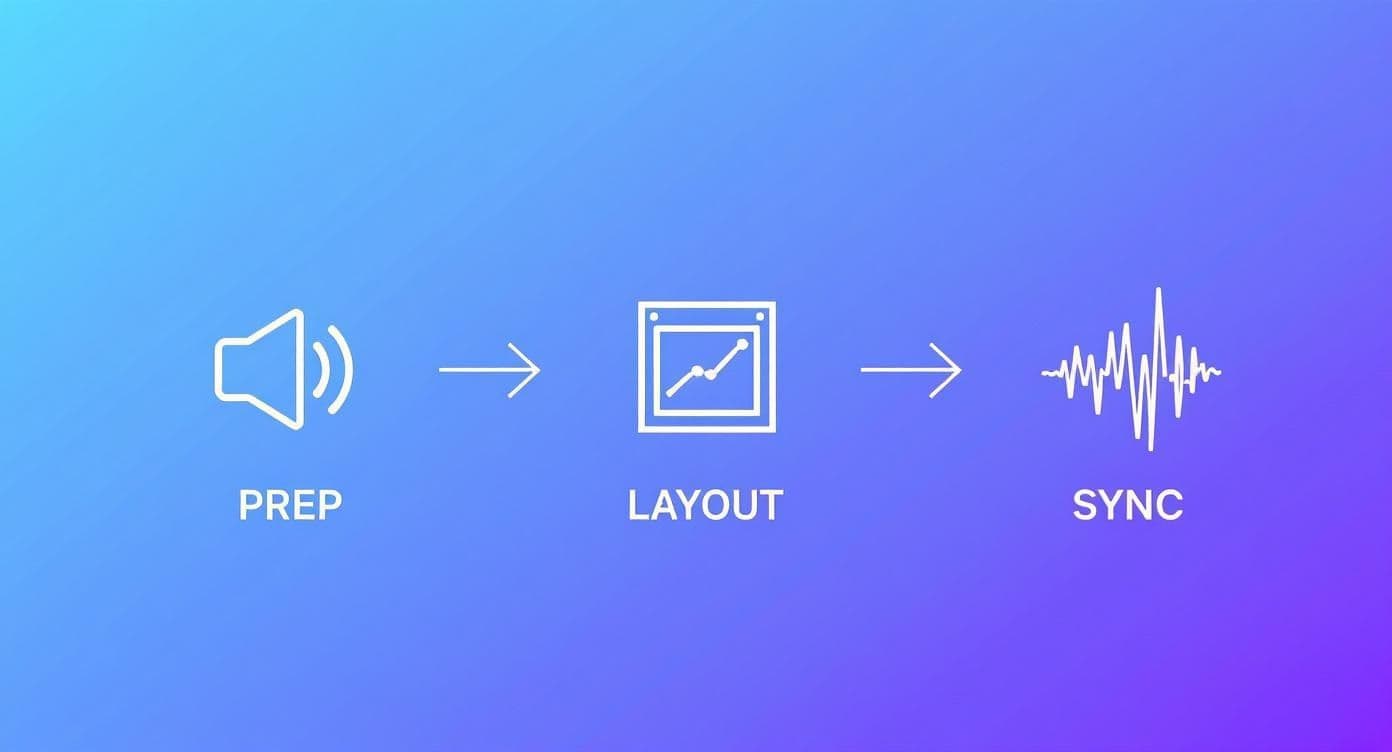
As you can see, synchronization is that final, critical touch that marries all your creative choices into one polished video.
And it's a great time to be making videos. The global market for online video platforms was valued at USD 1.11 billion in 2024 and is projected to hit USD 3.18 billion by 2033. This explosion is all about our growing hunger for on-demand content, which makes easy-to-use video tools more valuable than ever.
The Magic of AI Auto-Sync
Most modern lyric video makers come equipped with an AI-powered auto-sync feature, and honestly, it’s a massive time-saver. You just upload your song, paste in your lyrics, and the software gets to work, intelligently placing each line on the timeline for you. In a matter of minutes, you have a solid first draft.
This automated route is fantastic for a few scenarios:
- Getting a head start: It knocks out about 80-90% of the tedious work right off the bat.
- Simple song structures: For pop, folk, or acoustic tracks with clear vocals and a steady beat, it works like a charm.
- Quick turnarounds: Need to get a video out for a social media drop? Auto-sync is your best friend.
But, let's be real—AI isn't flawless. It can sometimes get tripped up by complex rhythms, lightning-fast rap verses, or songs where the vocals are swimming in effects. That’s when you need to roll up your sleeves and make some manual tweaks.
Taking Control with Manual Timing
For those projects that need to be absolutely perfect, manual synchronization is your go-to. This hands-on method gives you total control, letting you fine-tune the timing down to the millisecond. It’s less about starting from a blank slate and more about polishing what the AI has already built.
Don't be intimidated by the manual editor; think of it as your creative playground. The visual audio waveform is your roadmap, showing you the exact peaks and valleys that line up with every word and syllable.
The goal of manual syncing isn’t just to match the words—it’s to match the feeling. Holding a word on screen for an extra beat can emphasize emotion. A quick, snappy transition can amp up the energy. This is where your artistic instincts take over.
Most editors have keyboard shortcuts to make this a breeze. You can play the track and tap a key to set the start and end points for each lyric block in real-time. It’s a technique often called "karaoke timing," and it feels surprisingly natural once you get the rhythm down. To get deeper into the nitty-gritty, our guide on how to properly sync audio with video has more advanced techniques.
Auto-Sync vs Manual Sync: A Practical Comparison
So, when should you use each method? It really depends on your project. Use this breakdown to decide which synchronization method fits your needs, timeline, and desired level of precision.
| Consideration | Automatic Synchronization | Manual Synchronization |
|---|---|---|
| Speed & Efficiency | Excellent. Generates a full draft in minutes. | Slower. Requires line-by-line adjustment. |
| Precision | Good. Gets about 80-90% of the way there. | Perfect. Allows for millisecond-level accuracy. |
| Best For | Simple songs, quick projects, creating a base draft. | Complex rhythms, final polishing, artistic timing. |
| Effort Level | Low. Upload, paste, and let the AI do the work. | High. Requires focused attention and a good ear. |
| Creative Control | Limited. Relies on the algorithm's interpretation. | Total. You decide the exact start, end, and flow of each line. |
Ultimately, you don't have to choose just one. The most efficient workflow often blends both.
Tackling Common Syncing Challenges
No matter which path you take, you'll eventually hit a few tricky spots. Here's how to handle them like a pro.
Rapid-Fire Verses For those fast vocal sections, readability is your top priority. Don't try to cram an entire novel onto the screen. Break long lines into shorter, bite-sized phrases that are easy to digest. Using quick cuts and simple, clean animations can help maintain the energy without overwhelming your viewer.
Held Notes and Melismas When a singer holds a long note or does a vocal run (a melisma), a static line of text just hangs there feeling dead. The classic solution is a "karaoke-style" fill animation. This effect colors in the words syllable-by-syllable as they're sung, giving a clear visual for the note's duration and keeping the viewer locked in. Getting this right is a hallmark of a professional-looking video, and you can find more tips among the best ways to add subtitles to short videos for TikTok, Reels, and Shorts.
The best workflow is almost always a hybrid one. Let the AI do the heavy lifting to get you started, then jump into manual mode to add your personal touch and perfect those tricky parts.
Designing Visuals That Match Your Sound
Okay, you've got your lyrics synced up and everything is timed perfectly. Now for the fun part—making it all look incredible. This is where you transform a simple sing-along into a visual experience that actually amplifies the song's emotional core.
Think of your video's design as the stage production for your music. The font, the colors, the background... they all need to work together to tell the same story. Getting this right is what separates a generic, forgettable video from something that feels like a true piece of art.
An effective visual design doesn't just show the lyrics; it makes your audience feel them.
Choosing Typography That Sings
The font you choose is the lead actor in your lyric video. It's the most direct visual representation of your song's voice, and if it doesn't match the vibe, the whole thing can feel off. You wouldn't cast a comedian in a serious drama, right? Same principle applies here.
Think about the emotional weight of different font styles:
- For an upbeat pop anthem, you'll want something clean and bold. A solid sans-serif font like Montserrat or Poppins feels modern, energetic, and is super easy to read.
- For an intimate acoustic ballad, try a classic serif font like Garamond or even a tasteful handwritten script. These styles can really convey that sense of warmth and vulnerability.
- For a gritty rock track, a distressed, textured font with sharp edges can visually match the raw energy and power of the music.
Don't just pick the first font that looks cool. Play around. Test a few options against your background and see how they feel when the music is playing. And remember, legibility is non-negotiable. If your fans are squinting to read the words, you’ve missed the point.
Pro Tip: Contrast is your best friend. If your background is dark and moody, use a bright, crisp font. If you’ve got a light and airy background, go for a darker, well-defined font. It’s a basic design principle that guarantees your lyrics will always pop.
Setting the Scene with Backgrounds
The background is your video's supporting character. Its job is to set the mood without stealing the spotlight from the lyrics. I’ve seen too many videos where a busy, distracting background completely overpowers the text.
Most online lyric video makers have built-in libraries of stock videos and images, which are a fantastic starting point. Look for subtle motion—things like slowly drifting clouds, abstract light patterns, or gentle water ripples. These add a dynamic feel without being overwhelming.
But for a more personal touch, nothing beats uploading your own visuals. This is a great way to reinforce your brand as an artist. You could use:
- High-quality photos from a recent shoot.
- Subtle video clips that tie into the song's theme, maybe even B-roll from a music video.
- A simple, branded graphic with your logo or album art for a clean, professional look.
The key is making sure the background complements the lyrical journey. If you want to go deeper on this, we've got a whole guide on how to make compelling visuals for music that’s packed with creative ideas.
Harmonizing with Color and Animation
Your color palette is another powerful tool for telling an emotional story. Colors have strong psychological associations, so a well-chosen palette can really deepen the viewer's connection to your song. A warm, golden-hour palette can bring out feelings of nostalgia, while a cool, blue-toned palette might suggest melancholy or peace.
Finally, let's talk about text animation. Most platforms will give you a ton of options, from simple fades to more dramatic pop-ins. My advice? Less is almost always more. The goal of animation isn't to show off flashy effects; it's to guide the viewer's eye and control the pacing.
Honestly, a simple fade-in for each new line is often the most effective and professional-looking choice. It’s clean, it’s not distracting, and it keeps the focus exactly where it belongs—on your words and your music.
Getting Your Video Out There: Exporting and Sharing
https://www.youtube.com/embed/tsu01TR7Ofk
Alright, you've put in the work—synced the lyrics, picked the perfect background, and tweaked the typography until it was just right. Now for the fun part: getting your lyric video out into the world.
A killer video needs a smart release strategy, and that journey starts with the export settings in your online lyric video maker. This isn't just some technical box to tick; it’s what locks in the quality and makes sure your video looks crisp and professional on every screen.
Video is absolutely dominant online. It's on track to make up an incredible 82% of all consumer internet traffic by 2025. That number alone shows why a high-quality lyric video is no longer a "nice-to-have"—it's an essential tool for any artist trying to connect with an audience.
Nailing the Export Settings
When you're ready to export, you’ll be faced with a few options. They might look technical, but they're pretty straightforward, and choosing the right ones is a game-changer.
- Resolution: This is all about clarity. You should always aim for 1080p (Full HD) as your minimum for platforms like YouTube. If your tool offers 4K, go for it. A higher resolution not only looks better but can even give you a small edge with platform algorithms.
- Format: Stick with MP4 (using the H.264 codec). It’s the universal standard for a reason—it gives you a fantastic-looking video without creating a monstrous file size, making it perfect for uploading online.
- Aspect Ratio: You likely set this when you started, but a final check is always a good idea. For a standard YouTube release, make sure you’re exporting in 16:9 (widescreen).
Getting these settings right ensures that the video your audience sees is just as brilliant as the one you saw in the preview window.
Setting Your Video Up for YouTube Success
YouTube is the undisputed home for lyric videos, so a simple upload won't cut it. You need to give the algorithm all the right clues to help people find your music.
First up, the title. A solid, searchable formula is "Artist Name - Song Title (Official Lyric Video)". It's clean, professional, and tells everyone exactly what they're about to watch.
Next, focus on a description that serves both your fans and the algorithm. Put your most important links—like Spotify and Apple Music—right at the top where they're easy to find. Below that, paste in the full song lyrics. This is a simple but effective SEO trick that gives YouTube a ton of relevant text to work with.
My Personal Takeaway: Don't ignore YouTube Tags. They might not be as prominent as they once were, but they still play a role in how the algorithm categorizes your video. I always use a mix of broad terms ("lyric video," "pop music") and specific ones ("your artist name," "song title," and even names of similar artists your fans might listen to).
Building a Smart Distribution Plan
Your new lyric video is a marketing powerhouse, but only if you use it that way. Don't just upload it to YouTube and hope for the best. The real magic happens when you repurpose that main video into smaller, shareable clips for social media.
Jump back into your online video maker and create a few short, vertical clips (9:16 aspect ratio) of your song’s hook—usually the chorus or a really catchy line. These 15-30 second snippets are gold for:
- Instagram Reels & Stories: They're perfect for grabbing attention fast. Add a link in your bio or use a story sticker to funnel viewers to the full video on YouTube.
- TikTok: Use your clip to create a video and encourage others to use your song's audio in their own content.
- YouTube Shorts: This is a fantastic way to feed your main channel, attract new subscribers, and tease the full-length video.
This strategy turns a single piece of content into a full-fledged promotional web, with every clip pointing back to your music. If you want to dive deeper into promotion, our guide on how to effectively promote your music video is packed with more strategies to get your work seen. Thinking beyond the initial upload is how you turn a video into a real campaign.
Got Questions About Making Lyric Videos?
As you start piecing together your first few lyric videos, you're bound to hit a few roadblocks or wonder about the best way to do things. It happens to everyone. Whether you've been releasing music for years or are just getting your feet wet, getting the right answers can save you a ton of time and frustration.
This section is all about tackling those common questions we hear all the time. Think of it as a quick reference guide to help you sidestep common issues and get the most out of whichever lyric video maker you're using.
Can I Make a Lyric Video for a Cover Song?
This is easily the most common question, and getting it right is a big deal. If you're creating a lyric video for a cover song and plan to post it publicly on a platform like YouTube, you absolutely need a specific license. It's called a synchronization (or "sync") license, and you have to get it directly from the song's publisher.
If you skip this step, you're running a huge risk of getting a copyright strike, and your video will likely be taken down. Now, if you're just making it for fun or to practice your skills, you're fine. But for any public release, securing that license is non-negotiable.
Honestly, the easiest and safest path is creating videos for your own original music. You get total creative control without getting tangled up in legal paperwork.
What Video Quality Should I Export for YouTube?
Simple answer: go for the highest quality you can. For YouTube, you should be exporting in at least 1080p (Full HD). If your software gives you a 4K option, take it. Higher-resolution videos not only look more professional to your viewers, but YouTube's algorithm also tends to favor them.
The best format is almost always MP4 with the H.264 codec. This setup gives you a great balance between crisp visuals and a file size that won't take forever to upload. Luckily, most good online makers have presets like "YouTube 1080p" that handle all these technical settings for you.
How Do I Make My Lyric Video More Engaging?
Taking a lyric video from "just okay" to "wow" is all about the little things. To make your video really connect with people and feel memorable, concentrate on these three areas:
- Nail Down a Unique Visual Theme: Don't just stick with the default template. Think about the song's vibe and your brand as an artist. Choose a color scheme, font, and background that actually feel connected to the music.
- Use Dynamic, Readable Typography: The lyrics are the main event. You can add subtle animations to make key words pop, but never let cool effects get in the way of readability. If people can't read the words, the video has failed.
- Incorporate High-Quality Backgrounds: A static background can be boring. Add some depth with subtle motion graphics or a high-quality video clip that complements the song instead of distracting from it.
One other pro tip: consider adding a small, non-intrusive watermark with your artist logo to build brand recognition. It's also a great idea to add a call-to-action at the end, like asking viewers to stream the song on Spotify. It's a simple way to drive more engagement.
Are Free Online Lyric Video Makers Worth Using?
Free tools can be a fantastic starting point. They let you get a feel for the process and see if you like a platform's workflow without spending a dime. That said, they almost always come with major trade-offs that make them a poor choice for a professional release.
You'll usually run into these limitations on a free plan:
- A big, ugly watermark plastered over your finished video.
- Low export quality, often stuck at a grainy 720p.
- A very limited selection of fonts, effects, and background options.
For any video that you're using to seriously promote your music, upgrading to a paid plan is a smart investment. It unlocks the good stuff: 1080p/4K exports, no watermarks, and access to the creative tools you need to make something that looks polished and professional.
Ready to create stunning lyric videos without the hassle? MyKaraoke Video provides all the tools you need, from AI-powered syncing to full creative control, all in your browser. Start your first project today at https://www.mykaraoke.video and bring your lyrics to life.
