The quality of your instrumental music is, without a doubt, the single most important part of a great karaoke video. A clean, professional-sounding track makes singing along feel effortless and fun. On the other hand, a muddy track full of weird artifacts can completely tank the experience for your audience. If you want your channel to grow, you have to prioritize top-notch audio.
Why Better Instrumentals Mean Better Karaoke
Let's be real—the instrumental is the backbone of any karaoke performance. It's not just background noise; it's the entire foundation. When a track is muffled, or you can still hear faint, ghostly vocals from a sloppy AI removal job, it's just plain frustrating for the singer. That kind of thing directly impacts how long people stick around and whether they'll ever come back.
But when you give them a crisp, well-balanced instrumental, you're inviting them to jump in. Singers feel more confident when they can clearly hear the melody and all the little rhythmic cues. That professional polish sends a clear message: you care about their experience. It builds trust and turns casual viewers into loyal subscribers.
The Growing Demand for Quality Content
The karaoke scene is way bigger than a niche hobby—it's blowing up. The global karaoke market is on track to grow by a staggering USD 442 million between 2025 and 2029, all fueled by a massive appetite for high-quality, easy-to-access sing-along content.
This boom is a golden opportunity for creators who are willing to put in the work to deliver a superior product. If you're curious about the numbers, you can explore the full research about karaoke systems to see just how big this market is getting.
A professional-sounding karaoke channel immediately stands out in a very crowded field. Investing time to find or create clean instrumentals is the single best way to elevate your videos and grab a piece of this growing audience.
Methods for Sourcing Your Tracks
Getting that high-quality sound is more doable than you might think. There are a few different paths you can take, and we’ll walk through them all. You'll learn how to:
- Source Licensed Tracks: Find professional, ready-to-use instrumentals from reputable libraries.
- Generate Your Own with AI: Use modern tools to create custom tracks from the original songs.
- Polish Your Audio: Apply simple editing techniques to make sure every track sounds fantastic.
Here’s a quick breakdown of the most common ways to get instrumental music for karaoke, helping you decide which path is right for your project.
Comparing Methods for Sourcing Karaoke Instrumentals
| Method | Best For | Pros | Cons |
|---|---|---|---|
| Licensed Karaoke Libraries | Creators who want guaranteed quality and legal peace of mind. | - Professionally produced.- 100% legal for commercial use.- Instantly ready to use. | - Can be expensive.- Limited selection of songs.- Subscription fees add up. |
| AI Vocal Removers | Quickly creating instrumentals from any song for personal use or non-monetized videos. | - Fast and easy to use.- Access to any song imaginable.- Many free or low-cost options. | - Audio quality can be inconsistent.- Potential for artifacts.- Copyright issues for commercial use. |
| Hiring a Musician | High-end projects, original songs, or when a perfect custom instrumental is non-negotiable. | - Unmatched audio quality.- Fully customized to your needs.- You own the rights. | - Most expensive option by far.- Time-consuming process.- Requires finding the right talent. |
Each of these methods has its place. Your budget, timeline, and how you plan to use the videos will determine the best fit for you.
By getting a handle on these different approaches, you can build an incredible library of instrumentals that will make your karaoke videos shine.
Finding Legal and High-Quality Karaoke Tracks
One of the quickest ways to build a solid library of instrumental music for your karaoke videos is to tap into the world of pre-made tracks. Instead of making everything from scratch, you can dive into massive collections built by professionals. This route saves a ton of time and ensures you’re starting with a certain level of audio quality right out of the gate.
The real trick is knowing where to look and what you’re looking for. Not all services are the same, and telling the difference between a hobbyist site and a pro library is a huge deal for your channel's success and, just as importantly, its legal safety.
Reputable Karaoke Libraries
Your absolute best bet for legally sound and polished tracks are the dedicated karaoke companies. Services like Karafun and Sunfly Karaoke have been at this for years, specializing in creating note-perfect re-recordings of popular songs designed specifically for karaoke.
When you sign up with one of these services, you're getting more than just an MP3. You're often getting a license that permits you to use their music, which is a game-changer for anyone wanting to monetize their videos or perform publicly without the constant headache of copyright strikes.
- Karafun: This is a big one. They offer a huge catalog, and their subscription plans give you access to stream or download everything for offline use. The quality is consistently top-notch.
- Sunfly Karaoke: As a long-standing name in the industry, Sunfly lets you purchase tracks individually. This means you own the instrumental forever for specific uses, which can be more cost-effective if you only need a handful of songs.
These services create what are known as cover versions. Because they re-record everything themselves, they own the master recording rights. This makes the licensing side of things much, much simpler for creators like us.
I can't stress this enough: using a licensed track from a trusted provider is the safest path to building a commercial karaoke channel. It takes the legal guesswork off your plate so you can just focus on making awesome content.
Hunting for Official Instrumentals
Every now and then, you strike gold. Sometimes, the original artists or their labels release official instrumental versions of their songs. These are the holy grail because they offer perfect authenticity—it’s the exact music from the original recording, just with the main vocal stripped out.
YouTube is your primary hunting ground for these gems. Many artists upload official instrumentals to their own channels to cater to fans, producers, and, you guessed it, karaoke singers. Just try searching for things like "[Song Title] by [Artist] Official Instrumental" and see what pops up.
So, how do you know if you've found the real deal?
- Check the Uploader: Is it the artist's official VEVO channel or their verified personal channel? That’s the most reliable sign.
- Read the Description: Official uploads usually have credits, label info, and links back to the original song.
- Listen Critically: An official instrumental will sound absolutely identical to the original song's backing track. You shouldn't hear any weird audio artifacts or faint vocal echoes left behind.
Understanding Music Licensing Terms
Okay, let's talk rights. Navigating music licensing can feel like wading through mud, but a few key ideas will keep you on solid ground. To use tracks legally, it's so important to get familiar with the basics of music licensing agreements. This knowledge is what protects your channel from getting taken down.
For creators, the biggest distinction is personal vs. commercial use. Singing a track for fun at home is a world away from using it in a monetized YouTube video. As you grow, you might explore different types of content, so it's a good idea to understand the broader world of finding music for editing videos to see how licensing works across different projects.
Bottom line: always read the terms of service for any track you download to make sure you have the right permissions for what you want to do.
Using AI to Create Your Own Instrumental Tracks
So, what happens when the karaoke track you desperately want just doesn't exist? Maybe it's a deep cut, an indie darling, or a song that never got an official instrumental release. When you hit that wall, you don't have to give up. The answer is to make your own track, and thanks to AI-powered vocal removers, this is something anyone can do.
These tools are pretty incredible. They use sophisticated algorithms to analyze a song and digitally pull the vocal track away from the instrumental backing. A few years ago, this was a painstaking task for audio engineers. Now, it's often as simple as dragging and dropping a file, giving you a solid instrumental in just a few minutes.
Here’s a look at how this DIY approach fits into the broader picture of sourcing your karaoke music.
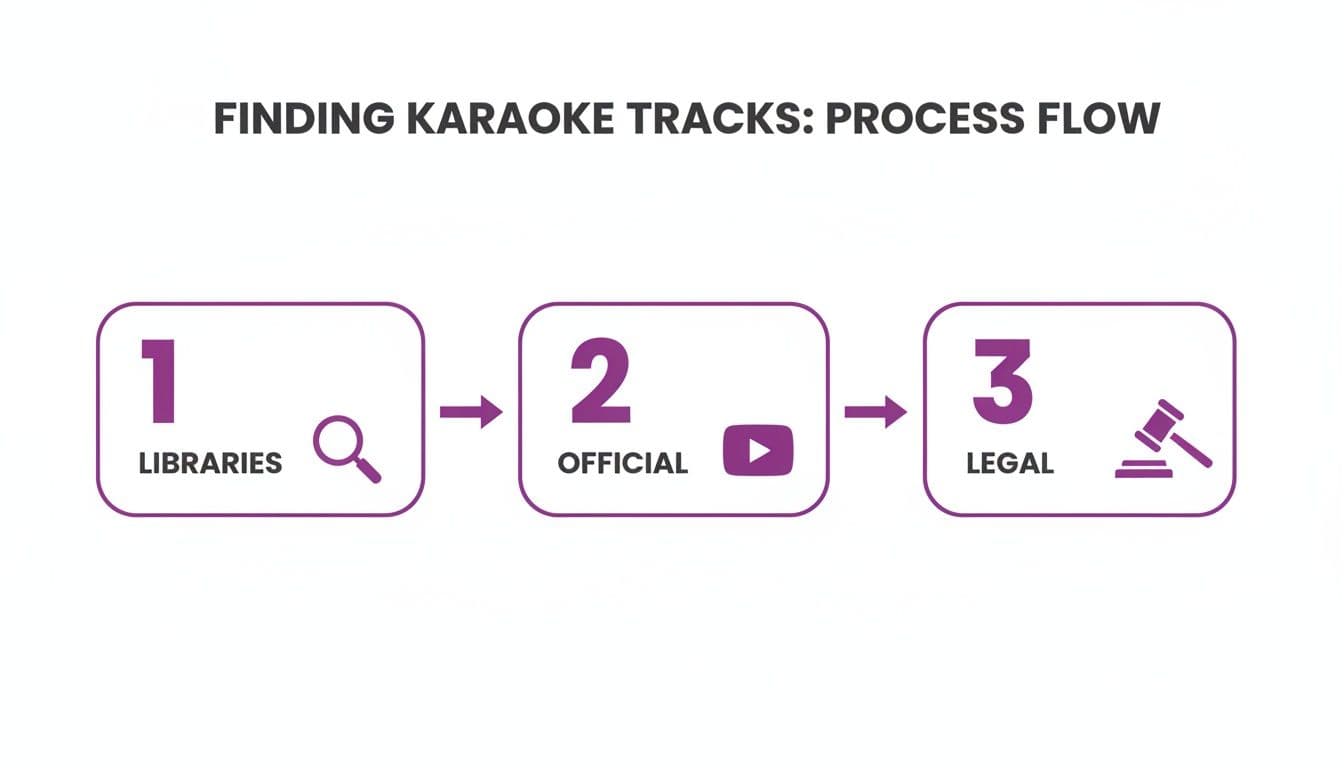
As you can see, turning to AI is a powerful backup when you can't find a licensed or official version of a song.
Choosing the Right AI Vocal Remover
The internet is flooded with AI vocal removers, but they're not all created equal. A couple of names consistently pop up for their quality and feature sets, like LALAL.AI and Moises.ai, each bringing something different to the table.
- LALAL.AI: This one is known for its really clean separation algorithms. It tends to produce instrumentals with fewer weird sounds or "artifacts." It’s a paid tool, but they offer a free trial so you can test the waters.
- Moises.ai: This is more of a full-fledged musical toolkit. It doesn't just remove vocals; it can separate drums, bass, and other instruments. This makes it a fantastic tool for musicians. They run on a subscription model but have a pretty useful free tier.
You don't always need to download software, either. There are some excellent tools that work right in your browser. We've put together a guide on using a free vocal remover online that dives into some of the best options out there, helping you match a tool to your needs and budget.
Best Practices for Getting Clean Results
Here's a crucial tip I've learned from experience: the quality of your AI-generated instrumental is 100% dependent on the quality of the original song file. You simply can't feed it a grainy, low-bitrate MP3 and expect a miracle.
Pro Tip: Always, always start with a lossless audio file like FLAC or WAV. These formats preserve all the original audio data, which gives the AI a much clearer picture to work with. The result is a cleaner separation with way fewer digital artifacts.
To get the absolute best instrumental track possible, follow these steps:
- Start with High-Quality Audio: The best thing you can do is buy the track from a digital store that offers lossless downloads (like Bandcamp or Qobuz) or even rip it from an official CD. Trust me, the difference is massive.
- Listen for Artifacts: Once the AI has worked its magic, put on a good pair of headphones and listen closely. You're hunting for any faint, "ghostly" remnants of the vocals or a weird "swishy" sound on the cymbals. These are the most common giveaways of AI separation.
- Do a Little Cleanup: If you spot minor issues, you can often fix them yourself. Just import the instrumental into a free audio editor like Audacity. From there, you can easily trim any dead air at the beginning or end or use a subtle EQ to tame any harsh frequencies the process might have left behind.
Navigating the Legal and Creative Landscape
Making an instrumental from a copyrighted song for your own personal practice is one thing. But the moment you upload it to a public platform like YouTube, you're stepping into a legal gray area.
Because the instrumental is created from the original recording, it's legally considered a derivative work. This means the original rights holders still own the composition and the recording.
This doesn't mean you can't use AI-generated tracks, but you need to go in with your eyes open. Be prepared for potential copyright claims, especially if you try to monetize your videos. If you're aiming for a completely risk-free YouTube channel, sticking to officially licensed karaoke tracks is your safest bet.
The creative power of AI isn't just limited to music, of course. For a glimpse into how automation is changing content creation across the board, it's interesting to see how an AI social media content generator can produce visuals and text for posts. It’s a great example of how AI is becoming a go-to creative partner for all kinds of creators.
Techniques for Polishing Your Karaoke Audio
Getting your hands on a clean instrumental is a huge win, but your work isn't quite done yet. This next part is where you add the polish that elevates a simple track into a truly professional-sounding karaoke experience. A few quick audio-enhancing tricks can make a world of difference for your singers.
And don't worry, you don't need a fancy studio or an audio engineering degree. You can make massive improvements with free software like Audacity, ensuring your instrumental music for karaoke sounds crisp and powerful every single time. It's all about creating a consistent, clear sound that your audience can rely on.
Normalize Volume for Consistency
Ever been blasted by one video only to strain to hear the next? It's an instant turn-off that has viewers reaching for the volume controls—or just clicking away. Normalizing your audio is the simple fix that prevents this jarring experience by setting a consistent peak volume for all your tracks.
Just about every audio editor has a one-click normalization feature. Using it means that as someone binges your karaoke videos, the audio level remains smooth and predictable from one song to the next. No nasty surprises.
Think of normalization as setting a "house standard" for your channel's audio. It’s a small step that shows a high level of care and professionalism, encouraging viewers to stick around for the next song.
Use EQ to Add Punch and Clarity
Equalization, or EQ, sounds more complicated than it is. At its core, it's just a set of volume knobs for different frequencies—bass, mids, and treble. A few careful EQ tweaks can take a good instrumental track and make it absolutely brilliant.
For example, a slight boost in the low-end can give the bass and kick drum more weight, while a little lift at the high end can make cymbals and synths shimmer. It's about adding that extra sparkle.
- Low-End Boost: Gently nudge up the frequencies around 80-120 Hz to give your track more warmth and impact.
- Mid-Range Cut: Sometimes a track can sound a bit "muddy" or boxy. A small dip around 400-600 Hz can often clear that right up.
- High-End Lift: Carefully boost the frequencies above 5 kHz to add brightness and a sense of "air" to the mix.
Subtlety is your best friend here. You want to enhance the track, not make it sound unnatural. If you're ready to go deeper, our guide on how to enhance audio quality covers more advanced techniques to make your sound truly pop.
Check Mono Compatibility and Export Correctly
A huge chunk of your audience will be listening on their phone, which often means a single speaker. This is why checking for mono compatibility is so important. It just means you're making sure your track still sounds great without the full stereo effect.
Switch your audio editor's output to mono and have a listen. Do any instruments vanish? Does the mix suddenly sound thin and weak? If so, you might need to pull back on any wide stereo effects or revisit your EQ.
Once you’re happy with the sound, it’s time to export. For the best blend of quality and file size, a 320kbps MP3 is the gold standard. This format keeps all the sonic detail you worked so hard on, making sure your instrumental is ready for its video debut.
You've got your perfect instrumental track ready to go. Now, it's time for the fun part: turning that audio into a full-fledged karaoke experience. This is where you bring the music, lyrics, and visuals together into something people can actually sing along to. You could wrestle with traditional video editing software, but a dedicated karaoke video creator makes this whole process much more intuitive.
The process kicks off by simply uploading your high-quality instrumental. After that, you'll need the lyrics. A quick search online should do the trick—just copy the full text and paste it directly into the editor. This is where a specialized tool really starts to shine, taking over the heavy lifting of the initial sync.
AI-Powered Lyric Synchronization
Once your audio and text are loaded, the platform's AI goes to work. It listens to the track and intelligently matches the words to the music, saving you a massive amount of time. Instead of spending hours manually placing every single word, you get a fully functional karaoke video in just a few moments.
Of course, AI gives you a running start, not a perfect finish. It's incredibly accurate and often gets about 90% of the timing spot-on, but for that truly professional, polished feel, a little manual adjustment is key.
Think of the initial AI sync as your first draft. It builds the foundation, letting you skip the tedious parts and jump straight to refining the artistic details that make a karaoke track feel perfectly in rhythm.
Fine-Tuning with a Sync Editor
This is where you get to put your own touch on the timing. A good sync editor gives you precise, granular control over every word. You can easily drag and adjust the timing markers to dictate exactly when a word or phrase appears on screen, ensuring the lyrics land perfectly with the beat.
This level of control is what makes a huge difference. You can align a word to the hit of a snare or make it appear just before a singer would take a breath. It's a specialized tool built for one purpose: making your instrumental music for karaoke feel seamless and natural to follow.
Customizing Your Video's Visual Identity
With the timing locked in, you can move on to the visuals. The look and feel of your video should match the vibe of the song. This is also a great opportunity to establish a consistent brand for your channel, making your videos instantly recognizable.
Here are a few essential tools that help turn a simple instrumental track into an engaging, high-quality karaoke or lyric video.
Key Features for Creating Professional Karaoke Videos
| Feature | Benefit for Karaoke Creators | Pro Tip |
|---|---|---|
| Custom Backgrounds | Upload your own branded images/videos or choose from a built-in library to create a consistent channel aesthetic. | Use a subtle, non-distracting video loop as your background. It adds energy without pulling focus from the lyrics. |
| Readable Fonts | Select from a variety of clear, legible fonts that are easy to follow, even on smaller screens. | Test your font choice on a mobile device. A font that looks great on a desktop might be hard to read on a phone. |
| Color Customization | Adjust text and highlight colors to match your brand or the song's mood, ensuring high contrast for readability. | Stick to a simple color palette. A primary text color, a highlight color, and a background color are all you need. |
| AI Syncing | Automatically aligns lyrics with the instrumental track, providing a solid foundation for final timing adjustments. | After the AI sync, play the track back at half-speed to catch and fix any subtle timing errors you might miss at full speed. |
| Manual Sync Editor | Offers word-by-word control to fine-tune lyric timing, ensuring perfect synchronization with the music. | Use the audio waveform as a visual guide. Aligning lyrics with the peaks and valleys can help you nail the timing. |
Ultimately, combining a fantastic audio track with perfectly timed lyrics and a clean, appealing visual style is how you create a professional karaoke video that keeps your audience engaged and eager for the next song.
Common Questions About Karaoke Instrumentals
As you start making your own instrumental tracks, you'll inevitably run into a few tricky questions. Getting these sorted out early on can save you a ton of frustration and help you create much better content. Let's walk through some of the most common issues that trip people up.
Probably the biggest one I hear is about the legal side of things, especially when using AI tools. It’s a bit of a gray area, and for good reason.
Is It Legal to Use AI Vocal Removers for YouTube Karaoke Videos?
This is the million-dollar question, and the answer is... it's complicated.
If you’re just making an instrumental from a copyrighted song to practice with at home, you're generally in the clear. But the game changes entirely the second you upload it to a public platform like YouTube. Because that instrumental was created from the original recording, it's legally considered a derivative work. This means the original copyright holders still own it.
So, what does this mean for your channel? It means using AI-generated instrumentals can easily lead to copyright claims or even get your videos demonetized. If you're serious about building a monetized channel without constant legal headaches, your safest bet is to either find official instrumental versions or use tracks from licensed karaoke libraries that grant you the rights for commercial use.
What Is the Best Audio Format for Karaoke Tracks?
The audio format you choose makes a massive difference. For the best possible results, you absolutely must start with a lossless format like WAV or FLAC. Think of these files as the original master recording—they contain every bit of audio data without any compression, which is crucial for getting a clean vocal separation.
Once your instrumental is polished and ready to go, the best final step is to export it as a high-bitrate MP3 (320kbps) or an AAC file. This strikes the perfect balance, giving you fantastic sound quality in a file size that’s easy to upload and stream.
Starting with a high-fidelity source file is non-negotiable. Feeding a compressed MP3 into an AI vocal remover is like trying to build a mansion on a shaky foundation—the final result will always be compromised.
Why Can I Still Hear Faint Vocals After Using an AI Remover?
Ever notice that faint, ghostly vocal sound in the background after you've processed a track? That's what we call "vocal bleed" or an "artifact." It happens because the AI gets a bit confused when trying to separate vocals that are deeply mixed with instruments in the same frequency range—think cymbal crashes or guitars drenched in reverb.
The single best way to minimize this is by using a high-quality studio version of the song, not a compressed MP3 or a live recording. Some of the more advanced AI tools also have settings that let you fine-tune the separation intensity. Playing with these can help reduce the bleed, but be aware that it might slightly change the sound of the instrumental itself.
Ready to turn that perfect instrumental into an amazing visual experience? MyKaraoke Video has everything you need, from AI-powered lyric syncing to complete visual customization. You can start creating professional-quality karaoke videos in just a few minutes.