Gone are the days of wrestling with clunky software and painstakingly timing every single syllable. If you've ever wanted to create your own karaoke songs for YouTube or just for a killer party, the good news is that what used to take hours of tedious work can now be done in minutes. The secret? Modern tools that use AI to handle the heavy lifting, from separating the audio to syncing the lyrics.
The New Way to Create Karaoke Videos
I remember the old way of doing this. It meant juggling complex video editors, manually isolating vocal tracks, and then spending an eternity timing each lyric to perfection. It was a technical nightmare that could burn an entire afternoon for just one song.
Thankfully, that’s all in the past. Today's browser-based tools have completely changed the game, making the process intuitive and fast. This guide will walk you through exactly how it’s done, step by step. The goal here is efficiency, letting you focus on the creative side of things instead of getting bogged down in technical details.
This shift isn't happening in a vacuum. It’s part of a huge boom in the global karaoke market, which is projected to hit USD 9,167.2 million in 2025 and jump to a staggering USD 14,457.1 million by 2034. That explosive growth is driven by people wanting easier, digital ways to create and enjoy karaoke. You can discover more insights about the growing karaoke market and see just how big this trend has become.
To really appreciate how much things have changed, it helps to see the old and new methods side-by-side.
Modern vs Traditional Karaoke Song Creation
| Aspect | Traditional Method | Modern Method |
|---|---|---|
| Audio Separation | Manually isolating vocals with complex audio software like Audacity or Adobe Audition. Requires technical skill and can be very time-consuming. | Automated, one-click vocal removal using AI-powered tools. Takes seconds and requires no audio engineering experience. |
| Lyric Syncing | Manually setting timestamps for every single word or line. Incredibly tedious, prone to errors, and requires hours of meticulous work. | AI analyzes the audio and syncs the lyrics automatically. You just review and make minor tweaks, saving 95% of the time. |
| Visual Customization | Using professional video editing software like Premiere Pro. Steep learning curve, slow rendering times, and template setup is complex. | Simple, intuitive interface with drag-and-drop backgrounds, real-time font and color previews, and pre-built animations. |
| Required Skills | Expertise in audio engineering, video editing, and motion graphics. A significant barrier for beginners. | Basic computer skills. The tools are designed for anyone to use, from hobbyists to professional content creators. |
This table really highlights the core difference: what was once a highly technical, labor-intensive craft is now an accessible and creative activity for everyone.
What Modern Karaoke Creation Involves
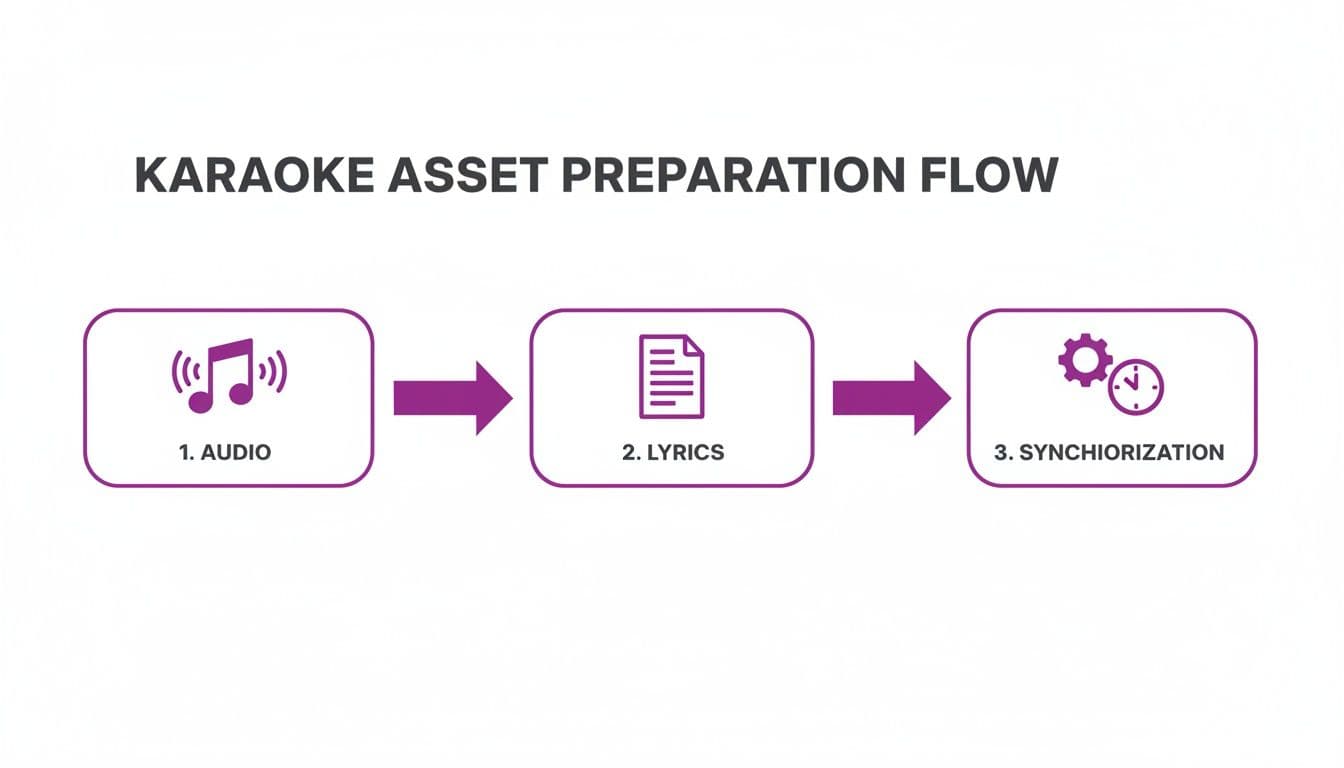
So, what does this new process actually look like in practice? It boils down to a few straightforward stages that anyone can handle, even with zero prior experience.
- Automated Audio Separation: First, you’ll need an instrumental. Modern tools can strip the vocals from almost any song, leaving you with a clean backing track in seconds.
- AI-Powered Lyric Syncing: This is where the real magic happens. Instead of manually tapping out the timing for each word, the AI listens to the song and lines up your lyrics perfectly. It's a massive time-saver.
- Intuitive Visual Customization: Finally, you get to be creative. With just a few clicks, you can add a custom background, pick fonts and colors that match the song's vibe, and choose how you want the lyrics to be highlighted.
The biggest advantage here is speed. A project that would have eaten up your entire Saturday can now be knocked out during a coffee break. For content creators, this means you can build a huge library of karaoke videos quickly and keep your audience engaged with fresh content.
Getting Your Audio and Lyrics Ready
Every great karaoke video starts with two core ingredients: a crisp instrumental track and perfectly prepped lyrics. Nailing these two things right out of the gate is the most important prep work you can do. Trust me, it makes everything that follows a whole lot smoother and saves you from some serious headaches later.
First up, the audio. You'll need a clean, high-quality instrumental version of the song you've picked. If you're working with a well-known hit like Queen’s “Bohemian Rhapsody” or “Wonderwall” by Oasis, you've got a couple of solid paths to get that backing track.
Finding Your Instrumental Track
The fastest route is often using an AI-powered vocal remover. These tools are surprisingly good at taking a standard song file, like an MP3, and stripping out the lead vocals, leaving you with a clean instrumental. It works like a charm for most professionally produced music. If you're curious about the nuts and bolts, our guide on how to remove the vocals from a song dives deep into the process.
https://www.mykaraoke.video/blog/how-to-remove-the-vocals-from-a-song
Another option is to hunt down professionally made backing tracks. There are plenty of sites out there dedicated to selling studio-quality instrumental versions of popular songs. This is a fantastic choice if you want to guarantee perfect audio quality without worrying about any weird AI artifacts sneaking in.
No matter which path you take, make sure your final audio file is in a standard format:
- MP3: This is your go-to for a good balance. It keeps file sizes manageable without sacrificing too much quality.
- WAV: If you're an audiophile who needs the absolute best quality, WAV is the way to go, but be prepared for some massive file sizes.
Honestly, for most videos you'll share online, a high-bitrate MP3 (320 kbps) is the sweet spot.
Prepping Your Lyrics for Syncing
Once your audio is sorted, it's time to tackle the lyrics. Accuracy is everything here. It's tempting to just grab the first version you find on Google, but I always recommend checking a couple of different lyric sites to make sure every single word is spot-on.
When you have the correct text, you need to format it in a simple text file (.txt). This isn't just a copy-and-paste job. A huge part of this is knowing how to effectively convert MP3 to text, which can give you a massive head start on the initial transcription.
To make sure your lyrics import flawlessly into a tool like MyKaraoke Video, stick to these simple rules:
- One Phrase Per Line: Each line in your text file should be a single, bite-sized phrase that will appear on the screen. No big blocks of text.
- Use Blank Lines for Pauses: When you hit an instrumental break or a long pause between vocals, just add an extra blank line in your file. This is a cue for the sync tool to recognize that gap.
- Add Singer Cues (Optional): For duets or songs with different vocalists, you can add little hints like
(Singer 1)or(All)before the line. It really helps.
Pro Tip: Seriously, spend five extra minutes cleaning up that text file. Fix typos, make the punctuation consistent, and check that the line breaks feel natural when you sing them. A little effort here saves a ton of tedious editing during the actual lyric-syncing phase.
Syncing Lyrics with AI and Manual Edits
Alright, you've got your audio track and your lyric sheet ready to go. Now comes the fun part—and arguably the most important one: synchronization. This is where you bring the two together, turning static words and music into a dynamic, sing-along experience. Getting the timing right is what separates a homemade lyric video from a professional-feeling karaoke track that people genuinely enjoy.
The good news? You no longer have to spend hours manually setting timestamps for every single syllable. Modern tools have completely changed the game, and this shift is a huge reason the global karaoke market is projected to hit USD 5,924.5 million by 2025, with the Asia-Pacific region alone making up 23% of that. AI-powered platforms have made this once-tedious task incredibly accessible, cutting down what used to be a full day's work into just a few minutes.
The Power of AI-Driven Synchronization
The first pass at syncing is where you'll see the most dramatic time savings. When you use a tool like MyKaraoke Video, the AI does the initial heavy lifting. You just upload your instrumental track and paste in your lyrics, and the system gets to work analyzing the audio to automatically align your words.
I've found this process to be remarkably accurate, usually getting about 90% of the timing right straight out of the gate. The AI is trained to detect vocal patterns and cadences, even from the faint vocal guides in some instrumental tracks, and match them to the text you provided. If you want to dive deeper into the tech, we have an article explaining how an AI lyric video generator works its magic behind the scenes.
https://www.mykaraoke.video/blog/ai-lyric-video-generator
Think about a song with a straightforward rhythm, like Dolly Parton's "Jolene." The AI will likely nail the timing almost perfectly on its first try, leaving you with just a quick review to do.
Fine-Tuning with a Visual Sync Editor
As good as AI is, it's not infallible. That final 10% is where your human touch comes in, and this is where a visual sync editor is your best friend. These editors display your lyrics as blocks on a timeline right above the audio waveform, so you can literally see how the words line up with the music.
Here’s where you can really polish your track:
- Adjust Timings: If a word appears a fraction of a second too early or late, you can just click and drag its block along the timeline to nudge it into the perfect spot. It’s that simple and gives you frame-by-frame control.
- Split Long Lines: Sometimes a line just looks too clunky on screen. In the editor, you can easily break a long phrase into two smaller, more readable chunks without needing to go back and re-format your original lyric file.
- Handle Complex Rhythms: Syncing a slow ballad is one thing, but what about a rapid-fire rap verse like in Eminem's "Lose Yourself"? A visual editor lets you drill down and adjust the timing of individual words to match that fast, syncopated delivery.
The real pro workflow is this combination of AI for the initial sync and a manual editor for the final polish. You get the incredible speed of automation without giving up the precision that only a human eye (and ear) can provide.
Mastering Your Timing Files
When you're done, the end product of all this syncing is a timed lyric file. The most common format you'll encounter is an SRT (SubRip Subtitle) file. It’s worth taking a little time to understand how to make an SRT file, as this knowledge is useful for all sorts of video projects, not just karaoke.
Once you get the hang of this process, you'll be able to tackle any song, no matter how rhythmically complex. It's the core skill that elevates your project from a simple lyric video to a truly engaging karaoke experience that's a blast to sing.
Designing Your Karaoke Video Visuals
While perfectly synced lyrics are the foundation of any good karaoke track, the visuals are what give it life. Think of it this way: the lyrics are the engine, but the visuals are the soul. This is where you get to be an artist and create a whole vibe that pulls the singer into the world of the song.
The right visuals can turn a simple lyric video into something memorable. For a high-energy rock anthem like The Killers' "Mr. Brightside," you might want a dynamic, fast-paced video loop to match the frantic energy. But for a slow, heartbreaking ballad like Adele's "Someone Like You," a single, elegant image or a soft color gradient would feel much more appropriate.
Choosing Your Background
The background is the canvas for your lyrics, and you’ve got some great options that each create a totally different atmosphere.
- Dynamic Video Loops: These are short, seamless video clips that add a ton of energy and movement. Think abstract geometric patterns, shimmering city lights at night, or even cinematic drone footage. They make the whole experience feel more alive.
- High-Resolution Images: Never underestimate the power of a single, striking image. A breathtaking landscape for a country song or a gritty urban scene for a hip-hop track can instantly set the tone.
- Solid Colors or Gradients: Sometimes, simple is best. A clean, on-brand color background is professional and makes sure the lyrics are the star of the show, with zero distractions.
Mastering Typography and Text Effects
Here's a non-negotiable rule: your lyrics have to be easy to read. If singers are squinting or can't keep up, the entire experience falls apart. That’s why your font and text effects are so important.
I almost always stick with a clean, sans-serif font like Montserrat or Poppins because they’re clear on any screen. Try to avoid overly decorative or script fonts—they might look cool, but they can be a nightmare to read in motion. Contrast is also your best friend. You can't go wrong with the classic combo of bold white text on a dark background (or the reverse).
Beyond the font, you can get creative with the lyric highlight—that sweep of color that guides the singer. You can change its color, style, and speed to perfectly match the song’s pacing. For some more advanced ideas, you can check out our guide on creating engaging animated text for videos.
The demand for high-quality, visually engaging karaoke is exploding. The global home karaoke market is on track to hit USD 5.78 billion in 2024, and a lot of that growth is coming from easy-to-use creation tools. Browser-based platforms like MyKaraoke Video are making it possible for anyone to produce professional-looking tracks without needing technical skills or big downloads. As the market expands, visual quality is what will make your videos stand out. You can read the full research about the karaoke market's expansion to see just how big the opportunity is.
Key Takeaway: The name of the game is visual cohesion. Your background, font, colors, and highlight effect should all work together to support the song's mood, not fight against it. A well-designed video just feels more professional and makes the whole experience way more immersive and fun for everyone.
Exporting and Sharing Your Finished Song
You’ve synced the lyrics, dialed in the visuals, and now your masterpiece is ready to meet the world. This is the home stretch—getting your video out of the editor and onto the screens of your audience. Exporting can sound a little technical, but most modern tools have thankfully made it a straightforward, one-click affair.
The most important decision here is choosing the right settings so your video looks great everywhere it's played.
For maximum compatibility, your go-to format should almost always be an MP4 file. Think of it as the universal language of online video; it works flawlessly on YouTube, Instagram, TikTok, and just about any other platform you can imagine.
When it comes to resolution, stick with 1080p (Full HD). This gives you a crisp, professional look on everything from a tiny phone screen to a massive event projector, all without creating a ridiculously large file that's a pain to upload. Exporting at this quality ensures all that hard work you put into the visuals really shines.
Navigating the Murky Waters of Copyright and Fair Use
With your shiny new MP4 file ready, you’re set to share. But hold on—publishing content online, especially on a platform like YouTube, means you have to play by the rules of copyright law. Getting a handle on this is non-negotiable for any creator who wants to build a channel without getting it shut down.
Creating karaoke videos means you're almost always working with someone else's music, and that's where things get a bit complicated. Here's a quick rundown of what you're dealing with:
- Royalty-Free Instrumentals: By far the safest route. Using backing tracks explicitly licensed for reuse is your best bet. Plenty of services offer high-quality instrumentals that you can legally use, even in monetized videos.
- Copyrighted Music: Using the original instrumental from a hit song is a different story. When you upload a video containing copyrighted audio, YouTube's Content ID system will almost certainly flag it.
Now, a Content ID claim isn't always a disaster. Often, the copyright holder will just run ads on your video and take the revenue. Sometimes they might block the video in certain countries. In a worst-case scenario, they can issue a copyright strike against your channel, and you don't want that.
A quick note on "fair use": It's a legal defense, not a permission slip. It's often misunderstood and generally doesn't cover creating a straight karaoke video of an entire song for public entertainment. It's always safest to assume the original work is fully protected.
To stay in the clear, always give prominent credit to the original artists in your video description. It's a sign of respect, helps viewers find the original track, and fosters goodwill within the creative community.
Got Questions About Making Karaoke Songs?
Even with great tools at your fingertips, you're going to run into questions when you first start making karaoke videos. That's totally normal, especially if you're trying to create something that looks and sounds professional. Let's dig into a few of the most common hurdles people face.
Most of the time, the first roadblock isn't technical at all—it's figuring out which song to even choose. Sure, you can turn any track into a karaoke video, but what makes a song truly great for karaoke?
What Songs Actually Work for Karaoke?
The best karaoke songs are the ones that are instantly recognizable, with a massive chorus that an entire room can scream along to. You know the ones—think Queen's "Bohemian Rhapsody" or "Wonderwall" by Oasis. They have that universal appeal that gets everyone involved.
When you're picking a song, keep these things in mind:
- Vocal Range: Is this a song that most people can actually sing without their voice cracking? Tracks with a manageable range are always more popular because they're simply more accessible.
- Catchy Melody: A melody that sticks in your head is key. It's what hooks people and keeps them singing along.
- Memorable Lyrics: Lyrics that are simple, maybe a bit repetitive, and hit an emotional chord are perfect. They make it easy for someone to join in, even if they only vaguely know the words.
It's not just about picking a song you love. It's about finding one an audience will have a blast singing together. A track with a legendary group sing-along moment, like Journey’s “Don’t Stop Believin’,” is pure karaoke gold.
Navigating the Technical and Legal Stuff
Okay, let's talk about the tricky parts: the tech and the legalities. For example, what happens when your AI vocal remover doesn't quite get the job done, leaving behind some faint vocal echos or weird audio artifacts?
While the AI tools we have today are incredible, they're not always flawless. If you find yourself in this situation, your best bet is often to track down a professionally produced instrumental backing track. It’s the surest way to get that clean, pristine audio you're after.
And then there's the big one: copyright. You absolutely need to pay attention to this. Using copyrighted music without the right permissions can get your video taken down or earn your channel a strike, especially on a platform like YouTube.
The safest path is to either use royalty-free instrumentals or secure the proper licenses for the song. As a rule of thumb, always credit the original artists in your video description. It's not a substitute for legal permission, but it's good practice, shows respect, and helps people find the original song.
Ready to spend less time troubleshooting and more time creating? MyKaraoke Video offers a simple, browser-based way to make incredible karaoke songs in just minutes, with AI-powered syncing and easy-to-use design tools. Start creating your first video for free today at https://www.mykaraoke.video.
