So, you're ready to build your karaoke songbook. The first, and most crucial, step is getting your hands on high-quality, legal backing tracks. This is what separates a killer karaoke night from a muffled, amateur-sounding mess. Thankfully, you've got some great options for downloading songs, each with its own perks depending on what you're trying to do.
Finding the Perfect Backing Tracks for Your Karaoke Night
The demand for at-home karaoke is exploding. We're talking about a global market that hit $5.4 billion in 2023, and home setups are a massive piece of that pie—almost a third of it, in fact. This just shows how easy digital downloads have made it for anyone to host a great singing party.
So where do you start? Let's break down the best ways to get your tracks.
Karaoke Song Source Comparison
Finding the right place to get your music really depends on your needs. Are you a weekend warrior who needs a huge variety, or are you carefully building a personal collection of favorites? This table lays out the most common options to help you decide.
| Source Type | Pros | Cons | Best For |
|---|---|---|---|
| Subscription Services | Massive, curated libraries; consistent quality; often includes synced lyrics. | You don't own the files; requires an ongoing subscription to access. | Serious karaoke hosts, venues, and frequent singers needing variety. |
| Individual Track Purchases | You own the files forever; high-quality official instrumentals. | Can be expensive to build a large library; not every song has an instrumental. | Anyone building a permanent, curated collection of their go-to songs. |
| Royalty-Free Music Sites | Legal for monetized content (YouTube/TikTok); unique, original music. | Won't find mainstream pop hits; quality can vary. | Content creators making lyric videos or needing background music. |
| YouTube Rips/Conversions | Access to rare or obscure instrumentals not found elsewhere. | Legality is a grey area; audio quality is often poor or inconsistent. | A last resort for finding that one impossible-to-get track. |
As you can see, there's a trade-off between convenience, ownership, and cost. Most people I know end up using a mix of these methods to cover all their bases.
Dedicated Karaoke Subscription Services
For anyone serious about hosting, a subscription service is pretty much the gold standard. I'm talking about platforms like Karafun, which give you an absolutely massive library of professionally produced songs for a flat monthly fee. You get instant access to tens of thousands of tracks, all with crystal-clear audio and often with the lyrics already synced up.
It's the ultimate plug-and-play solution. You never have to second-guess the quality. The only real catch is that you're essentially renting the music—stop paying the subscription, and your library disappears.
Purchasing Individual Instrumental Tracks
If you're more of a collector and want to own your music library, then buying tracks one-by-one is the way to go. Digital stores like iTunes and Amazon Music are your best friends here. You can search for official instrumental versions of your favorite songs and build a collection that's yours to keep forever. For a more detailed look at this, our guide on finding instrumental music for karaoke has some great tips.
This approach takes a bit more legwork, though. You'll quickly discover that not every artist releases an official instrumental, so some songs are just plain hard to find. And if you're trying to build a big library fast, the costs can add up. While you can sometimes find rare tracks using YouTube to MP3 transfer tools, just be careful and always keep copyright laws in mind.
Pro Tip: Always, always preview a track before you buy it. Listen closely for any weird digital artifacts or a "muddy" sound. That's usually a dead giveaway that it’s a cheap version made with a vocal remover tool, not a real studio instrumental.
Uncovering Royalty-Free Music Gems
Now, for all the content creators out there making videos for YouTube or TikTok, royalty-free music sites are a secret weapon. You won't find the latest Taylor Swift hit, but you will find a ton of high-quality, original instrumental music that you can use in monetized videos without getting hit with a copyright strike. It's the perfect solution for creating background music for your lyric videos or finding a unique sound for your channel.
Prepping Your Audio Files for a Flawless Performance
Getting your hands on the perfect backing track is a great start, but it's really only half the battle. If you want every song to sound polished and consistent, you’ll need to put in a little prep work. Trust me, taking the time to do this now prevents technical headaches later and makes the whole experience way smoother for every singer.
Think of it like a musician tuning their guitar before a gig—it’s a non-negotiable step for a quality show. This process is all about standardizing your files: checking the format, cleaning up the metadata, and making sure the volume is consistent across your entire library.
Choosing the Right Audio Format
Not all audio files are born equal. The format you choose has a huge impact on sound quality and file size, so it pays to know the difference.
- WAV (Waveform Audio File Format): This is what we call a lossless format. It’s the raw, uncompressed, full-quality audio, exactly as it was recorded. For professional gigs or high-stakes live events where every nuance matters, WAV is the gold standard. The only catch? The files are massive.
- MP3 (MPEG Audio Layer III): This is the workhorse of the digital audio world. It’s a compressed (or "lossy") format, but a high-bitrate MP3, specifically 320kbps (kilobits per second), strikes a fantastic balance between great sound and a reasonable file size. It's pretty much the perfect choice for making karaoke videos for YouTube or just building a personal library.
For most at-home karaoke nights or online uploads, a 320kbps MP3 is the sweet spot. To the average ear, it sounds virtually identical to a WAV file but won’t eat up your hard drive space.
Keeping Your Library Organized with Metadata
Once you start collecting tracks, keeping them organized is absolutely critical. Nothing kills the vibe of a karaoke party faster than someone scrolling for five minutes trying to find "that one song." This is where metadata, also known as ID3 tags, becomes your best friend. These little bits of data are embedded right in the audio file and store key info like the song title and artist.
You can easily edit these tags with free software like Audacity or MusicBrainz Picard. A well-organized library should always have accurate tags for:
- Song Title: "Don't Stop Believin'" instead of "track01_final.mp3"
- Artist: "Journey"
- Album: You can get creative here and use it for genre, like "80s Rock Karaoke"
Taking a few seconds to clean up ID3 tags the moment you download a song will save you hours of searching and frustration down the road. A tidy library just looks and feels more professional.
Normalizing Audio for Consistent Volume
Ever been at a karaoke night where one song is barely a whisper, and the next one immediately blows the speakers out? That jarring leap in volume is super common, but it's also incredibly easy to fix with audio normalization.
Normalization is a simple process that adjusts the peak volume of all your tracks to a consistent level without messing with their dynamic range. It's a one-click feature in most audio editors, including the free and powerful Audacity.
By applying normalization across your whole library, you create a smooth, predictable experience from one song to the next. You'll spend less time riding the volume fader and more time enjoying the performances. And if you want to get a little more advanced, like cutting out long, boring intros, you can learn more about how to trim songs to keep the energy up.
From Text to Screen: Mastering Lyric Synchronization
You've got a fantastic, high-quality audio file. Now for the real magic: getting the lyrics to pop up on screen at the perfect moment. This is lyric synchronization, and it's the heart and soul of a true karaoke experience. Nailing this is what separates a professional-looking video from a frustrating, out-of-sync mess.
Before you even think about timing, you need accurate lyrics. Seriously, don't just grab the first result from a random website—they’re often riddled with mistakes. I always stick to reputable sources like Genius or Musixmatch, where lyrics are usually community-vetted. Starting with a correct script is crucial because a single wrong word can throw off an entire verse.
The Old-School Manual Method
Back in the day, syncing lyrics was a painstaking, manual grind. You'd be in a video editor like Adobe Premiere Pro or DaVinci Resolve, listening to the song phrase by phrase. Sometimes, it was word by word.
For every single line, you had to create a new text layer and manually set its start and end points on the video timeline. It was incredibly tedious. A typical three-minute song could easily eat up a few hours of your day, filled with endless playback and tiny adjustments just to get the timing right. While this gives you absolute control, the sheer effort makes it a non-starter for anyone wanting to create content efficiently.
Understanding the manual approach is valuable because it highlights the massive leap forward that modern tools provide. What once required hours of meticulous, repetitive work can now be accomplished in a fraction of the time.
The Rise of AI-Powered Sync Editors
Thankfully, the game has completely changed. AI-powered synchronization tools have automated this entire process, and it’s a lifesaver. Platforms like MyKaraoke Video turn what used to be a major production bottleneck into a quick review.
The workflow is beautifully simple now.
- First, you upload your prepared instrumental track.
- Then, you copy and paste the full, accurate lyrics into a text field.
- Finally, you let the AI do its thing.
The software’s algorithm analyzes the audio waveform and the text you provided, automatically aligning each word or phrase to its precise timing in the song. In just a couple of minutes, you get a fully synced draft.
From there, you can jump into a user-friendly editor to make minor tweaks if needed, but the heavy lifting is already done. This efficiency frees you up to focus on what really makes a karaoke video stand out: the visuals. To really elevate your work, learning how to create motion graphics can add a dynamic, professional polish to your synchronized lyrics, making the whole experience far more engaging for your audience.
Staying on the Right Side of the Law with Karaoke Music
So you've downloaded a killer instrumental track for your next karaoke session. It's easy to think you're good to go, but the moment you hit "record" and plan to share it, you've waded into the waters of music copyright. Getting a handle on the rules isn't just about avoiding legal headaches; it’s about respecting the artists and songwriters who created the music in the first place.
Singing your heart out with a few friends in your living room? That's just fine—it's considered private use. The game completely changes, though, when you take that performance public.
Where Private Use Ends and Public Performance Begins
The line in the sand is pretty clear: who is your audience? A karaoke night at home with family is private. But the second you upload that performance to YouTube, TikTok, or even a public Facebook group, it's officially a public performance. And that's when licensing becomes non-negotiable.
The same logic applies if you're using your downloaded tracks at a bar, a paid event, or any commercial spot. While the venue itself should have its own public performance licenses, if you're the one creating and posting the video online, the legal buck stops with you.
The Licenses You Actually Need to Know
Music rights can feel like a tangled mess of legal jargon, but for anyone making karaoke videos, it really boils down to two key licenses.
- Synchronization License (Sync License): This is the big one for video creators. A sync license gives you the green light to combine a song (the audio) with moving images (your video). If you’re making a lyric video or any kind of visual performance, you absolutely must have this. It's the right to "sync" the sound to the picture.
- Performance License: This license covers the broadcast or public playing of the song itself. When you upload a video, platforms like YouTube have their own deals with Performance Rights Organizations (PROs) like ASCAP, BMI, and SESAC. But here's the catch: those deals usually only cover the performance part, not the sync rights. You still need the sync license.
For anyone serious about creating video content, it's worth getting familiar with the world of music for editing videos. Understanding these principles will keep all your projects—not just karaoke—legally sound from the get-go.
Honestly, the easiest and safest path forward is to source your music from services that explicitly give you the rights you need. Many professional karaoke companies offer subscriptions where the licensing for public use or video creation is baked right in. Just do yourself a favor and always read the terms of service. It’s the best way to make sure your fun project doesn’t land you in hot water.
A Smarter Way to Create Karaoke Videos Without Downloads
Hunting down audio files and wrestling with different software is the old way of making karaoke videos. Frankly, it's a huge time sink. But what if you could skip all that? There's a much more direct, browser-based workflow that brings everything—syncing, visual design, and exporting—into one spot, no downloads needed.
This is where tools like MyKaraoke Video come in. Instead of juggling files, you just upload your legally owned instrumental track, paste in the lyrics, and let its AI handle the tedious job of syncing everything up. What used to be a multi-step nightmare across different programs becomes a single, focused creative session.
Embrace a Download-Free Workflow
The real beauty of this approach is its sheer simplicity and speed. You're no longer bouncing between an audio editor for clean-up, a text file for lyrics, and video software for assembly. It all happens right in your browser, accessible from any computer.
This is a game-changer, especially when you look at the global karaoke scene. The Asia-Pacific region is a powerhouse, holding between 38.2% and 42.3% of the market in 2024. In places like China and the US, people download tracks all the time, but the biggest complaint is almost always poor synchronization. AI-powered tools tackle this problem head-on, letting anyone produce a perfectly timed 1080p video without installing a single thing. If you want to dig deeper, you can explore more insights on the global karaoke market.
This flowchart breaks down the legal side of things as you move from private fun to public performance.
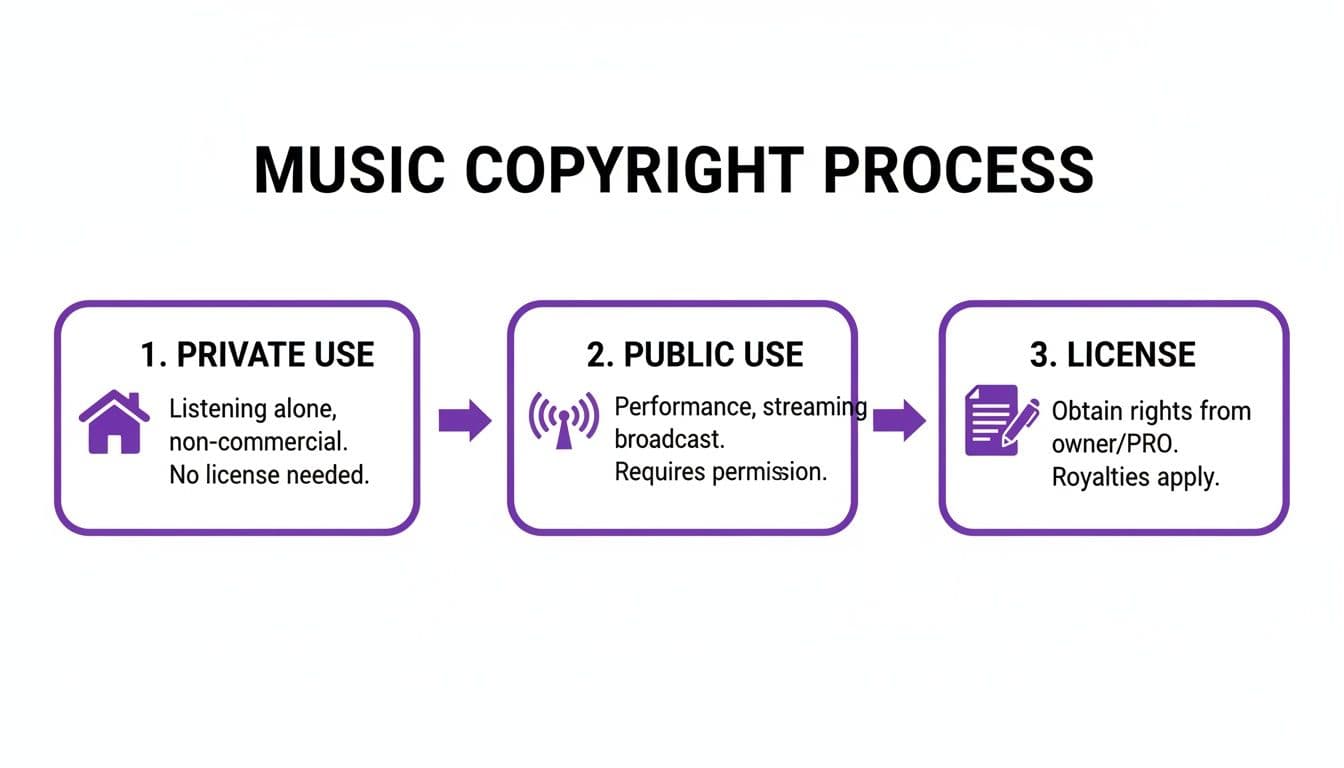
The key takeaway is clear: once your karaoke video goes public on a platform like YouTube, you've crossed into territory where licensing is essential.
Unleash Your Creative Vision
With the AI handling the technical timing, you get to focus on the fun part: making the video look incredible. This is where a good browser-based editor really shines, giving you creative control that used to require clunky, complicated video software.
- Custom Backgrounds: Forget the boring blue screen. Upload your own images or video clips to create a backdrop that perfectly matches the song's vibe.
- Fonts and Colors: Tailor the text to fit the mood. You can pick from hundreds of fonts, tweak colors, and add outlines or shadows to make sure the words are easy to read.
- Animated Lyrics: Bring the words to life! Make them pop, slide, or fade in sync with the music's energy for a polished, professional feel.
The most powerful feature here is the real-time preview. Every single tweak you make—a different font, a new background, a color change—shows up instantly. This immediate feedback gets rid of that frustrating cycle of render, watch, and re-edit. It saves so much time.
From Creation to Export in Minutes
Once you’ve dialed in the look and feel, you're ready to export. A single click is all it takes to generate a crisp, 1080p high-definition video file, ready for any platform. Whether it’s for a YouTube channel, a social media post, or a live event, your karaoke video is good to go. This all-in-one process completely redefines the effort it takes to produce top-notch karaoke content.
Got Questions About Karaoke Tracks? We've Got Answers.
Diving into the world of karaoke can feel a bit overwhelming at first. You start asking questions about what's legal, what file types to use, and how to get the best sound. It's a common experience, so let's clear up some of the most frequent questions people have when they start building their songbook.
Is It Really Okay to Download Karaoke Songs from YouTube?
This is probably the most common question I hear, and the short, honest answer is: no, not really.
Using one of those third-party "YouTube ripper" sites to grab the audio from a karaoke channel almost always violates YouTube's terms of service. But more importantly, it usually steps all over the copyright of the original artist and the company that produced the karaoke track. Those tracks are licensed specifically for streaming on YouTube, not for downloading.
To keep things legal and guarantee you're getting a quality track, your best bet is to stick with legitimate sources. That means using a dedicated karaoke subscription service or buying official instrumental versions from a reputable music store.
The Bottom Line: Grabbing songs from YouTube is tempting and easy, but it's a legal minefield and often gives you low-quality audio. Stick to official channels—it saves you headaches and supports the creators.
What's the Best Audio Format for Karaoke?
This isn't a one-size-fits-all answer. The "best" format really hinges on what you're doing with the track. Think of it as picking the right tool for the right job.
- For Live Gigs & Parties: When you're blasting music through a PA system, you want every bit of audio detail. Go with a lossless format like WAV or FLAC. These are uncompressed files, so they deliver the richest, fullest sound possible. No compromises.
- For Online Videos & Streaming: If you're making a lyric video for YouTube or social media, a high-quality MP3 is your best friend. A file encoded at 320kbps is the sweet spot—it sounds fantastic to the human ear and is way smaller than a WAV file, making it easier to upload and manage.
Can I Just Remove the Vocals from a Normal Song?
You absolutely can, and the technology to do it has gotten surprisingly good. AI-powered tools and audio software like Audacity have features that can isolate and remove the main vocal line from a regular studio recording.
But here's the catch: the results are often unpredictable. The process can leave behind weird audio artifacts—you might hear faint vocal echoes or a strange, "watery" sound where the voice used to be. For a truly clean, professional-sounding karaoke night, nothing beats an official instrumental track made by the pros.
Ready to skip the downloads and start creating stunning karaoke videos in minutes? With MyKaraoke Video, you can upload your audio, paste your lyrics, and let our AI handle the perfect synchronization. Try MyKaraoke Video today and bring your songs to life!
