Have you ever spent hours creating the perfect video, only to see it get awkwardly cropped or look blurry once you upload it to social media? The culprit is almost always the video format. Nailing this isn't just a technical box to check—it's the first and most crucial step in making sure your content actually reaches the right people.
Why Your Video Format Can Make or Break Your Reach
Think about it this way: uploading a video in the wrong format is like trying to fit a square peg in a round hole. It just doesn't work. It looks sloppy, and it won't make the impression you're hoping for. Each social platform is built to showcase content that fits its specific dimensions perfectly.
When your video is formatted correctly, it fills the viewer's screen, pulling them right into the experience. This is a game-changer on mobile-first platforms like TikTok and Instagram, where vertical video dominates. The algorithm notices this, too. Content that fits the screen and looks native to the platform is far more likely to get pushed out to a wider audience.
The Undeniable Power of Video Today
The massive shift toward video isn't just a passing trend; it's how people now prefer to learn, shop, and be entertained. The demand has never been higher. A whopping 84% of consumers say they want to see more video content from brands, a figure that has held strong for the past eight years.
When you look at how people prefer to learn about a new product or service, the numbers speak for themselves. An incredible 63% of consumers would rather watch a short video. That preference blows other formats out of the water, like text-based articles (12%) and even infographics (7%). You can dig into more of these video marketing statistics to see just how dominant video has become.
Choosing the right video format isn't optional anymore—it's a strategic move. It directly impacts your video's visibility, engagement, and potential to catch fire. A well-formatted video simply looks more professional and performs better.
This guide is here to demystify the essential social media video formats you need to know. We'll help you get it right from the start, so you can stop guessing and start creating karaoke and lyric videos that are built to perform the second you hit "upload." Let's turn a technical chore into your strategic advantage.
Breaking Down the Basics of Video Specs
To really nail your social media videos, you've got to speak the language. Forget the dry, technical manuals. Let's break down the jargon into simple terms that actually matter for making your karaoke videos look incredible.
First up, Aspect Ratio. Just think of this as the shape of your video's canvas. Is it a tall rectangle for a phone screen (like a portrait painting)? A wide one for a TV (like a landscape)? Or a perfect square for an Instagram post? Each platform has its favorite shape, and picking the right one is your first step toward looking like a pro.
Clarity, Smoothness, and All That Jazz
Next, let's talk about Resolution. This is all about how sharp and clear your video looks. It's the difference between a fuzzy, pixelated image and a stunning, high-definition one. For lyric videos, higher resolution is key—it keeps your text crisp and legible, even on a tiny screen.
Then you have Frame Rate, measured in frames per second (FPS). Think of it like a flipbook. The more pages (frames) you flip through each second, the smoother the animation looks. For most social media, 30 FPS is the sweet spot. It gives you that clean, fluid motion without making your file size ridiculously huge.
Getting these three right—aspect ratio, resolution, and frame rate—is the foundation of any great-looking video. It's how you make sure your audience sees your work exactly the way you imagined it, no matter where they're scrolling.
The Nitty-Gritty: File Size and Format
A couple of other terms pop up often. Bitrate is about how much data is packed into each second of your video. A higher bitrate usually means better quality, but it also means a bigger file. It’s a balancing act; you want great quality, but you also need a file that uploads quickly and respects platform limits.
Finally, there's the video container, or file type—you'll see names like MP4 and MOV. Think of these as the box that holds everything together: your video, your audio, and all the behind-the-scenes data. MP4 is the undisputed king of social media because it delivers fantastic quality in a reasonably sized package. For a deeper dive, check out our guide where we get into all the different video file types explained.
Once you get a feel for these concepts, you're no longer just blindly clicking "Export." You're in the driver's seat, making smart choices to ensure your lyric videos are polished, professional, and perfectly optimized for every feed. Now, let's see how this all applies to the platforms themselves.
How to Dominate TikTok and Instagram Reels
Let's be clear: vertical video isn't just another option anymore. On platforms like TikTok and Instagram Reels, it's the only language that matters. The entire experience is designed around a single, full-screen vertical feed, so if you want your karaoke videos to stand a chance, you have to create for that environment.
The golden rule here is the 9:16 aspect ratio. Think of it as the tall, rectangular shape that perfectly fills up a modern smartphone screen. When your video is in this format, it looks like it belongs there—it’s immersive and professional, with no ugly black bars or weird cropping to distract your audience.
But getting the shape right is just the first step. You also need to think about clarity and motion to create a video that truly pops.
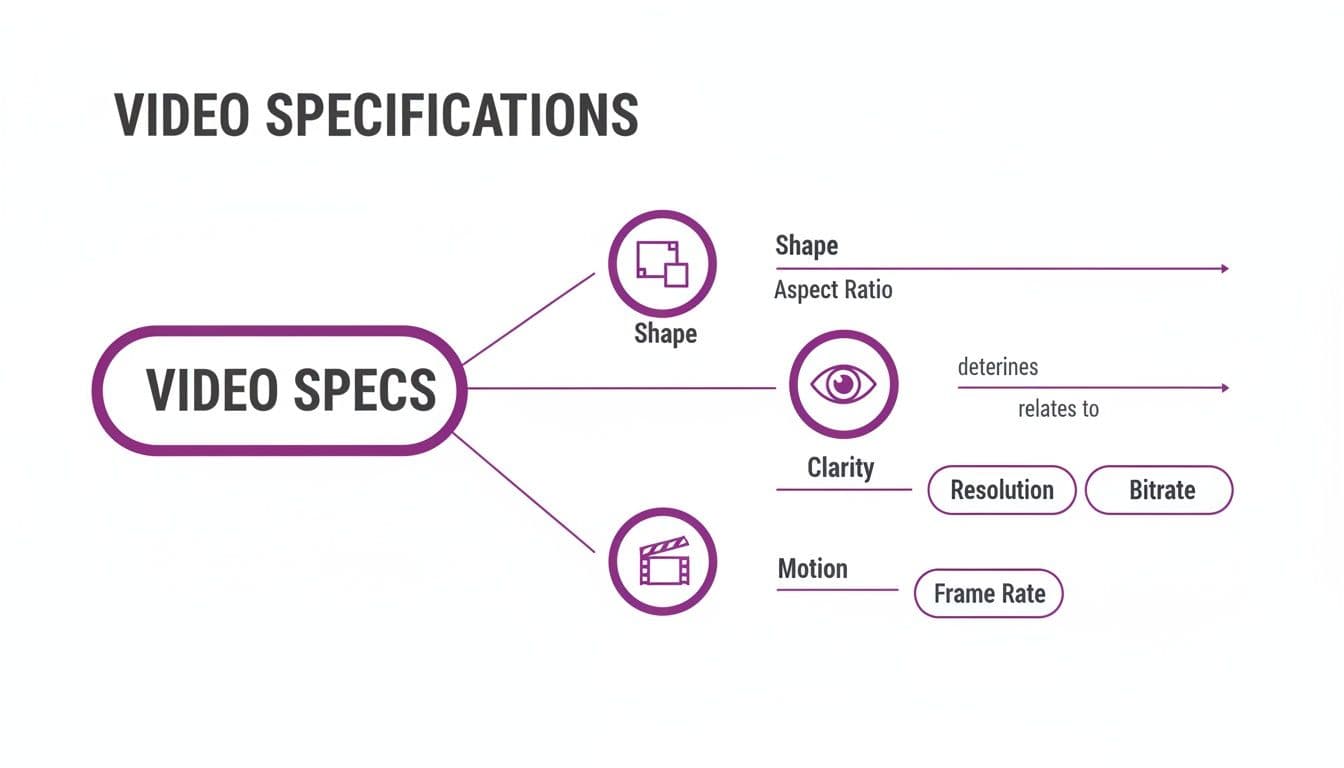
As you can see, aspect ratio (the shape) works hand-in-hand with resolution (the clarity) and frame rate (the motion). Nail all three, and you're well on your way to a professional-looking video.
Getting the Technical Details Right
For both TikTok and Reels, you'll want to export your videos at a 1080x1920 pixel resolution. This is the sweet spot—it’s standard high-definition, which guarantees your video looks sharp and any text you add, like lyrics, is crisp and easy to read on a small screen.
Stick to MP4 or MOV file formats. They give you the best of both worlds: great visual quality without a massive file size, which means faster uploads and smoother playback for your viewers. If you dip below this quality standard, the platforms' own compression algorithms can make your video look blurry or pixelated.
There's a good reason this format has taken over. Short-form video is how people consume content now. In fact, some analysts predict that 82% of all internet traffic will be video by 2026. Data shows videos under a minute get an average 50% engagement rate, crushing static images. You can dive deeper into these short-form video statistics to see just how powerful this format has become.
Let's quickly compare the nitty-gritty details for both platforms.
TikTok vs Instagram Reels Video Specifications
Here’s a side-by-side look at the key technical specs for TikTok and Instagram Reels. While they share a lot of similarities, knowing the subtle differences can help you fine-tune your exports for each platform, ensuring your karaoke videos look their absolute best everywhere.
| Specification | TikTok | Instagram Reels |
|---|---|---|
| Aspect Ratio | 9:16 | 9:16 |
| Resolution | 1080x1920 pixels | 1080x1920 pixels |
| File Format | MP4 or MOV | MP4 or MOV |
| Max Length | Up to 10 minutes (but shorter is often better) | Up to 90 seconds |
| Max File Size | Up to 287 MB (iOS) or 72 MB (Android) | Up to 4 GB |
As you can see, the core visual requirements are identical. The main differences are in the maximum video length and file size, with Instagram being a bit more generous on file size and TikTok allowing for much longer content.
Navigating the Platform Safe Zones
One of the most common rookie mistakes is forgetting about the user interface. Both apps slap buttons, usernames, captions, and like/comment icons right on top of your video. If your lyrics or the best part of your visual lands behind one of these, it's completely wasted.
The "safe zone" is the central area of the 9:16 screen where your most important content should live. Always keep critical text and visuals away from the very top, bottom, and right edges of the frame to ensure they remain visible at all times.
Before you export, just take a second to picture where the platform's interface will be. This simple gut-check can save you the headache of uploading a great video that no one can actually read. For those of you making karaoke videos with a tool like MyKaraoke Video, this is extra important—make sure your lyric animations are right in that central sweet spot.
Best Practices for TikTok and Reels Content
Beyond the tech specs, you need to create content that works with the platforms, not against them. The algorithms are designed to reward videos that grab and hold attention from the first second.
- Hook Them Fast: You have less than three seconds to stop the scroll. Start with a bang—your most exciting visual, a punchy text overlay, or an intriguing question.
- Keep Up the Pace: Think quick cuts, dynamic motion, and high energy. Long, slow shots are the enemy of a fast-moving feed.
- Use Native Features: Jump on trending sounds, filters, and stickers from within the apps. It’s a clear signal to the algorithm that your content is made for the platform.
- Sound Matters: Sure, lots of people scroll with the sound off, but for those who don't, audio is everything—especially for karaoke! Make sure your music and vocals are clean and well-mixed.
- Put Text On-Screen: Use captions or text overlays to get your message across. This not only helps silent viewers but also adds another layer of visual interest to your video. Our guide has plenty more TikTok video editing tips to help you get started.
When you pair the right technical format with a smart content strategy, you create videos that don't just look good but also have the best shot at getting pushed out by the TikTok and Instagram algorithms.
Winning on YouTube with Shorts and Long-Form Videos
Think of YouTube not as one single platform, but as two very different worlds living under the same roof. In one corner, you have traditional long-form videos—the cinematic, widescreen content that we all love to watch on our desktops and smart TVs. In the other, you have YouTube Shorts, the hyper-addictive, vertical content designed to compete with TikTok and Reels.
To really make it on YouTube today, you need a strategy for both.
This is a massive opportunity for karaoke and lyric video creators. You can pour your heart into producing a stunning, high-quality, full-length song for your main channel. Then, you can strategically slice it up into multiple, attention-grabbing clips for the Shorts feed. This isn't about doing twice the work; it's about making your content work twice as hard for you.
We live in a mobile-first world, and that has completely changed how people consume video. It's predicted that over 3.7 billion people will be watching videos on their phones by 2026. This is especially true on YouTube, where an incredible 90% of how-to videos are watched on mobile. People are learning, singing, and watching on the go.
Crafting the Perfect Long-Form Experience
For your main YouTube channel, think like a filmmaker. This is the stage where your full-length karaoke songs get to shine in all their high-definition glory. The standard here is the familiar 16:9 aspect ratio, that classic widescreen format that looks perfect on just about every modern screen.
To make sure your lyrics and visuals are crystal clear, always aim for the highest resolution you can manage. While 1080p (1920x1080 pixels) is a fantastic standard for crisp HD quality, uploading in 4K (3840x2160 pixels) can give you a serious quality advantage. YouTube’s compression algorithms are kinder to 4K files, which often means that even the 1080p version viewers see looks cleaner and sharper.
Here are the key specs to nail for your standard YouTube videos:
- Aspect Ratio: 16:9 is the go-to for widescreen playback.
- Resolution: 1920x1080p (Full HD) is great, but 3840x2160p (4K) is even better for future-proofing your content.
- File Format: Stick with MP4 using the H.264 codec. It's the most reliable and widely compatible choice.
- Frame Rate: 24 or 30 FPS will give your videos that smooth, professional look.
Getting the format right is a huge part of the battle, but building a successful channel takes more. While mastering video formats is crucial for this platform, you might also be interested in general strategies for YouTube success to round out your content plan.
Repurposing for Maximum Impact with YouTube Shorts
Once you’ve perfected your beautiful 16:9 masterpiece, it’s time to adapt it for the Shorts feed. This is more than just cropping your video; it’s about rethinking the entire experience for a viewer who’s scrolling quickly and looking for instant entertainment.
The technical requirements for Shorts are pretty much identical to TikTok and Instagram Reels:
- Aspect Ratio: A vertical 9:16 format is non-negotiable.
- Resolution: 1080x1920 pixels keeps your vertical video looking sharp.
- Length: Keep it short and sweet—60 seconds or less.
The real art of making great Shorts is finding the most powerful 15 to 60-second slice of your song. Is it the explosive chorus? A cool instrumental break? The climactic final note? Each of these moments can become a standalone Short that draws viewers back to your full video.
When you convert your landscape video to vertical, you can't just slap a center crop on it and hope for the best. The lyrics, once spread out nicely across a wide screen, now need to be re-stacked or re-animated to fit within the vertical "safe zone." This is critical for making sure they aren't covered up by the YouTube Shorts interface, like the channel name or the like and comment buttons.
For karaoke channels, a tool like MyKaraoke Video can make this process a breeze. Instead of starting from scratch, you can often just switch the canvas settings from 16:9 to 9:16, tweak the text placement, and have a perfectly formatted Short ready to go in minutes. This approach of strategically repurposing your work lets you feed both of YouTube's powerful algorithms, maximizing your reach across the entire platform.
Getting Your Video Formats Right for Facebook and X (Twitter)
Unlike the rigid vertical-only worlds of TikTok and Instagram, platforms like Facebook and X (what we used to call Twitter) give you a lot more breathing room. But that flexibility can be a trap. Just because you can upload a video in almost any shape doesn't mean you should.
While vertical video (9:16) definitely has its place for Stories and Reels, the real workhorse for the main feed is the 1:1 square format.
Think of a square video as the universal adapter for your social content. It’s the perfect compromise, grabbing a ton of screen real estate on a phone without getting awkwardly cropped when someone views it on a desktop. That makes it one of the most reliable and effective social media video formats you can use.
For karaoke and lyric videos, this is a huge win. A square frame keeps your lyrics perfectly centered and easy to read, so your audience gets a great experience no matter how they’re scrolling. It’s a simple choice that immediately makes your videos look more professional.
Mastering Facebook Video Formats
Facebook is a beast. You've got the main feed, Stories, Reels, and a dozen different ad placements to think about. For a regular organic post that shows up in the feed, a square 1:1 aspect ratio (like 1080x1080 pixels) is your safest and most effective bet.
That said, a slightly taller 4:5 vertical video can be a secret weapon, taking up even more of the screen on mobile and stopping the scroll.
Here are the key specs to nail for a standard Facebook feed video:
- Recommended Aspect Ratios: 1:1 (square) or 4:5 (vertical)
- Ideal Resolution: 1080x1080 pixels for square, or 1080x1350 pixels for 4:5
- File Format: Stick with MP4 or MOV. They just work.
- Maximum Length: Up to 240 minutes, but let's be real—shorter is almost always better for keeping people's attention.
One critical thing to remember about Facebook: a massive chunk of users—some studies say as high as 85%—watch videos with the sound off. This makes captions non-negotiable. While you can upload a separate SRT file, I always recommend burning them directly into your video (known as open captions). This locks in your font, colors, and placement, guaranteeing they show up exactly as you intended.
If you're diving into paid ads, the specs can get a lot more specific. This complete guide to Facebook video ad sizes is a great resource for breaking down all the different requirements.
Optimizing Your Videos for X (Twitter)
The X feed is all about speed and text, so your video has to make an instant impact. Like Facebook, X is pretty forgiving with video shapes, but square and landscape formats tend to look the most natural in the feed.
A 1:1 square video (like 1280x1280) is a fantastic choice here, too. However, a classic 16:9 landscape video (1280x720) also fits in perfectly, especially if you're creating content you plan to share on YouTube as well.
Pro Tip: The X feed moves at lightning speed, so the first three seconds of your video are everything. Use a punchy thumbnail or an immediate burst of motion to stop thumbs from scrolling. Don't save the good stuff for the end.
X also has much tighter limits on video length for most accounts, which forces you to be concise. Getting the export and upload settings right is crucial. For a step-by-step walkthrough, check out our guide on https://www.mykaraoke.video/blog/how-do-you-upload-a-video-on-twitter.
Here’s a quick cheat sheet for X:
- Recommended Aspect Ratios: 1:1 (square) or 16:9 (landscape)
- Resolution: At least 1280x720 pixels
- File Format: MP4 with the H.264 codec is the gold standard.
- Maximum Length: 140 seconds (that's 2 minutes and 20 seconds)
- Maximum File Size: 512 MB
By tailoring your video formats for the unique vibes of Facebook and X, you're setting your content up for success. You'll look more professional and stand a much better chance of capturing attention in two of the busiest feeds on the internet.
Your Ultimate Social Media Video Export Cheat Sheet
All the theory is great, but this is where it gets real. Let's talk about the exact export settings that will make your karaoke videos shine on every platform, every single time. No more blurry uploads, weird cropping, or fighting with compression.
This is your go-to guide, the one you’ll want to bookmark. I’ve broken down the must-know specs for every major platform so you can stop guessing and start exporting with confidence.
Getting It Right Before You Upload
Think of this table as your master checklist. You'll start to notice a few patterns. For instance, MP4 using the H.264 codec is pretty much the gold standard everywhere—it hits that sweet spot between high quality and a manageable file size. For resolution, 1080p is almost always a safe and solid bet for keeping your visuals crisp.
Come back here anytime you’re about to hit that "Export" button. It’s the simplest way to make sure all your hard work looks just as sharp on someone's phone as it did on your monitor.
I can't stress this enough: starting with the right export settings is your best defense against ugly platform compression. When you upload a high-quality file, you're giving the algorithm more data to work with, which means a much cleaner, clearer video for your audience.
Here are the specific settings you’ll need to lock in for each platform.
Universal Export Settings Cheat Sheet for Social Media Video
Here it is—a quick-reference guide with the ideal export settings for each major social media platform. Using these social media video formats will ensure your karaoke videos always look perfect and professional.
| Platform | Aspect Ratio | Resolution | Max Length | Recommended File Type |
|---|---|---|---|---|
| TikTok | 9:16 (Vertical) | 1080 x 1920 | 10 minutes | MP4 or MOV |
| Instagram Reels | 9:16 (Vertical) | 1080 x 1920 | 90 seconds | MP4 or MOV |
| YouTube (Standard) | 16:9 (Landscape) | 1920 x 1080 (or 4K) | 12 hours | MP4 |
| YouTube Shorts | 9:16 (Vertical) | 1080 x 1920 | 60 seconds | MP4 |
| Facebook Feed | 1:1 (Square) or 4:5 (Vertical) | 1080 x 1080 or 1080 x 1350 | 240 minutes | MP4 or MOV |
| X (Twitter) | 1:1 (Square) or 16:9 (Landscape) | 1280 x 720 (or higher) | 140 seconds | MP4 |
Getting these specs right is the difference between a video that looks polished and one that screams "amateur." This table takes the guesswork out of it.
MyKaraoke Video Pro-Tips
If you’re making your videos with a tool like MyKaraoke Video, putting this into practice is incredibly simple. The whole platform is built to make this easy.
- For TikTok & Reels: Start your project in the 9:16 format right away. This ensures your lyrics and background are framed perfectly for vertical screens from the get-go.
- For YouTube: Build your main video in the traditional 16:9 landscape format. When you’re ready, you can create a new version, switch the canvas to 9:16, quickly tweak your text to fit the "safe zone," and export a flawless Short in minutes.
- For Facebook/X: The 1:1 square format is your most versatile option here, and you can set it up directly in the editor to get it right the first time.
By keeping this cheat sheet handy, you can create and export videos that are perfectly dialed in for each platform's algorithm and audience, every single time.
Common Questions About Social Media Video Formats
Even when you've got all the technical specs down, a few nagging questions always seem to pop up. Let's tackle some of the most common ones so you can finalize your video workflow and upload with total confidence.
What Is the Best All-Around Video Format?
This is the million-dollar question, isn't it? While there’s no single magic bullet format that works perfectly everywhere, the 1:1 square video (1080x1080 pixels) is your most versatile player. It looks solid in the main feeds on Facebook and X, and it doesn't get awkwardly cropped in most views. Think of it as your reliable go-to.
That said, for platforms built entirely around vertical video—like TikTok, Instagram Reels, and YouTube Shorts—you absolutely need a 9:16 vertical video (1080x1920 pixels). It's not just a recommendation; it's essential for getting your content seen and making it feel native to the platform.
So, the 1:1 format is your safe bet, but the 9:16 is your specialist tool for maximum impact.
Why Do My Videos Look Blurry After Uploading?
It’s incredibly frustrating to upload a crystal-clear video only to see it turn into a blurry mess. The culprit is almost always compression.
Social media platforms have to shrink massive video files to save storage space and make sure videos load quickly for everyone. During this process, some of the visual data gets tossed out, which can soften the image.
Here’s how you can fight back and minimize the quality loss:
- Start with a high-quality source file. Always export at 1080p or higher. This gives the platform's compression algorithm more data to work with, resulting in a cleaner final product.
- Use the right file type. Stick with the industry standard: MP4 with an H.264 codec. It offers the best balance of quality and file size.
- Check your internet connection. A spotty or slow upload can sometimes corrupt the file on its way to the server, causing a noticeable drop in quality.
Think of it like making a photocopy. If you start with a sharp, high-resolution original, the copy will look pretty good. But if you start with a fuzzy, low-res document, the copy will be almost unreadable. The same logic applies here.
Can I Use the Same Video File for All Platforms?
Technically, you can, but it's a huge missed opportunity. If you upload a widescreen 16:9 video everywhere, it'll look great on YouTube but will appear tiny and out of place on TikTok, with massive black bars. This instantly tells viewers—and more importantly, the algorithm—that the content wasn't designed for their platform.
The best approach is to create a few different versions tailored to each platform's preferred aspect ratio. For lyric videos, this is much easier than it sounds. You can often use the same core audio and timing, simply adjusting the background and reformatting the text to create versions that fit perfectly wherever you post them.
Ready to create stunning karaoke and lyric videos that are perfectly formatted for every social media platform? MyKaraoke Video makes it easy with intuitive tools and built-in presets. Stop guessing and start creating professional-quality videos today.