Making a lyric video for YouTube isn't as complicated as you might think. It really comes down to three main parts: getting your audio file and lyrics ready, using a smart tool like MyKaraoke Video to handle the timing automatically, and then tweaking the look and feel to match your song's personality. With the right AI tool, you can knock this out in just a few minutes, giving any artist a powerful way to create content that pulls listeners in.
Why Lyric Videos Are a Smart Move for Musicians
Before we jump into the step-by-step, let's talk about why this is such a good idea. A lyric video is so much more than just a temporary placeholder while you’re figuring out a big-budget music video. It's a key piece of your content strategy that keeps your YouTube channel fresh, gets your audience involved, and makes your song much easier to find.
Think of it as a direct line to your fans, giving them a chance to really connect with your lyrics. I've seen countless indie artists and even major labels use them to fill the space between big releases. It’s a proven strategy for keeping the momentum going and staying on the good side of both your subscribers and the YouTube algorithm.
Building a Deeper Connection With Your Audience
At its core, a lyric video creates a shared experience. It turns someone just listening in the background into an active participant who's singing along. That simple act helps your words stick and builds a much stronger bond with your message, fostering a real sense of community around your music.
The impact goes beyond a simple singalong, though. A well-made lyric video can dramatically improve your watch time and viewer retention. Those are huge metrics for YouTube. When people stay on your video to read the lyrics, it tells the algorithm that you've got something special, which can lead to your music being shown to a whole new audience.
A Budget-Friendly Way to Create Great Content
Let’s be real: producing a full-scale music video can be incredibly expensive, especially if you're just starting out. Lyric videos are the perfect solution. They offer a professional, high-quality alternative that saves you both time and money. You can skip the hassle of coordinating shoots and hiring a crew and instead pour your creative energy into making visuals that truly serve the song.
The real power of a lyric video lies in its ability to deliver a polished, engaging piece of content quickly. This allows you to stay consistent with your release schedule and keep your audience hooked without breaking the bank.
This approach becomes even more powerful when you consider the sheer scale of YouTube. By creating a lyric video, you're tapping into a platform with a massive built-in audience. Music content is consistently one of the most-viewed categories online. With over 2.85 billion global users, a sharp lyric video makes your music accessible and engaging for listeners all over the world. You can explore more data on YouTube's user base to see just how big that opportunity really is.
Getting Your Creative Toolkit Ready
Before we jump into the fun part, let's talk prep. A truly great lyric video is built on the quality of its parts. Think of this as gathering your ingredients before you start cooking—getting these pieces right from the start will save you a ton of frustration later on and make your final video look and sound so much better.
First up, the most critical piece: your audio. It might be tempting to just grab whatever MP3 you have lying around, but for the best results, you really need to use a high-quality, uncompressed format like a WAV file. Here’s why: YouTube has to process and compress any audio you upload. If you start with an already-compressed MP3, it gets squashed again, and you’ll hear a real drop in quality. A WAV file keeps your music sounding crisp and clear, just like it did in the studio.
Prepping Your Lyrics and Visuals
Next, you'll need a perfect copy of your lyrics. Don't just copy and paste them into a plain text file and call it a day. A little prep here goes a long way. A pro tip I've learned is to add rough timestamps next to key lines. It doesn't have to be perfect down to the millisecond, but something like [0:15] First verse starts gives you a roadmap. This makes syncing everything up inside an AI tool like MyKaraoke Video way easier.
With your audio and lyrics set, it's time to think about the visuals. The background you choose sets the whole vibe for your video. You’ve got a few solid options:
- High-Quality Stock Footage: You can find some amazing free clips on sites like Pexels or Unsplash. I usually look for subtle, looping videos that add a cinematic feel without distracting from the words on screen.
- Simple Animated Backgrounds: You don’t need to be a motion graphics pro. Sometimes, a slowly moving gradient, a simple particle effect, or some gentle light leaks are all you need to create a dynamic and engaging backdrop.
- Album Art with a Twist: This is one of the easiest and most effective routes. Take your existing album art and add a slow zoom or pan effect. It brings a bit of life to a static image while keeping everything perfectly on-brand.
Whichever path you take, just remember one thing: the background should support the song's energy, not steal the spotlight. The lyrics are always the star of the show.
Finally, let’s talk branding. This is a small detail that makes a huge difference. Every single lyric video you put out there should have your artist logo or name on it, usually as a small, semi-transparent watermark in a corner. It's not just about looking professional; it's about building recognition. This ensures that even if your video gets shared all over the place, people will always know who made the music. It’s a simple, non-negotiable step that helps new fans find and remember you.
Bringing Your Lyric Video to Life with AI
https://www.youtube.com/embed/GAAZtHL0QI0
Alright, this is where the magic really happens. If you've ever tried to manually time lyrics in a traditional video editor, you know it's a soul-crushing, hours-long process. We're going to skip all of that. By using an AI-powered tool like MyKaraoke Video, we let the technology do the tedious work, which frees us up to focus on what matters: the creative vision.
The whole concept is refreshingly simple. You bring the core ingredients—your song and your lyrics—and the AI handles the complex, time-consuming task of syncing everything up. No more nudging text clips frame by frame.
This flowchart gives you a bird's-eye view of the process. It's a clean, straightforward path from your audio file to a finished lyric video.
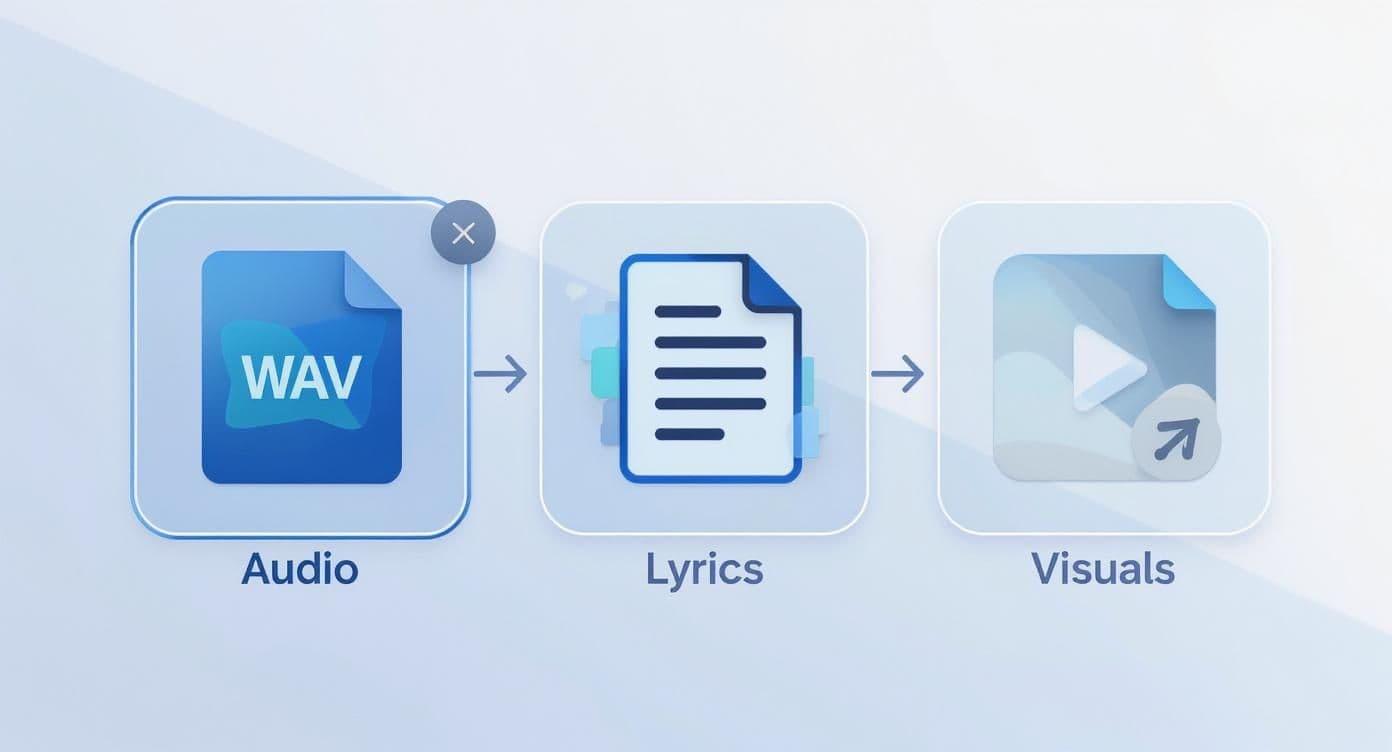
As you can see, the system is designed to seamlessly merge your audio, text, and background visuals. It takes care of the technical synchronization, so you can stay in the director's chair and make the important artistic calls.
First, Feed the AI Your Song and Lyrics
Getting started is as easy as it sounds. The first thing you'll do is upload your audio file—that high-quality WAV we prepared earlier—directly into the platform. Once that's in, just paste your clean, formatted lyrics into the text editor.
This is the point where the AI takes over. MyKaraoke Video’s engine gets to work, analyzing the audio and intelligently matching your lyrics to the vocals in the song. In just a few moments, you’ll have a perfectly timed first draft of your video. It's pretty incredible to see each line pop up on the screen right on cue.
Pro Tip: This initial sync is the single biggest time-saver. A task that could easily eat up an entire afternoon in Adobe Premiere Pro or After Effects is often done in less than a minute. You get a working draft almost instantly.
This automated process is what makes modern tools so powerful. If you're curious about the tech behind this, we have a great post that breaks down the benefits of using an AI lyric video generator.
To really put the difference into perspective, let's look at how the two approaches stack up.
AI-Powered vs Traditional Lyric Video Creation
| Factor | AI-Powered Tools (e.g., MyKaraoke Video) | Traditional Software (e.g., Premiere Pro, After Effects) |
|---|---|---|
| Time Investment | Minutes to an hour. Most of the time is spent on creative tweaks, not technical setup. | Several hours to days. Manual lyric timing and animation is extremely time-consuming. |
| Skill Required | Beginner-friendly. The interface is intuitive, designed for musicians, not video editors. | Intermediate to Advanced. Requires a steep learning curve and understanding of keyframes, timelines, and effects. |
| Cost | Affordable subscription models. Predictable monthly or annual costs for access to all features. | High upfront or subscription costs. Plus potential costs for plugins, templates, and stock assets. |
| Creative Focus | On aesthetics and style. You focus on fonts, colors, and backgrounds. | On technical execution. A lot of energy goes into the "how" (timing, layers) rather than the "what." |
Ultimately, while traditional software offers limitless control, AI tools provide the most efficient path for musicians and creators who want professional results without becoming full-time video editors.
Customizing the Visual Vibe
Now that the timing is locked in, you can dive into the fun part: defining the look and feel. This is your opportunity to inject your personality and make sure the visuals perfectly match your song's mood.
MyKaraoke Video gives you a whole suite of easy-to-use options to play with. You can experiment with:
- Font Selection: The right typeface says a lot. A clean, bold font might be perfect for a punchy pop track, while a classic serif could better suit an emotional ballad.
- Color Palettes: Tweak the text and background colors to match your brand or album art. High-contrast colors are your friend here—they make the lyrics pop and ensure readability.
- Text Animations: Add a layer of polish with subtle animations. Simple fades, slides, or pops can make the lyrics feel much more dynamic and engaging.
Think about a real-world scenario. Let’s say you have an upbeat, synth-heavy electronic track. You could pair a modern, geometric font with a vibrant, glitchy background video. Then, you could add a quick "pop" animation to each line to match the driving beat.
On the other hand, for a slow, acoustic song, you might choose an elegant script font over a serene video of a forest or a coastline. A gentle fade-in animation for each line would complement the track’s calm, reflective mood perfectly. The AI has already handled the technical part, leaving you to be the artist.
Pro Techniques to Make Your Lyric Video Unforgettable
Now that the AI has handled the heavy lifting, it's your turn to focus on the artistry. This is where a good lyric video becomes a great one. Anyone can slap words on a screen, but the real magic happens when the visuals amplify the song's emotional core, making your video truly stand out.
Think of your lyrics less like static text and more like a performance. By using dynamic text effects and smart visual storytelling, you can pull your audience into a fully immersive experience.
Embrace Kinetic Typography for Impact
Kinetic typography—the art of moving text—is your secret weapon for injecting personality into your video. We're talking about more than just a simple fade-in. This is about making the words themselves feel alive. When you're figuring out how to create a lyric video for YouTube, getting a handle on this concept is a complete game-changer.
The trick is to match the animation to the meaning. For a line about falling, why not have the words drift down the screen? For a hard-hitting, percussive lyric, make the text pulse or shake with the beat. It’s a powerful way to direct the viewer’s focus and add an emotional punch that static text just can’t deliver.
Here’s how you could tailor this to different genres:
- Acoustic Ballad: Think soft, slow-drifting text over a clean, minimalist background. The motion should feel gentle and reflective.
- EDM Track: Go for bold, glitchy, or strobing text effects that sync perfectly with the drops and builds. The visuals have to match that high-energy vibe.
- Hip-Hop Song: Get creative with rhythmic, punchy animations that hit on the beat and emphasize your flow.
The goal is to make the visual behavior of the text mirror the sonic character of the music. When you get this right, the lyrics don't just appear—they perform.
If you really want to get creative with how your words move, exploring different types of animated text for videos will give you a ton of fresh ideas to play with.
Tell a Story with Visuals
Your background isn't just wallpaper; it's a canvas. The visuals you choose should weave a narrative that complements your lyrics, telling a story on two levels: one with words, and another with imagery.
Is your song about city life? Try a time-lapse of bustling streets. For a track steeped in nostalgia, vintage film grain or subtle light leaks can evoke that warm, fuzzy feeling of a memory. These choices might seem small, but they add incredible depth. To keep everything organized and make sure your visuals hit the right emotional notes at the right time, using a video script template to plan everything out is a pro move.
Fine-Tune the Mood with Color and Effects
Color grading is how you set the emotional tone in an instant. Don't just stick with the default colors of your background footage. A few tweaks to the hue, saturation, and contrast can completely transform the vibe.
- Warm, golden tones often create a sense of happiness or nostalgia.
- Cool, blue tones can suggest feelings of sadness, calm, or even isolation.
- High-contrast, desaturated looks can feel edgy, serious, and dramatic.
Layering on subtle visual effects can also elevate the final product. Consider adding particle effects like floating dust motes or embers to build atmosphere, or maybe lens flares that pulse in time with the kick drum. These small details give your video a polished, cinematic quality that grabs viewer attention from the first second and holds it until the very end.
Making Sure Your Video Gets Found on YouTube

You’ve poured your heart into creating a stunning lyric video. That’s a huge win, but it's really just the first step. Now, we need to make sure people actually see it.
A few simple, smart tweaks to how you upload your video can make a world of difference. This is all about telling the YouTube algorithm what your video is about so it can show it to the right people—your future fans.
Nail Your Title and Description
Let’s start with the basics: your video's title. This isn't the place to get overly artistic. Stick to a tried-and-true formula that works for musicians: [Your Name] - [Song Title] (Official Lyric Video). It’s clean, professional, and contains the exact keywords people will use to find your music.
Next up is the description, which is prime real estate for SEO. The first couple of lines are absolutely critical because they show up before a viewer has to click "Show more." Use this space to repeat the artist and song name and drop a link to your website or Spotify profile.
After that, flesh out the rest of the description to help with discovery:
- Paste in the full lyrics. This is a game-changer. It allows your video to show up in search results when someone only remembers a single line from your song.
- Give credit where it’s due. Acknowledge any co-writers, producers, or the artists who helped create the visuals.
- Use a few hashtags. Think broad, like
#NewMusicor#IndiePop, to help YouTube categorize your video.
Applying general SEO optimization best practices here will give your video a serious leg up on the competition.
Think of your thumbnail as your video’s album cover. It needs to pop. A high-contrast design with bold, easy-to-read text is what stops someone from scrolling and gets them to click.
Give Your Video a Strong Start
The first 24 hours after you hit "publish" are massively important. You need to send strong signals to the YouTube algorithm that people are interested in your video. Don't just upload it and hope for the best.
Get proactive. Blast the link out on all your social media channels. Embed the video on your website's homepage. Send it to your email list. This initial push is a huge part of modern music marketing.
And there's a good reason to put in the effort. With YouTube Music expected to hit over 1 billion active users by 2026, it’s a platform you can't afford to ignore. That massive, engaged audience is exactly why artists are investing more in content like lyric videos. Getting these small optimization details right is your key to reaching them.
For a more in-depth guide on this, be sure to check out our complete breakdown of https://www.mykaraoke.video/blog/youtube-seo-optimization-tips.
Got Questions? Let's Talk Lyric Videos
Whenever I talk to artists about making lyric videos, the same few questions always come up. It's completely understandable—you want to get it right from the start and avoid any nasty surprises later on. Let's walk through some of the most common ones.
"Can I Make a Lyric Video for a Cover Song?"
This is probably the biggest question I get. The short answer is yes, but you have to handle the legal side first. It's not as scary as it sounds, but it's a step you can't skip.
To legally use a cover song in a video, you'll need two specific licenses:
- A mechanical license lets you reproduce and distribute the audio of the song.
- A synchronization (sync) license gives you permission to pair that audio with a video—which is exactly what a lyric video is.
Getting these squared away protects you from copyright claims and potential takedowns on YouTube. It's just part of being a professional creator.
"What Are the Best Export Settings for YouTube?"
You’ve poured your heart into creating a beautiful video, so the last thing you want is for it to look pixelated on YouTube. Nailing your export settings is key.
For a sharp, professional look on any screen, I always recommend a high-quality MP4 file using the H.264 codec. Here are the specific settings that work best:
- Resolution: Go for 1920x1080p (Full HD) at a minimum. If you shot your background video in 4K, definitely export in 4K.
- Frame Rate: Keep this consistent with your original footage. Most of the time, that’s going to be 24 or 30 frames per second (fps).
- Bitrate: For 1080p video, a variable bitrate between 8-12 Mbps is the sweet spot. It keeps the quality high without creating a massive file that takes forever to upload.
"The Lyrics Are on the Screen... Do I Still Need Captions?"
It seems redundant, right? But the answer is a resounding yes. Adding proper closed captions (CC) is a game-changer for two big reasons: accessibility and discoverability.
Captions make your video accessible to viewers who are deaf or hard of hearing. A good caption file (called an SRT file) can include more than just lyrics, like [guitar solo] or [upbeat synth intro], which paints a fuller picture of the song.
On top of that, YouTube's algorithm reads your caption file. This gives it more text to understand what your video is about, which can seriously help your video show up in search results.
Pro Tip: Think of your SRT caption file as a secret weapon. It makes your art more inclusive and gives YouTube's algorithm more data to work with, helping more people find your music.
"Should I Bother Making a Vertical Version for Shorts?"
One hundred percent, yes! Don't sleep on YouTube Shorts.
Take the most powerful 60-second snippet of your song—the chorus, the bridge, the big finale—and create a vertical version. It's a fantastic way to grab the attention of a whole new audience scrolling through the Shorts feed and pull them over to your full-length video.
Feeling overwhelmed by the technical details? What if you could just focus on the creative part? MyKaraoke Video uses AI to handle the tedious lyric syncing and gives you simple tools to customize everything else. You can have a polished, professional-looking lyric video ready in minutes.