So, you're ready to create a karaoke video that looks like it was made by a pro? It all boils down to three key parts: getting a solid instrumental track and the right lyrics, nailing the timing so the words sync up perfectly, and then making it all look good.
Let's walk through the whole process, step by step, so you can create a karaoke video you'll be excited to share.
Your Starting Point for Creating Karaoke Videos
Making a great karaoke video isn't some dark art reserved for video editing wizards anymore. With the right tools and a smart approach, anyone can produce awesome content for a YouTube channel, a birthday party, or just for a fun night in. The secret is simply to focus on quality at each stage of the process. Modern software has thankfully made the old, clunky methods a thing of the past.
Think of this guide as your complete roadmap. We'll cover everything from gathering your raw materials—the audio and the lyrics—all the way to choosing the right export settings for whatever screen you're aiming for. You absolutely do not need a film degree to get started.
The Modern Karaoke Landscape
At-home entertainment has completely changed the game, turning karaoke from a bar-only activity into a hobby for everyone. It's a huge market. The global karaoke video player scene was valued at around USD 1.5 billion back in 2023 and is on track to hit USD 2.7 billion by 2032. What's driving this? People want easy-to-use tools that let them create right from their own computers.
Key Takeaway: A fantastic karaoke video is built on three pillars: clean audio, precise lyrics, and visuals that are easy to follow. Get these right, and you're 90% of the way to a professional result.
What to Expect in This Guide
To give you a clear picture of the journey ahead, this guide is broken down into the essential production stages. Each section builds on the last, making sure you have a solid foundation before you move on.
We'll dive into:
- Asset Preparation: How to get your hands on a clean instrumental track and prepare your lyrics file so it’s ready for the next step.
- Lyric Synchronization: This is the heart of it all. We’ll cover the techniques for timing every word and syllable perfectly to the music.
- Visual Design: How to choose the right fonts, colors, and backgrounds to make your video pop and ensure the lyrics are super readable.
- Export and Sharing: Getting your masterpiece rendered in the best format for platforms like YouTube or for playback on a big-screen TV.
To get you started, here's a quick overview of how these pieces fit together.
| Stage | Objective | Key Considerations |
|---|---|---|
| 1. Preparation | Gather and prepare your core assets (audio and lyrics). | Audio quality is non-negotiable. Ensure lyrics are 100% accurate before starting. |
| 2. Synchronization | Time the lyrics perfectly to the vocal cues in the music. | This is the most crucial step for usability. Take your time to get it right. |
| 3. Design | Customize the visual appearance of the video. | Prioritize readability (contrast, font size). The background shouldn't distract from the lyrics. |
| 4. Export | Render the final video in a shareable format. | Choose the right resolution and format for your intended platform (e.g., YouTube, TV). |
This framework applies no matter what software you end up using. While this guide will give you the universal skills, if you're still weighing your tool options, check out our breakdown of good karaoke programs to find the best fit for you. Let's get started
Sourcing Your Audio and Lyric Files
Every fantastic karaoke video is built on two things: a crisp instrumental track and a spot-on set of lyrics. Getting these two elements right from the jump is absolutely critical. Think of this prep work as the foundation of your project—a little time spent here will save you a world of headaches later on.
You wouldn't start building a house on a shaky foundation, right? The same principle applies here. You can't expect a great final product if you start with a muffled audio file or incorrect lyrics. Let's walk through how to get the best possible raw materials for your video.
Finding the Perfect Instrumental Track
First up, you need to hunt down an instrumental version of your song. The quality of this track is everything; it directly shapes the experience for the person singing along. A low-resolution, muddy-sounding file will instantly make your video feel amateur, no matter how slick your visuals are.
Luckily, you've got a few solid options:
- Dedicated Karaoke Sites: Platforms like Karafun or Sunfly Karaoke are gold mines for professionally produced instrumentals. They're made specifically for this purpose and sound fantastic, though they usually come with a price tag.
- YouTube: A quick search on YouTube can often turn up official instrumentals or high-quality fan remakes. Just be careful with copyright—using these for a public channel might get you a content claim.
- AI Vocal Removers: This is where things get really interesting. Modern tools can use AI to strip the vocals from a song with incredible precision, leaving you with a clean instrumental. It's a total game-changer.
For anyone serious about creating karaoke content, AI vocal removers are a must-have tool. They give you access to a massive library of songs that don't have official instrumental releases.
If you go the AI route, the source file quality is non-negotiable. Always start with a lossless format like WAV or a high-bitrate MP3 (320 kbps is a good baseline). This gives the AI more data to work with, which means a cleaner, more professional-sounding instrumental. For a complete walkthrough, check out our guide on how to remove the vocals from a song.
Preparing Your Lyric File for Import
With your audio ready, it’s time to tackle the lyrics. This seems easy—just copy and paste, right? Not so fast. How you format your lyrics now will make the synchronization process either a breeze or a nightmare.
First, find a reliable source. Sites like Genius or AZLyrics are usually pretty accurate, but I always recommend listening to the song with the lyrics in front of you. You'd be surprised how many tiny errors even "official" sources have.
Your goal is to create a simple plain text file, ending in .txt. This basic format is universally compatible with pretty much any video software you'll use, including MyKaraoke Video.
Here’s how to format it perfectly:
- One Lyric Line Per Text Line: Each line in your file should match what you want to appear on the screen at one time. Avoid clumping lyrics into a big paragraph.
- Use Stanza Breaks: Add a blank line between verses, choruses, and the bridge. This makes it so much easier to navigate the file when you're in the middle of syncing everything up.
- Proofread Like a Pro: Seriously, read through the lyrics while the song is playing. Listen for those small words like "a," "the," or "oh" that are easy to miss.
- Check Special Characters: Make sure any accents or special characters are showing up correctly. The last thing you want are weird symbols popping up in your final video due to encoding issues.
By taking the time to prepare your audio and lyrics properly, you're setting yourself up for a much smoother, more creative process down the road. This groundwork means you can focus on the fun stuff—syncing and design—without getting bogged down by technical problems.
The Art of Syncing Lyrics to Music
You've got your clean instrumental track and a perfectly typed-out lyrics file. Now for the fun part—and arguably the most critical step of the entire project. This is where you bring it all to life, transforming a simple song into a real karaoke experience.
Syncing lyrics to music is truly an art form. It's a delicate dance between technical precision and feeling the song's natural rhythm. Get it right, and your video is a joy to sing along with. Get it wrong, and it’s just frustrating. The goal is simple: make the words light up exactly when they're supposed to be sung.
Before we jump into the how, let's remember the prep work that gets us to this point.
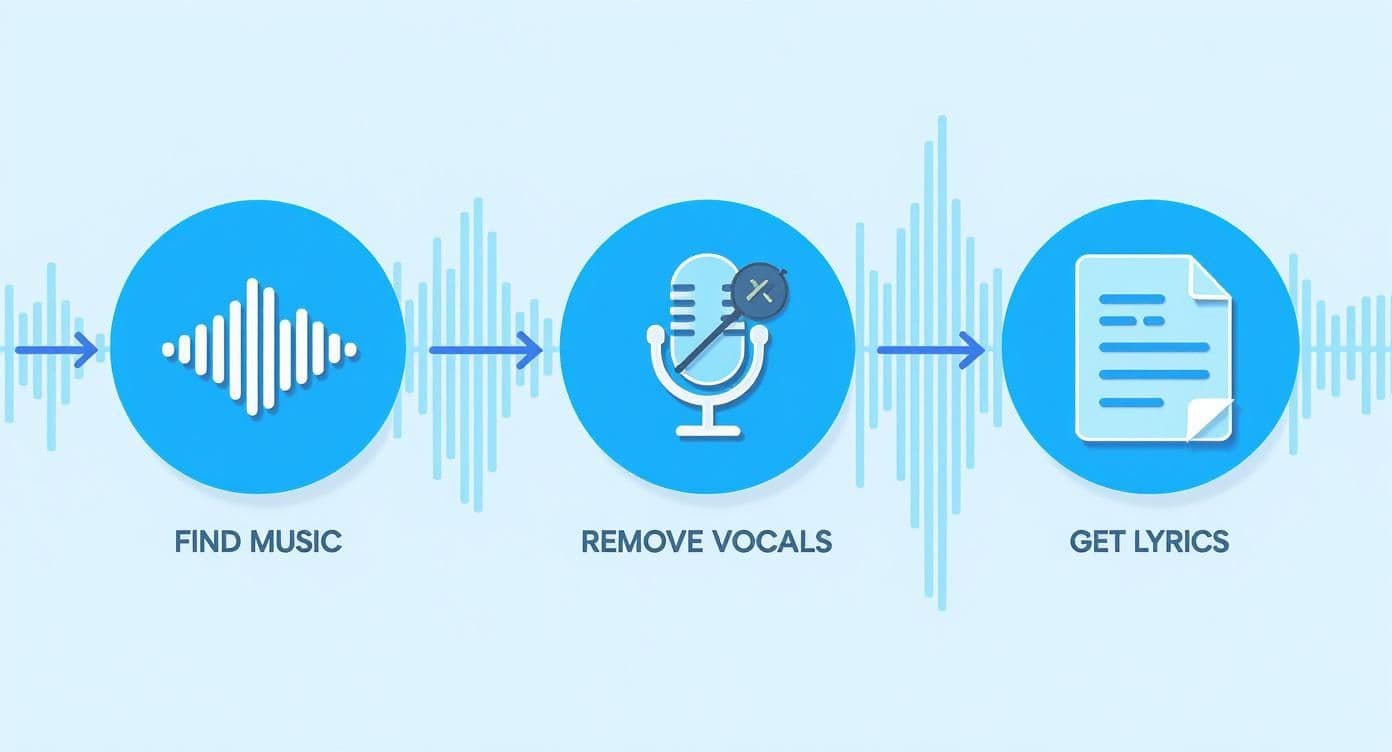
As you can see, solid preparation is the foundation. Without clean audio and accurate lyrics, even the best syncing won't save the final video.
Two Paths to Perfect Timing
When it comes to the actual syncing process, you've got two main ways to go. Neither is inherently "better," but one might be a better fit for you depending on your software, budget, and how much hands-on control you want.
- Dedicated Karaoke Software (like MyKaraoke Video): These tools are built from the ground up for this specific task. They often have slick features like AI-powered automatic syncing or editors where you can just tap a key along with the music to set the timing.
- Manual Timing in a Video Editor: Going this route with a program like Premiere Pro or DaVinci Resolve gives you absolute, granular control. The trade-off? It's a lot more work. You'll be manually creating every text layer and keyframing its color changes along the timeline.
For most creators, especially those just starting out, a dedicated tool is the path of least resistance. The automation handles the tedious parts, letting you focus on polishing the final result instead of building it from scratch.
The Foundation: Setting Timestamps
No matter which tool you use, the job boils down to one thing: setting timestamps. A timestamp is just a specific point in the song (like 00:32.500) that tells the software when a word or line needs to light up.
Your first pass should be all about the big picture—getting each line to appear at the right moment. Listen to the track over and over, focusing on the very first syllable of every line and marking that exact spot. This creates the basic skeleton of your karaoke video.
Pro Tip: Don't get hung up on perfection on the first go. The goal is to get a rough draft done, with all the lines appearing at approximately the right time. You'll circle back to refine the details later.
It's easy to feel overwhelmed by the sheer number of timestamps in a song. My advice? Break it down. Tackle the first verse, then the chorus, then the second verse. Working in smaller chunks makes the whole process feel much more manageable.
Fine-Tuning for a Natural Feel
With the basic line timing in place, it's time to zoom in and add the polish that separates amateur videos from professional ones. This means syncing to the singer's actual cadence. Real singers don't perform like robots—they breathe, they pause, they stretch out words. Your timing needs to reflect that human element.
This is where you'll shift from syncing whole lines to syncing individual words.
- Line-Level Syncing: The entire line highlights at once when the singing starts. It's simpler and can work for really fast-paced songs.
- Word-Level Syncing: Each word lights up precisely as it's sung. This is the gold standard for professional karaoke and gives the singer the best possible guide.
To nail word-level syncing, you have to listen for the little things. If a singer holds a note on the word "love" for three full seconds, your highlight should stay on that word for the entire duration. It’s this attention to detail that makes the video feel intuitive. It takes time, yes, but the payoff in quality is huge. This level of syllable-by-syllable accuracy is also what allows modern AI lip sync models to analyze speech cadence and generate hyper-realistic mouth movements automatically. For a more technical breakdown, we have a detailed guide on how to sync audio with video effectively.
Syncing Beyond the Words
Fantastic syncing isn't just about the lyrics. You also have to guide the singer through the instrumental parts of the song. Intros, solos, and outros are all part of the performance.
Think about adding these elements:
- Instrumental Cues: A simple on-screen message like "Guitar Solo" or "Instrumental" tells the singer it's okay to take a break. It prevents that awkward moment where they're wondering if they missed a line.
- Breathing Room: Try to align your highlights with the original singer's natural breathing points. Starting a highlight just a fraction of a second before the word is sung gives the user a perfect cue to breathe and get ready.
- Pacing the Highlight: The speed of your highlight effect should match the song's vibe. A slow, emotional ballad calls for a smooth, gentle highlight progression. A frantic punk rock song? You'll want a quick, snappy effect to match.
At the end of the day, syncing is an exercise in empathy. You are the director guiding the performer. The more accurate and intuitive your timing is, the more fun they'll have. Every timestamp is a tiny instruction, and when they all flow together perfectly, you've created a truly professional-grade karaoke video.
Designing an Engaging Visual Experience
Alright, your lyrics are perfectly timed. Now for the fun part: making it look amazing. The visual design is what elevates your project from a simple lyric track into a truly immersive karaoke experience. It’s what sets the mood and, most importantly, keeps the lyrics crystal clear for the singer.
Think of your karaoke video as a stage performance. The background, fonts, and colors are your set design. Get it right, and you enhance the whole show. A cluttered or distracting design, on the other hand, just pulls focus away from the star—the person holding the mic.
This is more important than ever. While karaoke bars and their fixed systems made up 44.31% of the market in 2023, the real growth is in home entertainment. The demand for portable, at-home setups is climbing fast, with a projected growth rate of 4.2% for home users. That means more people are looking for high-quality, polished videos they can enjoy right in their living rooms.
Choosing the Right Background
Your background is the canvas. It needs to complement the song's vibe without ever overpowering the text. You’ve got a few solid options, each with its own feel.
- Static Images: A high-resolution photo or a clean graphic can be incredibly powerful. For a slow ballad, maybe a soft-focus sunset image. For a high-energy pop track, a vibrant abstract pattern could be perfect. The trick is to avoid anything too "busy" that might clash with the text.
- Looping Video Clips: This is my personal favorite for adding a professional touch. Subtle motion, like drifting clouds or an abstract particle animation, makes the whole video feel more alive. Just make sure the loop is seamless so there isn't a jarring jump when it restarts.
- Solid Colors or Gradients: Don't ever underestimate the power of simplicity. A clean, dark background with bright, bold text is a classic for a reason—it offers maximum readability, no questions asked. A subtle gradient can also add a modern touch without becoming distracting.
If you're looking for something truly unique, you can even explore how to generate AI images. This can give you an endless supply of custom backdrops tailored to any song imaginable.
Typography and Readability
This is probably the most critical design decision you'll make. The absolute number one rule for karaoke typography is readability. Someone needs to be able to glance at the screen from across the room and instantly know the words.
Here’s a quick breakdown of what to focus on:
| Visual Element | Best Practice | Why It Matters |
|---|---|---|
| Font Style | Use a clean sans-serif font like Arial, Helvetica, or Montserrat. | Ornate or script fonts are a nightmare to read quickly and can cause eye strain. |
| Font Size | Go big! The text needs to be easily legible from a distance. | If the singer has to squint, you've broken their focus and the performance suffers. |
| Color Contrast | Ensure there's high contrast between text and background (e.g., white text on a dark blue background). | Low contrast makes the words blend in, which is the fastest way to frustrate a singer. |
| Text Outline | Add a thin, dark outline or a subtle drop shadow to the text. | This helps the letters "pop" and stay readable, even if the background behind them changes color. |
Key Insight: Always prioritize function over flair. A simple, bold, high-contrast font will beat a fancy but unreadable one every single time. Your job is to make singing along effortless.
Designing the Lyric Highlight Effect
The highlight is the visual cue that guides the singer, telling them exactly which word is next. It’s more than just a color change; it's an animation that needs to match the rhythm and feel of the song.
You've probably seen a few common styles:
- Classic Color Sweep: The most popular effect for a reason. The highlight color smoothly "wipes" across the words as they're sung. It's intuitive and works for just about any genre.
- The Bouncing Ball: A fun, nostalgic choice that's perfect for older tunes or kids' music. A small icon or ball literally bounces from one word to the next in time.
- Word-by-Word Reveal: Instead of a smooth sweep, each word instantly changes color right on the beat. This is fantastic for fast-paced rap or rock tracks where the timing is sharp and precise.
Whatever style you pick, the motion should feel fluid and natural. Inside a tool like MyKaraoke Video, you can play around with these effects and colors in real-time. Experiment until you find the perfect combination of background, typography, and highlighting that makes your video a joy to sing along to.
Exporting and Sharing Your Finished Video
Alright, you've done the hard work. The lyrics are perfectly timed, the visuals are dialed in, and your karaoke video is ready for its debut. This is the final and most rewarding step: getting your creation ready for the world to see and enjoy.
Exporting isn't just about clicking a button; it’s about making sure the video looks and sounds just as good on a YouTube channel or a big-screen TV as it does on your computer. Let's break down how to get a flawless finish every time.
Getting Your Export Settings Right
Diving into export settings can feel a bit technical at first, with terms like "codec" and "container" flying around. But honestly, it's much simpler than it sounds. The goal is to choose settings that match where you plan to share your video.
Think of it like this: you're packing your video in a box to ship it. You need the right box and the right packing material to make sure it arrives in perfect condition.
Here are the only three settings you really need to worry about:
- Container (Format): This is the "box" itself. Your best bet, almost always, is MP4. It’s the universal standard, meaning it plays nice with pretty much every device and platform out there. No compatibility headaches.
- Codec: This is how your video is compressed inside the box. Stick with the industry go-to: H.264 (sometimes called AVC). It gives you that perfect sweet spot of high-quality video without a gigantic file size.
- Resolution: This is all about clarity. For almost any purpose, 1080p (1920x1080 pixels) is the gold standard. It’s crisp, professional HD that won't take ages to upload. If you built your project with 4K assets, you can certainly export in 4K, just be ready for a much larger file.
My Pro Tip: For 99% of your projects, this is the winning formula: an MP4 file, using the H.264 codec, at 1080p resolution. You simply can't go wrong with this combination.
Sharing on YouTube and Social Media
Once that perfect MP4 file is sitting on your desktop, it's time to share it. YouTube is the natural home for karaoke videos, but you need to give its algorithm a few nudges to help people discover your content.
Your video’s title and description are your best friends here. Don't just name it "Song Title - Karaoke." Give it some descriptive power, like "Song Title - Artist (Official Karaoke Video with Lyrics)." This immediately tells viewers (and YouTube) exactly what you've made.
Use the description to add more value. You can paste the full lyrics, credit the instrumental track you used, or share a little backstory about the song. Most importantly, use smart tags. What would someone type into the search bar to find your video? Think like your audience: "karaoke version," "instrumental with lyrics," "song title lyrics," and so on.
For channel owners who are uploading a lot of content, this manual process can get old fast. If you're looking to scale up and automate your workflow, exploring programmatic options is a game-changer. A deep-dive guide like Mastering the YouTube Upload API for Developers can be a huge help for streamlining everything.
The karaoke world is booming online, especially with younger audiences on social media. But it's not without its challenges. Navigating copyright can be tricky, and in some areas, complex licensing issues mean up to 30% fewer songs are legally available. This is exactly why high-quality, creator-made videos like yours are so valuable to the community.
Questions That Pop Up When Making Karaoke Videos
As you dive into creating your first karaoke video, you're bound to run into a few common questions. I've seen these trip up creators time and time again. Let's get them sorted out so you can avoid the usual frustrations and focus on making something great.
What's the Best Free Software Out There?
Look, everyone wants to start for free, and that's totally understandable. The tricky part is that dedicated free karaoke creation software is pretty hard to come by. But that doesn't mean you're out of luck. You can get professional-level results by combining a couple of powerful, no-cost tools.
My go-to recommendation for a zero-budget setup is pairing a serious video editor with a simple text editor. The free version of DaVinci Resolve is a beast—it's what many pros use. You can create your lyrics as text elements and then manually animate the highlighting effect using keyframes. It's definitely more hands-on, but it gives you complete creative control without costing a dime.
How Do I Legally Use a Famous Song?
This is the big one. Seriously, this is where so many new creators stumble. Using commercial music on a public platform like YouTube is a legal minefield. The simplest, safest route is to use instrumental tracks from royalty-free or licensed music libraries. These tracks are specifically cleared for this kind of use, so you won't have to look over your shoulder waiting for a copyright claim.
What happens if you use a popular song anyway? Your video will almost certainly get flagged by YouTube's Content ID system. From there, a few things can happen:
- The copyright owner might run ads on your video and take all the revenue.
- Your video could be blocked in certain countries, limiting your audience.
- Worst case: you get a copyright strike against your channel. Three of those, and you're out.
If you're just making a video to share with a few friends, the risk is practically zero. But for a public channel you want to grow? Stick with properly licensed music. It's the only way to build a sustainable channel without the constant headaches.
My Two Cents: The second your karaoke video with a commercial song hits a public platform, you're playing in the world of copyright law. For your own peace of mind and the health of your channel, just use licensed instrumentals. It's worth it.
How Can I Get Rid of the Vocals in a Song?
A clean instrumental track is the backbone of any good karaoke video. Thankfully, AI-powered tools have made this process incredibly easy and effective. Online services like LALAL.AI or Moises use artificial intelligence to pull a song apart, separating the vocals from the instruments with amazing precision.
All you have to do is upload a high-quality audio file—a WAV or a 320kbps MP3 is your best bet—and the AI handles the rest, spitting out separate audio stems for you to use. This is worlds better than the old-school methods, like the "Vocal Reduction" effect in software like Audacity, which often left you with a muddy, washed-out sound.
For the cleanest instrumental possible, always start with a high-res source file and let a modern AI tool work its magic. This unlocks a massive library of songs for your projects.
Ready to stop wrestling with manual sync and complicated software? MyKaraoke Video uses smart AI to sync your lyrics for you, gives you a full design toolkit, and works right in your browser. Start creating and bring your songs to life at https://www.mykaraoke.video.
